 myagent.mxBLOG
agents & inboxes · best langchain email api
LangChain Email Integration: Gmail, IMAP or an Agent Mailbox
How to give a LangChain agent email: the Gmail toolkit, IMAP, connector platforms and a dedicated agent mailbox, plus approval gates and a CrewAI note.
There are four realistic ways to give a LangChain agent email. You can use the official Gmail toolkit, read over IMAP, route through a connector platform, or give the agent its own mailbox through an email API. The right one depends on a single question: whose mailbox is it? If the agent acts inside your own Gmail account, the toolkit is fine. If the agent needs an identity of its own, or you are building for many customers, you want mailbox infrastructure and a thin set of custom tools.
This guide walks through each path, shows where each one stops working, and covers the part that matters most in production: controlling what the agent is allowed to send.
TL;DR
- Prototype on your own inbox: use
GmailToolkitfromlangchain-google-community. It gives the agent five tools, and it needs Google OAuth credentials. - Agent or tenant needs its own identity: use a mailbox API, not a borrowed human account. LangChain stays the reasoning layer, and the mailbox service owns provisioning, inbound events and scoped keys.
- Never expose an unrestricted send tool. Put human-in-the-loop approval in front of sending, at least for new contacts and bulk sends.
- Inbound mail needs an event loop, not polling alone: deduplicate, store a stable thread ID and resume the right graph thread.
- Want an agent mailbox to test with? An agent can register itself for an @myagent.mx inbox without a human signup form and receive mail with a durable read token.
Table of Contents
- What a LangChain email integration actually consists of
- Path 1: the Gmail toolkit
- Path 2: IMAP for reading
- Path 3: a connector platform
- Path 4: an agent mailbox through an email API
- Choosing between the four
- Design the workflow before you pick the API
- Put a human between the model and the send button
- Where Sendmux fits
- What about CrewAI?
- Perspective: the mailbox is the hard part
- FAQ
- Sources
What a LangChain email integration actually consists of
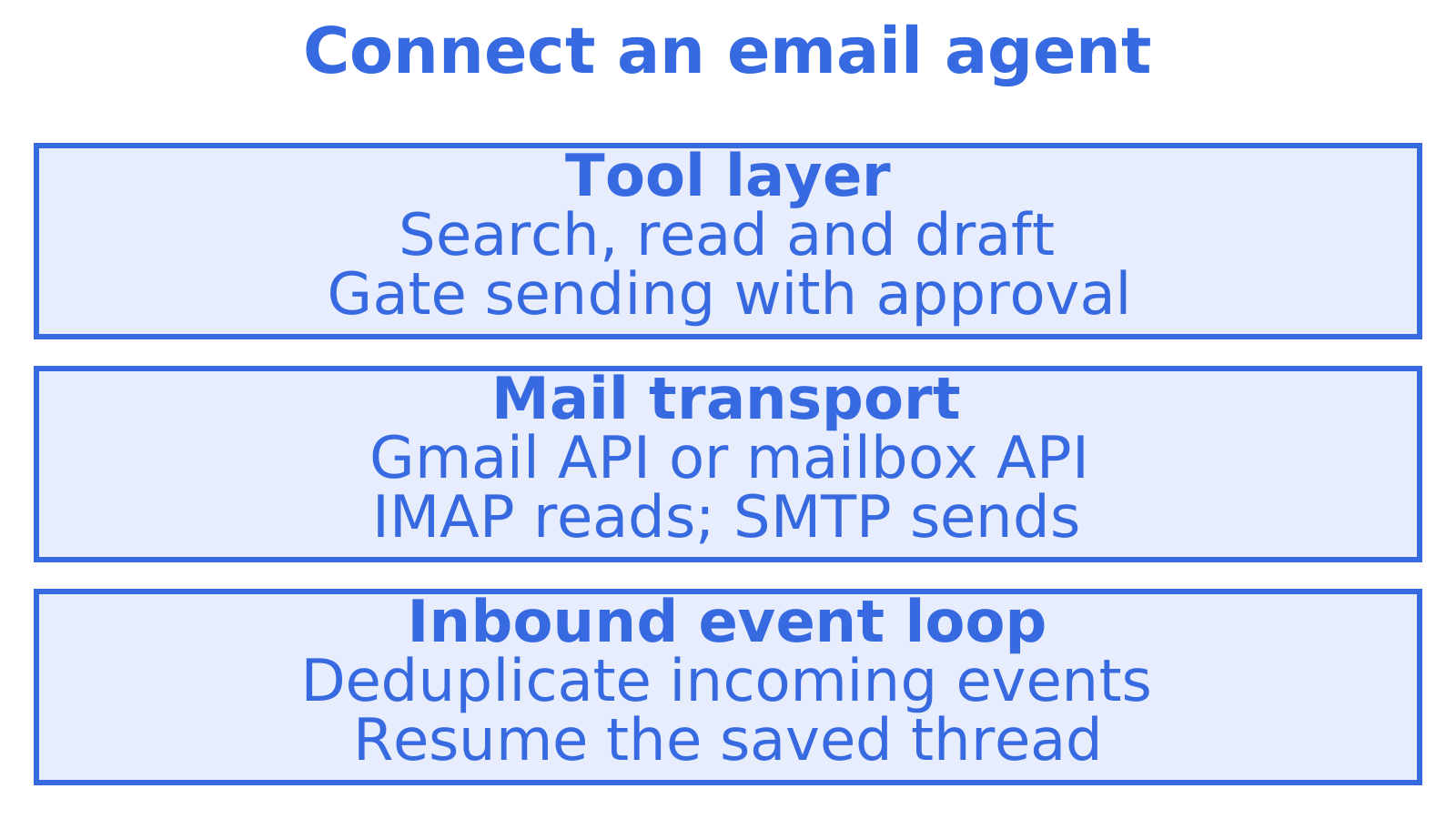
There is no single “email protocol” for LangChain. An integration is three things stacked together:
- A tool layer. Functions the model can call: search, read, draft, send.
- A transport. Gmail API, IMAP, SMTP or an HTTP email API that actually moves the message.
- An event loop. Something that notices inbound mail and wakes the agent, with state so the reply lands in the right conversation.
Most tutorials cover the first two and skip the third. That is why so many email agents work in a demo and fall over when a customer replies two days later.
Path 1: the Gmail toolkit
The official Python route is GmailToolkit in the LangChain docs. You install langchain-google-community[gmail], supply Google credentials, instantiate the toolkit and pass toolkit.get_tools() to your agent. It exposes five tools: GmailCreateDraft, GmailSendMessage, GmailSearch, GmailGetMessage and GmailGetThread.
Credentials come either from the default local credentials.json flow or from a Google credentials object with the scopes you choose, such as read-only or full mail access. The official example pairs the toolkit with ChatOpenAI and LangChain’s create_agent.
Where it shines: a personal assistant that triages your own inbox, a weekend prototype, an internal tool for one person.
Where it stops:
- It assumes an existing Google account and an OAuth consent screen. Every user or tenant you add means another consent flow.
- The send tool builds a MIME message and base64url-encodes it before calling the Gmail API. Recipients, CC/BCC, subject and body are tool arguments, but attachments, retries, provider-specific threading and delivery status are yours to handle.
- The abstraction ends at Gmail API calls. Per-tenant mailboxes, delivery logs, bounce visibility and mailbox-scoped permissions are not part of it.
- LangChain’s own reference carries a security note: this toolkit can read and modify the state of a service, so scope the credentials tightly.
We cover the wider trade-offs between Gmail, SendGrid and agent-native options in Email for AI Agents: Why Gmail and SendGrid Fall Short, and in our LangChain email integration comparison.
Path 2: IMAP for reading
LangChain lists an IMAP retriever integration. It is a transport-neutral way to pull mail from a mailbox that is not Gmail, which helps if your provider offers IMAP and nothing else.
Be clear about what it gives you, though. It is a retriever, not a complete send-and-receive toolkit. You would still build sending, a webhook or polling trigger, thread correlation, authorisation and delivery observability yourself. IMAP suits read-only research or archive-search agents. It is a poor foundation for an agent that holds a conversation.
If you are stuck with a provider that only speaks IMAP through a local bridge, our note on the Proton IMAP bridge explains why an agent mailbox needs no desktop app.
Path 3: a connector platform
When authentication across many SaaS accounts is the real headache, LangChain documents a Composio integration that handles OAuth and API-key state, event-driven workflows and permissions. Its catalogue includes Gmail among more than 1,000 toolkits, so you do not write each connector yourself.
That removes OAuth plumbing. It does not remove your design work. Tenant boundaries, tool allowlists, approval policies, idempotency and audit logging are still yours, and they have to be built around the business action, not assumed from a catalogue. Check that the specific connector behaves the way you expect for your account before you commit.
Path 4: an agent mailbox through an email API
The fourth path treats email as infrastructure the agent owns. Instead of borrowing a person’s Gmail, the platform provisions a mailbox for each agent, customer or workspace, and the agent talks to it over HTTP, SMTP or an SDK. You then write two or three small LangChain tools (read inbox, search, send or draft) that call that API.
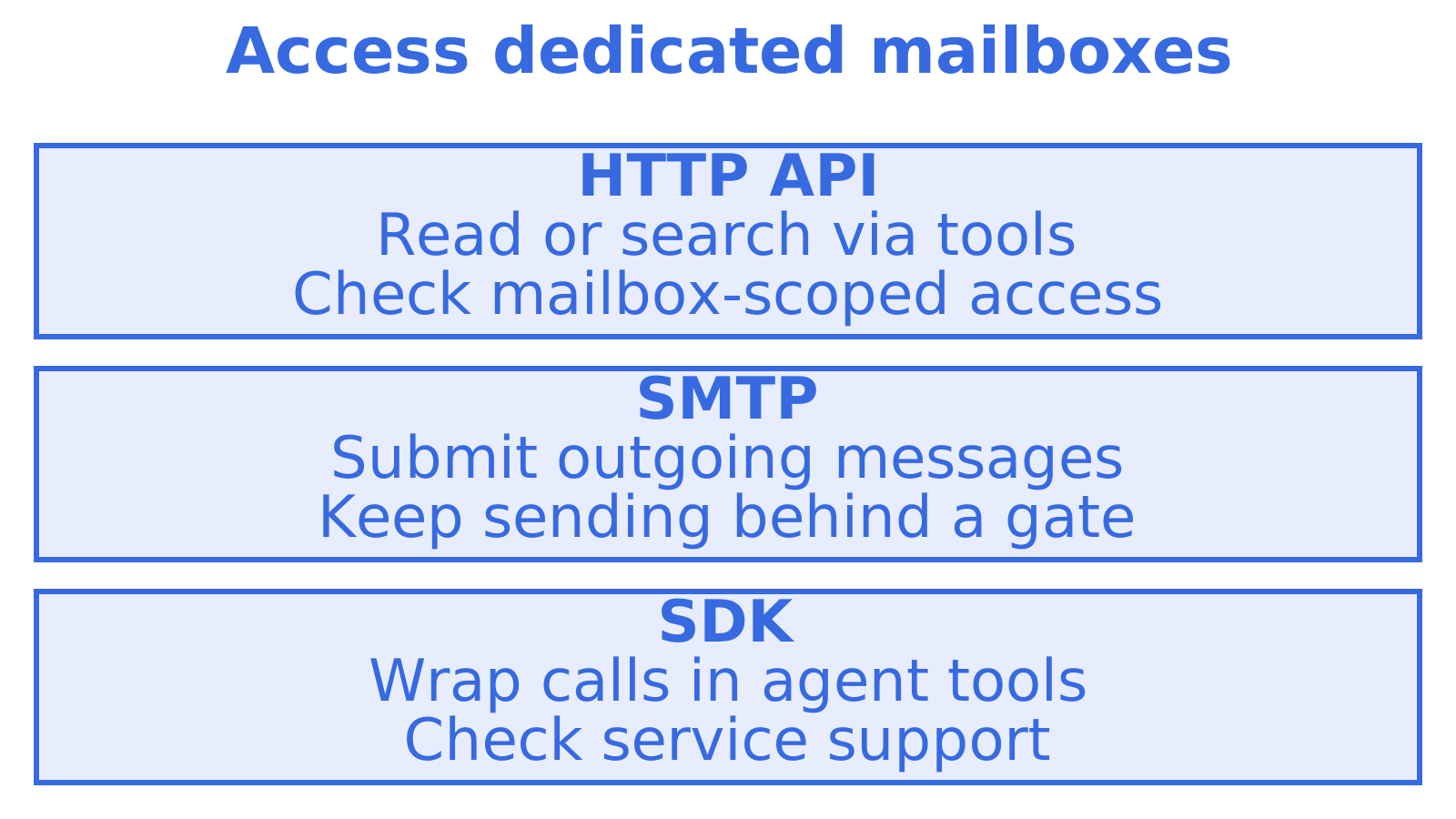
This is the architectural split that matters. The Gmail toolkit gives an agent access to a user’s mailbox. An agent-native mailbox gives the agent an identity: provisioned by code, with its own credentials, inbound events and isolation from every other tenant. LangChain remains the reasoning and tool-calling layer.
What to look for in such a service:
| Requirement | Why it matters for a LangChain agent |
|---|---|
| Persistent mailbox per agent or tenant | Replies arrive days later and must hit the same identity and thread |
| Mailbox-scoped API keys | A compromised or confused agent can only touch its own mail |
| Inbound delivery by webhook or SSE | Wakes the right graph thread without polling |
| Structured JSON parsing | Fewer tokens spent on raw MIME and quoted replies |
| Delivery logs and bounce visibility | You can tell the model, and yourself, what actually happened |
| Outbound routing across providers | Quotas, rotation and failover when you send at volume |
Sendmux provides mailbox-scoped credentials, structured JSON message content, received-message event notifications and delivery logs. Our mailbox API guide goes deeper, and the agent inboxes product page shows how the pieces fit.
Choosing between the four
| Situation | Best fit |
|---|---|
| One developer, one Google account, a prototype | Gmail toolkit |
| Read-only search over an existing non-Gmail mailbox | IMAP retriever |
| Many third-party SaaS accounts, OAuth is the bottleneck | Connector platform |
| Each agent, customer or workspace needs its own inbox | Agent mailbox API |
| Multi-tenant product with logs, keys and routing | Agent mailbox API |
If you are weighing providers in that last row, our page on AgentMail alternatives lays out the differences, and the Gmail API alternatives roundup covers the case where Gmail is what you are trying to leave.
Design the workflow before you pick the API
Email reliability is mostly a workflow-design problem. LangChain’s agents-from-scratch repository builds an email assistant that combines a triage step with a response agent, and it covers short-term thread state, long-term memory, evaluation and human review. The pattern holds whatever transport you use.
Model the agent as a stateful graph, not a single prompt:
- Ingest. Receive the inbound email and store it with a stable message or thread ID.
- Classify. Decide whether to respond, notify a human or ignore.
- Load memory. Pull what you know about the sender and the thread.
- Decide and draft. The model proposes a reply.
- Gate. A controlled node decides whether the draft goes out, waits for approval or is dropped.
- Send and record. Log the outcome against the thread.
Keep ingestion separate from agent execution. Polling alone is a weak production pattern: deduplicate delivery events, because webhooks can arrive twice, and resume the correct LangGraph thread using the stored identifier. If you want a broader view of how teams structure production agents, this overview of AI agent platforms is a useful companion read.
Put a human between the model and the send button
Sending email is irreversible. LangChain’s human-in-the-loop guidance groups it with deleting records and executing financial transactions. The documented pattern pauses execution, emits an action request and resumes only when a reviewer approves, edits, rejects or responds. It uses durable checkpoints, so a delayed review does not force you to replay the whole run. The human-in-the-loop middleware page shows how to wire it around individual tool calls.
In practice:
- Give the agent a draft tool by default and make send the gated one.
- Require approval for first-time recipients, bulk sends, external domains and low-confidence decisions.
- Let the agent auto-send only where the blast radius is small, such as replies on an existing thread with a known contact.
- Log every approved, edited and rejected action. That log is your audit trail.
An illustrative shape for a custom send tool, with the approval gate configured outside the model’s reach:
from langchain_core.tools import tool

@tool
def send_email(to: str, subject: str, body: str) -> str:
    """Send an email from the agent's mailbox. Requires approval."""
    # Call your mailbox API here with the agent's scoped key.
    # Return the provider's message ID so the thread can be tracked.
    ...
Then attach the human-in-the-loop middleware to send_email only, and leave read and search tools ungated. The model never decides whether approval applies.
Where Sendmux fits
We built Sendmux for the fourth path. It provides mailboxes on @myagent.mx or your own verified domain, HTTP mailbox access, SMTP sending, structured JSON content, per-mailbox credentials and delivery logs. The Mailbox API streams live received-message notifications through SSE, and webhooks provide inbound event notifications. Sending uses managed Amazon SES or your own configured providers, including Gmail, Outlook and custom SMTP accounts. Usage is billed per provider-accepted outbound recipient occurrence, per distinct inbound mailbox delivery and for mailbox storage. Pro also has a $7 per-team monthly base price. See the solution page for agent builders.
Let the agent register itself
The part most relevant to a LangChain developer is how an agent gets its first address. At myagent.mx, an agent can register an @myagent.mx inbox without a human signup form or an existing Sendmux API key:
- Use the Sendmux CLI to register a private agent profile; use
https://app.sendmux.ai/auth.mdfor HTTP discovery when the CLI is unavailable. - Register the inbox with
sendmux agent:register <profile>. - The CLI waits for the @myagent.mx inbox to become ready and saves its durable read credential privately.
- Use the durable
smx_agent_read token for the assigned mailbox;/api/v1/mailbox/mereturns mailbox details. - Invite a named human owner.
Durable read tokens carry mailbox.read and email.receive, so your agent can receive and read mail, search messages and read conversation threads. They do not carry email.send. Sending unlocks only after the human owner accepts the invitation and approves sending; the durable credential can then be exchanged for a one-hour Sending-resource token. That is the same principle as the approval gate above, enforced at the credential level: the person whose name the mail goes out under stays in control of what leaves.
If your agent runtime supports skills, npx skills add Sendmux/skills installs the Sendmux pack. For multi-tenant products and sending at scale, see the platform builders page and the full product overview.
What about CrewAI?
The same decision applies. CrewAI’s platform has a Gmail integration that lets agents send emails, search and manage drafts through a connected Google account, which makes it the CrewAI counterpart of the Gmail toolkit, with the same ownership assumption: it works through an account someone has connected. For a crew where each agent or customer needs its own address, wrap a mailbox API in a custom tool in exactly the way described above. The workflow design, gating and inbound event handling carry over unchanged.
Perspective: the mailbox is the hard part
We see teams spend a week getting the LLM to write a good reply and a month discovering that the mailbox underneath was never designed for an agent. Borrowed OAuth tokens expire, consent screens do not scale to a hundred tenants, and a single key that can read everything is a liability the moment a prompt injection arrives in an inbound email.
Our view is simple. The model should reason and the infrastructure should enforce. Scope belongs in the API key, not in the system prompt. Approval belongs in the credential and the graph, not in a polite instruction to the model. And an agent that receives mail should be able to do so before any human has signed anything, which is why durable read tokens can read but cannot send. We would rather ship that honest constraint than a send button that works instantly and worries you later.
FAQ
Can a LangChain agent send email without Gmail?
Yes. Gmail is only one transport. You can write a custom tool that calls any email API over HTTP or SMTP, and give the agent a draft tool and a gated send tool. The agent never needs to know which provider sits underneath.
Is the Gmail toolkit safe to use in production?
It is a good starting point for one user’s inbox, but it requires Google OAuth and offers no tenant isolation, delivery logs or bounce handling of its own. LangChain’s reference notes that the toolkit can read and modify service state, so limit scopes and put approval in front of sending. For many tenants, use a mailbox per tenant instead.
How does my agent find out a reply has arrived?
Avoid relying on polling alone. Use webhooks or server-sent events to push inbound mail to a worker, deduplicate on the message ID, then resume the LangGraph thread tied to that conversation. Store the thread identifier when you send, so replies map back cleanly.
Can my agent get an email address without me signing up first?
Yes. Sendmux lets an agent register an @myagent.mx inbox without a human signup form. Its durable read token supports receiving and reading mail. Sending stays locked until a human owner accepts the invitation and explicitly approves it.
Does the same approach work for CrewAI?
Yes. CrewAI tools are ordinary functions, so the same custom read, search and send tools work there. The approval gate and inbound event handling are framework-agnostic.
Sources
- Gmail toolkit integration, LangChain docs
- GmailSendMessage source code, langchain_community
- GmailToolkit reference, langchain_community
- IMAP retriever integration, LangChain docs
- Composio integration, LangChain docs
- langchain-ai/agents-from-scratch, GitHub
- Human-in-the-loop, LangChain docs
- Human-in-the-loop middleware, LangChain docs
- Gmail integration, CrewAI docs
Recommended
Give an agent its own address
Sendmux is the Email Inbox API for AI Agents.