 myagent.mxBLOG
deliverability · smtp bounce codes
Email Bounce Handling: A Developer's Guide to Hard and Soft Bounces
How to handle email bounces in code: read SMTP and RFC 3463 codes, split hard from soft, retry safely, suppress bad addresses and keep your reputation intact.
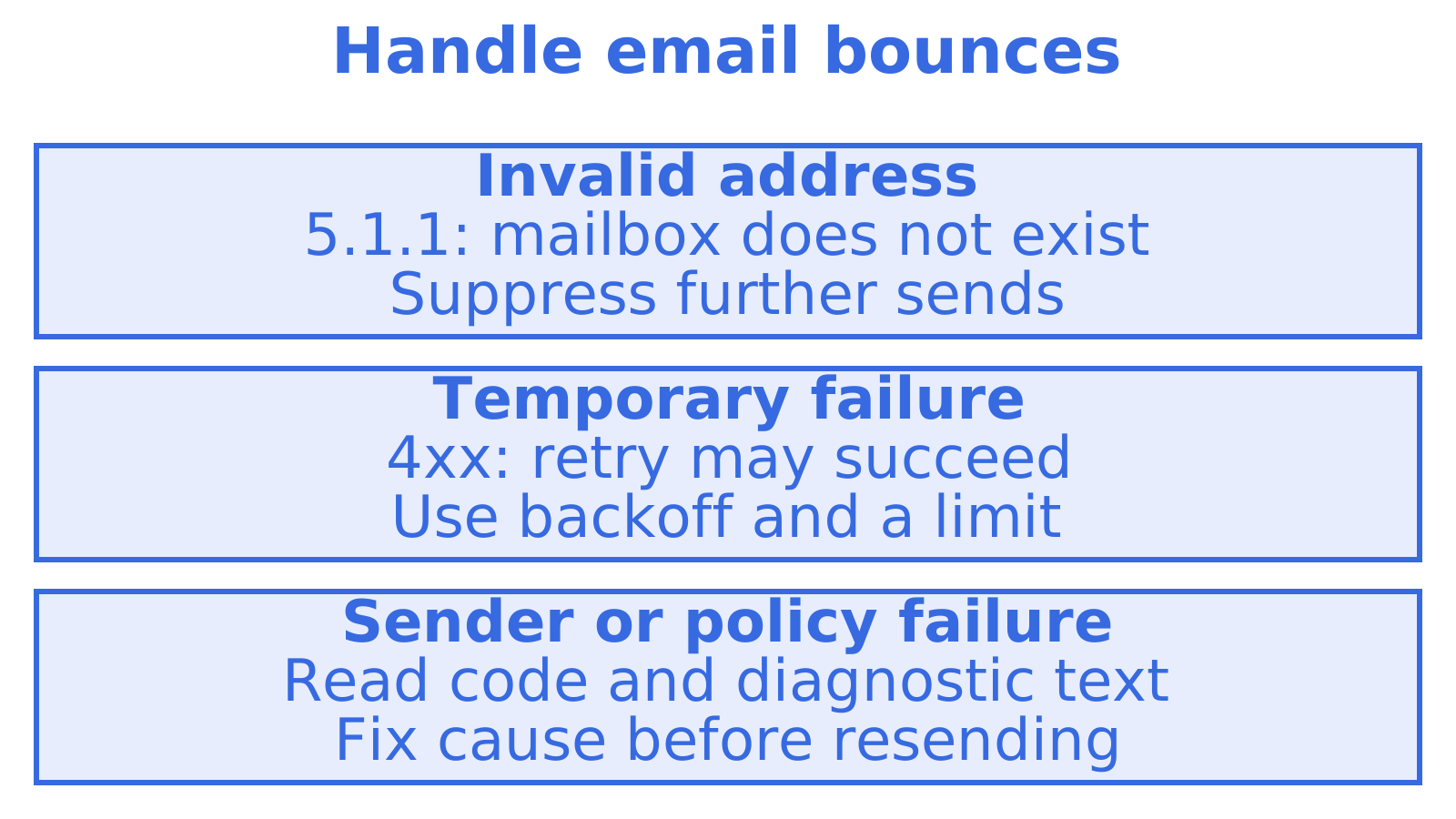
Your app gets a failed delivery notice. Should it retry the message, stop sending to that address or alert you to a sending problem? That is the job of email bounce handling. Read the full status code, retry temporary failures with longer waits between attempts, suppress invalid addresses and save each bounce in your application database.
If you send from an app or an agent, this guide shows how to turn smtp bounce codes into rules for a webhook handler, the endpoint that receives your provider’s delivery events.
TL;DR
- A 5xx reply means the current delivery attempt has failed permanently. Suppress an invalid recipient, and investigate sender or policy problems separately. A soft bounce (4xx) signals a temporary failure. Retrying with longer waits between attempts may help.
- Check the enhanced status code, such as 5.1.1, alongside the diagnostic text. The three-digit reply alone can mislead you: servers use 550 or 554 for very different problems.
- Pause sends to an address after repeated soft bounces, then investigate. Five or more failures within a defined window is a common heuristic. Set the limit to suit your traffic.
- Feed bounce events into your database through webhooks. Your app can then stop sending to bad addresses before it sends the next message.
- Keep an eye on rates. Industry guidance puts hard bounces below 2% and complaints below 0.1%.
Table of Contents
- What a bounce actually is
- Hard bounces versus soft bounces
- Reading SMTP bounce codes properly
- A handling policy you can ship
- Suppression lists: your first line of defence
- Bounces are a reputation signal
- Build it into the architecture
- Our perspective on bounce handling
- Giving an agent a mailbox that can see its bounces
- Common mistakes
- FAQ
- Sources
What a bounce actually is
The receiving server can accept your message or return an error. A failure can arrive during SMTP, the protocol mail servers use to transfer messages. It can also arrive later as a non-delivery report (NDR). A delivery status notification gives a structured account of a delivery outcome.
First, work out if the failure is permanent or temporary. Then check where the problem sits: the recipient’s address, the receiving server or your sending setup. That tells you whether to suppress the address, retry later or fix your configuration.
Hard bounces versus soft bounces
An unknown user or a nonexistent domain can produce a hard bounce, a permanent failure. Cloudflare’s deliverability documentation says to remove these addresses from active lists and warns that retrying hard bounces harms sender reputation. Spamhaus describes the failure as fatal. No retry should follow.
A soft bounce is temporary. The inbox might be full, the server busy, or the receiver might use greylisting to ask an unfamiliar sender to try later. Another attempt may succeed.
| Property | Hard bounce | Soft bounce |
|---|---|---|
| SMTP class | 5xx (permanent) | 4xx (transient) |
| Typical causes | Unknown user, no such domain, policy refusal | Mailbox full, server busy, greylisting |
| Retry? | No | Yes, with backoff and a limit |
| List action | Suppress immediately | Keep, but escalate after repeated failures |
| Reputation risk | High if repeated | Low once, rising if it persists |
Start with the table, then check the reason given. A 5xx reply can point to your sending setup, including a blocklisted IP address or failed authentication. Suppress the recipient in that case and you risk losing a valid address.
Reading SMTP bounce codes properly
A failure response can include two codes. The three-digit SMTP reply gives the broad outcome, while the enhanced status code defined in RFC 3463 adds detail in the form X.Y.Z.
- X gives the class: 2 means success, 4 means persistent transient failure, and 5 means permanent failure.
- Y gives the subject: 1 covers addressing, 2 the mailbox and 7 security or policy, for example.
- Z gives the detail: the specific condition within that subject.
A 5.1.1 means the destination mailbox does not exist, a permanent addressing failure. A 5.2.2 means the mailbox is full, reported as permanent for that attempt. Stop automatic retries of the unchanged message. Codes starting with 5.7 concern security or policy, so the cause may be authentication, reputation or content rather than an invalid address.
Why the three-digit code is not enough
A generic 550 or 554 can mean spam rejection, a policy block or an invalid address, as Palisade’s SMTP error guide explains. Check the NDR’s diagnostic text alongside the code before deciding to suppress the address or fix your sending setup.
A practical classification table for your handler:
| Signal | Likely meaning | Action |
|---|---|---|
| 5.1.1 or 5.1.2 | Bad mailbox or bad domain | Suppress the address |
| 5.2.2 or 4.2.2 | Mailbox full | Retry later, escalate if it persists |
| 4.x.x with greylisting text | Temporary deferral | Retry with backoff |
| 5.7.X with blocklist or authentication text | Your sending is the problem | Do not suppress the recipient. Fix authentication or reputation |
| Bare 550 or 554 with no enhanced code | Ambiguous | Parse the diagnostic text, default to cautious handling |
For a block involving your own server, follow our walkthrough on reproducing and fixing an SMTP 550 block. Our RFC-backed bounce reason code reference maps more codes to handling decisions.
A handling policy you can ship
Start with this policy. Set retry limits and review windows to suit your application’s traffic.
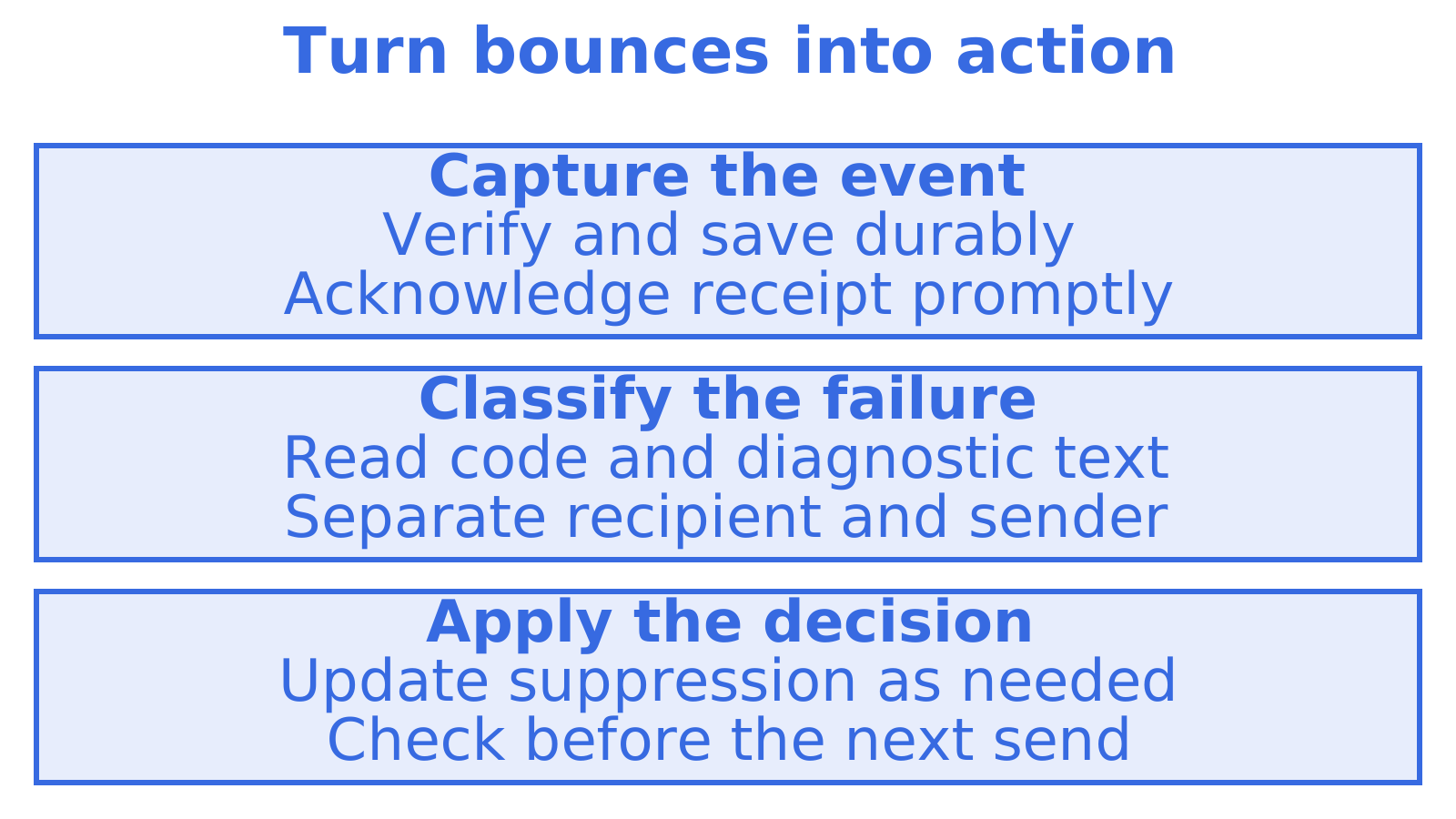
- Capture every bounce as an event. Collect structured failure data through your provider’s webhooks or event stream. A mailbox full of NDRs should not depend on someone reading it.
- Classify on the enhanced code first, then the text. Save the raw code, diagnostic string and timestamp. You’ll need them to investigate the decision later.
- Suppress on permanent addressing failures. Before another send is queued, put the recipient on your suppression list: the record of addresses your app must not send to.
- Retry temporary failures with increasing delays and a limit. With exponential backoff, each failed attempt means a longer wait. End retries when the defined window closes.
- Escalate repeat soft bounces. Spamhaus suggests treating repeated soft failures as hard. Five or more is a common heuristic. Count them within a defined window, and investigate before sending again.
- Separate recipient problems from sender problems. Raise an alert when your IP reputation causes a 5.7.X. Fix the sending problem and keep valid recipients off the suppression list.
- Report rates by stream. A healthy average can conceal a failing segment. Track bounce rates by tenant, sending domain and provider.
Our email retry strategy guide works through the backoff schedule in more depth.
A worked example
Say your app sends 10,000 messages today and 240 fail. The breakdown is 150 with 5.1.1 (unknown user), 60 with 4.2.2 (mailbox full), and 30 with 5.7.1 and text saying your IP is listed.
- Suppress the 150 invalid addresses. They make up a 1.5% hard bounce rate, below the 2% guideline. Still, check which address sources produced those failures.
- Retry the 60 temporary mailbox-full failures with longer waits and a defined limit. If an address keeps failing, pause further sends to it.
- Treat the 30 policy failures as a sending problem. Pause affected sends, check the blocklist listing and your authentication, then work out the remedy.
The total of 240 hides different jobs. Save the enhanced codes and diagnostic text so your app can suppress invalid addresses, retry temporary failures and raise alerts for sender problems.
Suppression lists: your first line of defence
Your suppression list records addresses the application must not send to. Add an invalid recipient as soon as you identify a permanent addressing failure. Keep sender and policy failures separate. They should not cost you valid recipients.
Suppression controls vary across managed platforms. Before deciding what to store in your database, read the Amazon SES global suppression list documentation. For a product serving several customers, also check how to configure tenant-level suppression.
Provider lists are a backstop, not a strategy. Keep your own copy in your own database, keyed by tenant where you have tenants, because:
- You can explain to customers why a message was not sent.
- You can keep your history when moving between providers.
- You can set your own rules, including when to review a temporary mailbox-full suppression.
Our piece on suppression list management for engineers covers scope, expiry and reinstatement decisions.
Bounces are a reputation signal
Look for patterns in bounce history. If a signup source keeps producing invalid recipients, fix how it collects addresses as well as suppressing the ones that failed. Mailbox providers can treat repeated attempts to reach dead addresses as a reputation signal.
Check sender authentication when reviewing bounce rates. SPF authorises sending servers. DKIM adds a signature receivers can verify, and DMARC checks alignment with the visible sender domain. If 5.7.X failures spike, read how SPF, DKIM and DMARC work and use the diagnostic text to pin down the cause.
Rates worth watching
Cloudflare’s guidance puts hard bounces below 2% and complaints below 0.1%. Use those as warning thresholds. Break rates down by address source to find a failing list, and consider confirmed signup flows to reduce the invalid addresses entering your system.
A 20% bounce rate calls for pausing affected sends and investigating. Sort invalid recipients from temporary failures and policy blocks, then decide whether the remedy is list cleanup, different retries or a fix to your sending setup.
Build it into the architecture
Give delivery failures a durable route into your application. Amazon’s deliverability documentation covers outcomes and notifications. Check how your provider reports failures and what it does when your endpoint is unavailable.
The pattern is consistent across providers:
- The provider reports a bounce through a webhook, notification topic or event stream.
- Your endpoint verifies the event and saves it durably, then promptly acknowledges receipt.
- A worker classifies the bounce and records its action, updating the suppression table where appropriate.
- Before each send, the send path checks the suppression table.
The same event may arrive twice. Make your handler idempotent so processing a duplicate does not repeat its effects. Our guides cover production-ready webhooks with idempotency and reliable inbound processing. Before writing your parser, examine a typical bounce notification and check whether it contains a delivery status notification (DSN), because formats differ.
Save delivery logs with the SMTP response, enhanced code, diagnostic text and timestamps. You can use them to explain a failure and check your handler’s decision. Our guide to delivery logs for developers covers fields to consider.
Our perspective on bounce handling
We build email infrastructure for AI agents and for the platforms that run them, so picture an agent sending messages from a supplier queue. Nobody is watching when one fails. The workflow needs a failure event it can act on, whether that means stopping, retrying or asking a person for help.
Decide access and delivery separately. Per-mailbox keys and permissions limit access to the assigned mailbox. Your app still needs rules for delivery failures. A temporary deferral may call for a wait, while a 5.1.1 should stop further sends to the invalid address. Make the failure reason available wherever the next send is decided.
Someone also needs to be accountable for sending. That is the reason agents on myagent.mx start with receive-only access, and send only once a human owner approves.
Build the failure path before live traffic starts. Use enhanced codes and diagnostic text to classify failures, suppress invalid recipients, and review rates by sending stream every week.
Giving an agent a mailbox that can see its bounces
Start with a mailbox at myagent.mx if your agent needs an email address. A mailbox on the shared @myagent.mx domain can send and receive mail. Pre-claim tokens let it receive, read, search and thread mail straight away. Sending unlocks once a human owner joins and approves, so a person stays in control of what leaves. Work out bounce classification and suppression rules as you set up the mailbox.
When you are ready to send at scale, Sendmux’s sending API handles high-volume provider-routed sending, and the agent inbox API covers the receiving side. See email for AI agents for how sending and receiving fit an agent workflow.
Common mistakes
- Retrying an unchanged permanent failure wastes attempts. Address the reported cause before considering another send.
- Suppressing every 5xx risks losing valid recipients. Use the enhanced code and diagnostic text to separate addressing failures from sender or policy problems.
- A bounce log alone leaves sending unchanged. Put classification decisions back into your database before the next send.
- Endless soft-bounce retries leave failures unresolved. Set a limit and pause affected addresses while you review the cause.
- A global bounce rate can conceal a failing segment. Check rates by tenant, domain, provider and address source.
- Review temporary suppressions. Set a time to reassess mailbox-full failures so they don’t become permanent by accident.
FAQ
Why does an email soft bounce?
A soft bounce means the receiving server reported a temporary problem. Common causes are a full mailbox, a busy or unavailable server, greylisting, or a message that is too large. The 4xx class tells you a retry may succeed, so retry with backoff and a limit.
What is the difference between a 4xx and a 5xx SMTP code?
A 4xx reply is a persistent transient failure, where retrying is appropriate. A 5xx reply is a permanent failure, and resending the same message in its current form is unlikely to work. Always read the enhanced code too, because RFC 3463 status codes give the detail the three digits leave out.
How many soft bounces before I treat an address as hard?
There is no standard. Spamhaus describes a common heuristic of treating five or more soft failures as a hard bounce. Tune the number to your traffic, and count failures over a defined window so one quiet fortnight does not trip the rule.
Should I suppress every address that returns a 550?
No. A 550 can mean the user does not exist, but it can also mean the receiver rejected your message for spam, policy or authentication reasons. Read the diagnostic text and the enhanced code: suppress for addressing failures, and fix your own setup for policy ones.
Sources
- Cloudflare Email Service: email deliverability
- Spamhaus: how to handle bounced emails
- RFC 3463: Enhanced Mail System Status Codes
- Palisade: SMTP error codes, explained and fixed
- Amazon SES global suppression list
- Amazon SES tenant-level suppression
- Understanding email deliverability in Amazon SES
- Amazon SNS bounce notification examples
Recommended
Give an agent its own address
Sendmux is the Email Inbox API for AI Agents.