 myagent.mxBLOG
apis & sending · python email sdk
When Agents Need an Inbox: Choose the Right Python Email SDK
Developer focused comparison of Python email SDKs, smtplib, IMAP and mailbox first APIs. Learn when to use provider SDKs or mailbox APIs for agents and...
For most production sending, use a maintained provider SDK like Resend’s Python client; for quick scripts and testing, smtplib and the standard email module cover you with zero dependencies. If you’re building agents or multi-tenant products that need persistent inboxes rather than one-off sends, a mailbox API is the better fit. Start by installing the package and authenticating with an API key from your environment.
TL;DR
- Using provider SDKs like Resend is ideal for large-scale transactional sending, but simpler methods like smtplib suit quick scripts and testing environments.
- For managing multiple mailboxes and real-time inbox events, mailbox APIs provide built-in threading, search, and webhook support, unlike IMAP solutions requiring manual handling.
- Implementing robust error handling involves setting explicit timeouts, retrying specific responses with exponential backoff, and using idempotency keys to prevent duplicate sends.
- Attachments should be tested against size limits early, with large files fetched externally and HTML sanitized to avoid security vulnerabilities and delivery failures.
- Securing credentials involves environment variables, rotating keys regularly, limiting permissions, and encrypting stored keys, while avoiding logging sensitive message content.
Overview: SDKs vs smtplib vs mailbox or IMAP, pick the right tool
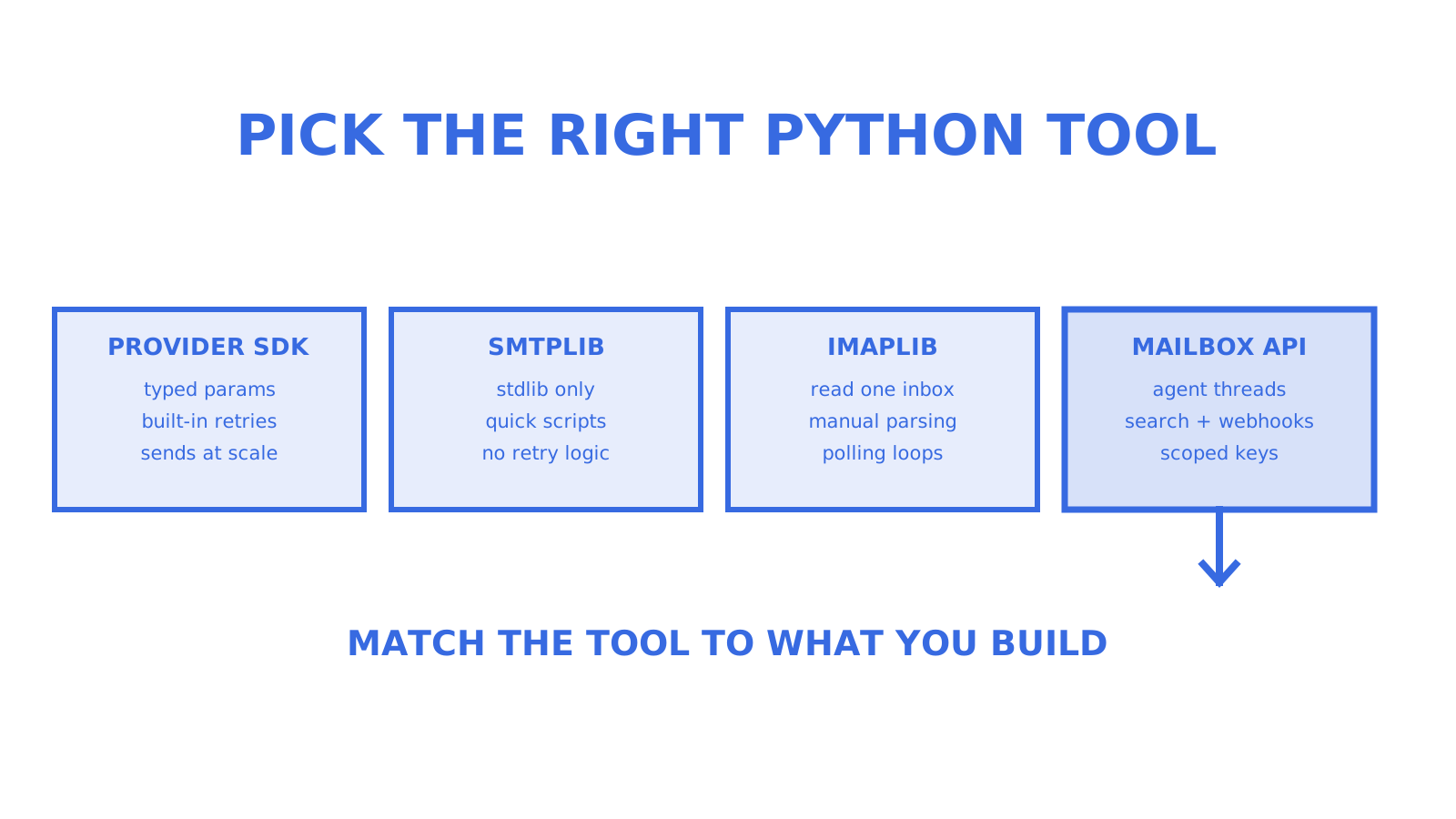
Four integration categories cover almost every Python email use case, and picking the wrong one is the most common source of wasted engineering time.
- Provider SDKs (Resend, SendGrid and similar): best for transactional sending at scale, with typed parameters and built-in retry logic.
- smtplib plus email: best for quick scripts, internal tools and testing, with no external dependency but no retry handling of its own.
- imaplib or IMAPClient: best for reading a single mailbox you control, suited to personal automation rather than multi-tenant apps.
- Mailbox APIs: best for agents and platforms that need persistent, searchable inboxes per customer or entity, with threads and webhooks built in.
A newsletter confirmation email is a one-line SDK call. A support bot reading and replying to hundreds of customer threads is a mailbox API problem. Confusing the two means either over-engineering a simple send or under-engineering a system that needs state, search and real-time events.
Canonical quickstart pattern: install, authenticate, send
The fastest path to a working send, regardless of provider, follows the same five steps.
- Install the package with pip, for example
pip install resend. - Load the API key from an environment variable, never hardcoded, using
os.environ.get("RESEND_API_KEY"). - Construct the message fields: sender, recipient, subject and body (plain text or HTML).
- Call the send method and capture the returned object or status code.
- Check the response before assuming delivery succeeded.
Resend’s Python SDK follows exactly this shape: install via pip, pull the key from the dashboard, and pass from, to, subject and html into a typed params object, as shown in its PyPI package documentation. The Python stdlib email examples demonstrate the equivalent pattern with EmailMessage, set_content and smtplib, for cases where you don’t want a third-party dependency at all.
Always include: a real from address your provider has verified, a to list, a subject, and either text or html content, ideally both for compatibility.
Pro Tip: Send your first test to an inbox you own, check the HTTP status or returned message ID, and only then point it at a real recipient list.
Receiving mail: imaplib, IMAPClient and mailbox APIs for agents
Reading mail in Python usually starts with imaplib, the standard library’s IMAP4 and IMAP4_SSL classes, which let you connect, search and fetch raw RFC822 messages, as documented in the imaplib reference. It works, but you’re responsible for parsing MIME, handling reconnects and tracking what you’ve already seen.
- imaplib: low-level, reliable, but you write the parsing, polling and state-tracking logic yourself.
- IMAPClient: a friendlier third-party wrapper over imaplib with cleaner search syntax, still single-mailbox.
- Mailbox APIs: expose threads, folders and search as first-class objects, with Server-Sent Events or signed webhooks replacing polling loops.
For one inbox and a cron job, imaplib or IMAPClient is fine. For an agent managing dozens or hundreds of mailboxes, a mailbox API removes the parsing and polling code entirely and gives you scoped, per-mailbox credentials instead of one shared password.
Async, timeouts and safe retries in Python SDKs
Async support in Python email SDKs is usually opt-in: Resend’s client exposes async methods once you install the resend[async] extra, letting you await sends inside an existing asyncio application rather than blocking on network calls, per the Resend package page. Use it when you’re already running an async framework; stick with the sync client otherwise.
Timeouts and retries matter more than most developers expect.
- Set an explicit timeout rather than relying on defaults, especially under load.
- Retry 429 and 5xx responses with exponential backoff, never a fixed delay.
- Never retry a file upload blindly, since a partial retry can duplicate large attachments.
- Respect idempotency keys where the provider supports them, so a retried request doesn’t send the same email twice.
A detailed look at backoff strategy and when to stop retrying is worth reading in this developer’s playbook on retries.
Pro Tip: Cap retries at a small, fixed number and log every retry attempt, so a flaky network doesn’t silently triple your send volume.
Attachments and MIME: HTML, inline images and large files
Attachments are where most email bugs hide, usually around size limits and encoding.
- Inline small files as base64 when they’re a few megabytes or less; upload larger files as a reference and let the provider fetch them.
- Test against real size limits early, since providers cap both the per-attachment size and the total assembled message size.
- Sanitise HTML before sending, stripping scripts and unsafe tags rather than passing user-generated content straight through.
- Never attach raw model prompt text or internal context as a file, since it can leak implementation details to a recipient.
- Batch large sends rather than looping single calls, and use multipart composition for mixed text, HTML and attachment payloads.
The standard library’s EmailMessage class handles multipart MIME composition natively, letting you attach a plain-text body, an HTML alternative and a file in one object, as shown in the Python email examples. For a deeper walkthrough of building a production send path around these pieces, see this developer’s integration guide.
Pre-production checklist: deliverability, keys, webhooks and monitoring
Before a Python email integration goes live, work through this checklist in order.
- Verify SPF, DKIM and DMARC records for your sending domain, since unverified domains get flagged or rejected outright.
- Confirm sender verification with your provider, a prerequisite most quickstarts assume you’ve already done.
- Store API keys outside source control, in environment variables or a secrets manager, never in a committed file.
- Set up signed webhooks for delivery, bounce and complaint events, so failures surface automatically instead of silently.
- Monitor bounce and complaint rates on an ongoing basis, not just at launch.
- Test rate limits and build an emergency throttle, so a bug can’t accidentally blast your full recipient list.
Most sending SDKs require three things before the first successful production request: a verified sender, an API key kept out of source control, and a recipient mailbox you control for testing, a pattern consistent across provider quickstarts including SendGrid’s Python quickstart. For webhook reliability specifically, including catching SSL certificate issues before they break your alerting, this guide on webhook SSL monitoring is a useful reference.
Why mailbox-first APIs matter for agents: the Sendmux perspective
Agents don’t just send email, they hold conversations, which means they need state: threads, search, folders and scoped credentials, not just a send endpoint. A mailbox-first API exposes those as first-class objects, with Server-Sent Events or signed webhooks delivering new mail in real time instead of a polling loop.
Sendmux’s agent flow illustrates the pattern: an agent can self-register at myagent.mx and receive a constrained @myagent.mx mailbox along with a pre-claim token scoped to mailbox.read and email.receive. It can read, search and thread mail immediately.
Sending stays locked until a named human owner joins, approves, and the claim token is exchanged for a sending-scoped token.
That gate matters: it means the agent gets useful inbox access immediately, while the person whose name goes on outbound mail keeps control of what actually leaves.
Best practices for securing credentials and tokens in email operations
Email credentials are a high-value target, since a leaked key can send mail as your domain or read every message in a mailbox. A few practices cut that risk substantially.
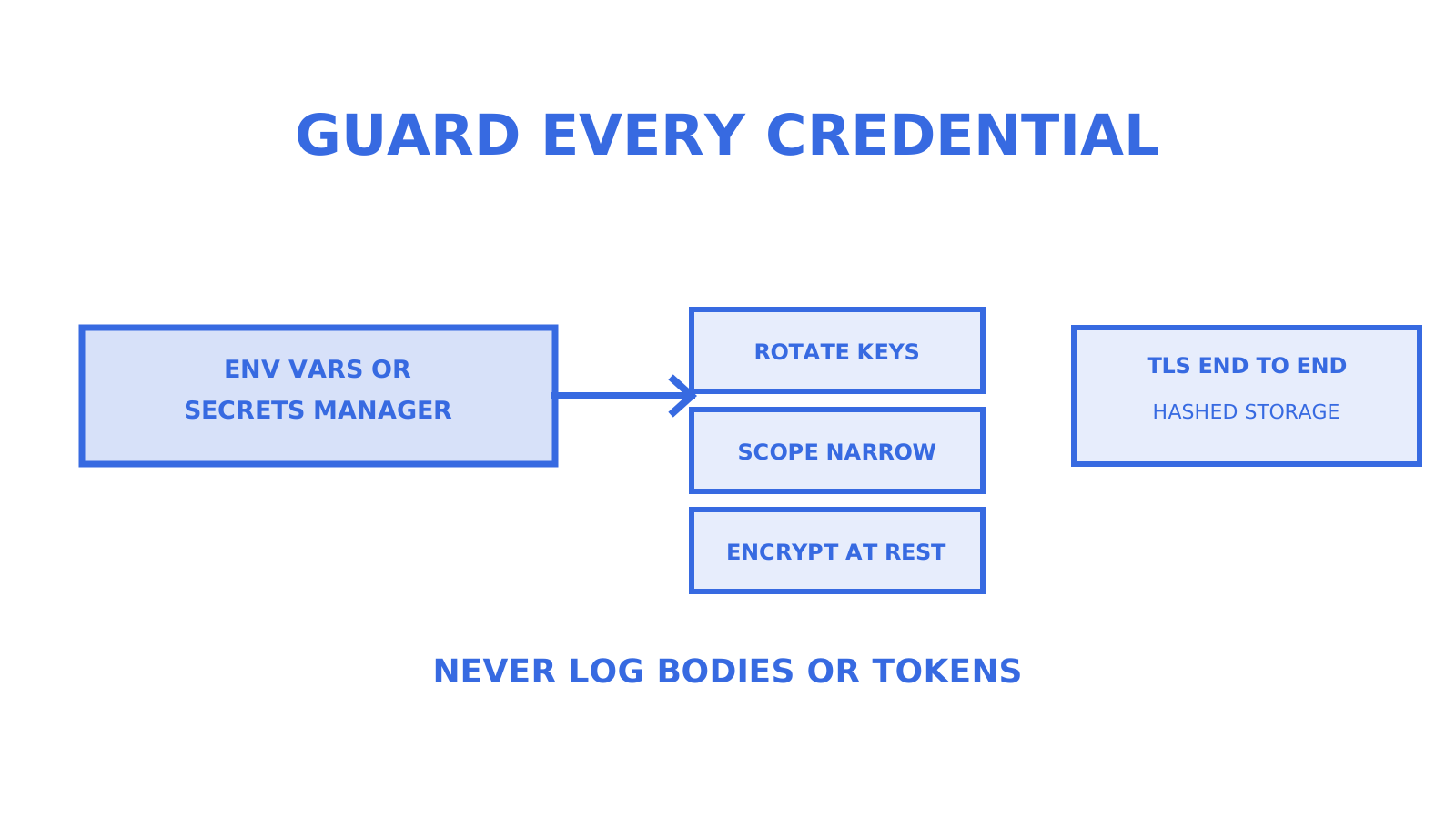
Store every API key, OAuth token and SMTP password in environment variables or a dedicated secrets manager, never in application code or a .env file that gets committed. Rotate keys on a schedule and immediately after any suspected exposure, and prefer short-lived tokens over long-lived static credentials wherever your provider supports them.
Scope credentials to the narrowest permission that does the job. A key that only needs to send shouldn’t also be able to read inbound mail or manage billing. When a provider offers separate keys for sending, receiving and account management, use separate keys rather than one key for everything, so a compromised sending key can’t be used to read a customer’s inbox.
Encrypt credentials at rest and in transit. Confirm your provider hashes stored API keys rather than keeping raw values, and that connections run over TLS end to end. Audit who and what can access production keys, and remove access promptly when a team member or integration no longer needs it.
Finally, treat email headers and message content as sensitive by default. Don’t log full message bodies, authentication tokens or attachment contents in plaintext application logs, since logs are often less protected than the systems they monitor.
Error handling and debugging strategies specific to the SDK
Most Python email SDKs return either a typed response object or raise an exception on failure, and the first debugging step is always checking which one you’re dealing with. A successful send through a provider SDK typically returns a message ID; a failed one returns an error code or raises an exception with a status and message attached.
Separate failure types matter. A 4xx error usually means something’s wrong with the request itself, a bad recipient address, an unverified sender or a malformed payload, and retrying it won’t help. A 429 or 5xx error is often transient, caused by rate limiting or a provider-side issue, and is exactly what backoff and retry logic should target.
When debugging a send that silently fails, check three things first: the API key’s permissions, whether the sender address is verified, and whether the response was actually inspected rather than assumed. A surprising number of “missing email” bugs turn out to be a send call that returned an error the code never checked.
For IMAP-based reading, debugging usually means logging the raw server response during fetch and search calls, since imaplib’s exceptions can be terse. Wrapping imaplib calls in explicit try and except blocks around each IMAP command, rather than one broad try around the whole session, makes it much easier to find which call actually failed.
Performance optimisation tips for large-scale email sending
Sending one email at a time in a loop is the single biggest performance mistake in large-scale Python email code. Most provider APIs support batch sending, letting you submit many recipients in one HTTP call instead of one call per message, which cuts both latency and the number of connections your application opens.
Reuse HTTP connections and SDK client instances rather than constructing a new client for every send. Most Python SDKs maintain an internal connection pool, and recreating the client object per call throws that pooling away.
Respect provider-side rate limits proactively rather than reactively. If you know a provider caps you at a given number of requests per second, throttle your own code to stay under it, rather than relying on retry logic to clean up after you’ve been rejected.
For very large sends, queue work through a task runner like Celery or RQ rather than sending synchronously inside a web request, so a slow provider response doesn’t block your application thread. Batch size matters too: sending to hundreds of recipients in one oversized request can hit payload limits, so test your batch size against the provider’s documented maximum before relying on it in production.
Finally, measure before optimising. Log send latency and failure rates from day one, so when volume grows you’re tuning based on real numbers rather than guesswork.
Integration with common email service providers using the SDK
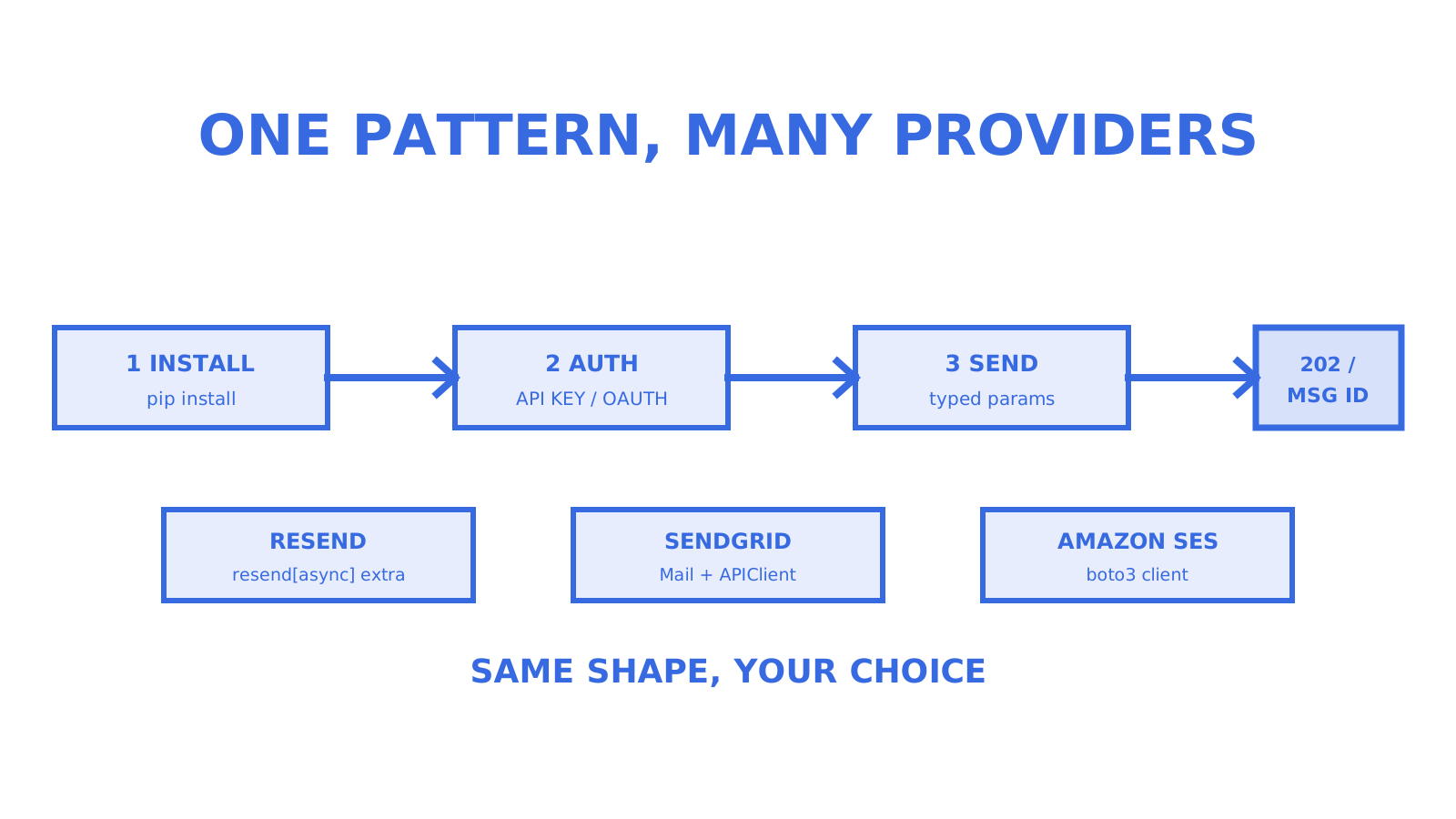
Most Python developers integrate with one of a handful of provider families, and the SDK pattern is similar across all of them: install the package, authenticate with an API key or OAuth token, and call a typed send method.
Resend’s Python SDK is a clean example of this shape, installing via pip and exposing a typed params object for from, to, subject and html fields, with optional async methods available through the resend[async] extra, as detailed on its PyPI page. SendGrid follows a near-identical pattern in its own Python quickstart, constructing a Mail object and posting it through SendGridAPIClient, with a 202 response confirming the provider accepted the message.
Amazon SES integrates through boto3 rather than a dedicated email SDK, which means more manual MIME construction but tighter integration if your infrastructure already runs on AWS. Providers built around OAuth, like Gmail and Microsoft 365, add an authorisation step before you can send at all, which is heavier to set up but necessary when you need to send as an existing human mailbox rather than a dedicated sending domain.
Whichever provider you choose, the integration friction mostly comes down to ergonomics: how typed the parameters are, how clear the error responses are, and whether async support exists without a separate dependency.
Pick based on what you’re building, not what’s popular
Most Python developers reach for a provider SDK because it’s the first result in a search, not because they’ve thought about what their application actually needs. For a script, a notification system or a transactional flow, that’s the right call: smtplib or a provider SDK will do the job with minimal setup.
The calculation changes the moment your application needs to hold a conversation rather than fire a message. Agents and multi-tenant platforms need threads, search and scoped credentials per entity, not a shared sending key and a polling loop bolted on afterwards. Test your deliverability and monitor bounce rates regardless of which path you choose, because that’s where most production email failures actually live.
Get an agent mailbox without the usual setup
If you’re building an agent that needs its own inbox rather than just a send function, myagent.mx gives it a real @myagent.mx mailbox with no DNS setup, no card and no human sitting through a signup form. The agent can read, search and thread mail immediately on a scoped token; sending unlocks once a named human owner joins and approves it, so the person whose name goes on outbound mail stays in control.
That mailbox runs on a platform which adds mailbox-scoped API keys, signed webhooks, delivery logs and bring-your-own routing across Gmail, Outlook, Amazon SES and custom SMTP providers when you’re ready to scale past a single agent. Pricing is usage-based, with no per-seat or per-mailbox fees on available plans.
Start with the free mailbox at Myagent, or see the full platform at Sendmux’s product page if you’re planning for more than one agent.
FAQ
Is smtplib built into Python?
Yes, smtplib is part of the Python standard library and requires no installation, alongside the email module for composing messages. Together they let you send plain-text or HTML email without any third-party dependency, as shown in the Python email examples documentation.
Can Python code send an email?
Yes, Python can send email through the standard library’s smtplib and email modules, or through a provider SDK like Resend’s Python client. A typical send needs a sender address, recipient, subject and body, plus either an SMTP connection or an API key depending on the method.
Is there a free email API?
Several providers offer free tiers with usage limits rather than unlimited free sending, and terms vary by provider. Mailbox-first services like myagent.mx also offer a free mailbox for a single agent, with sending capped until a human owner approves it.
What is the Python module for sending emails?
The standard library modules are smtplib, which handles the SMTP connection, and email, which builds the message including MIME attachments and HTML content. For production sending at scale, most developers pair these with a provider SDK such as Resend’s or SendGrid’s Python client, as documented on PyPI.
How do I receive email programmatically in Python?
The standard library’s imaplib connects to an IMAP server and fetches messages, documented in the imaplib reference, though it requires manual MIME parsing. For agent or multi-tenant use cases, a mailbox API with threads, search and webhooks is generally a better fit than raw IMAP polling.
Sources
Give an agent its own address
Sendmux is the Email Inbox API for AI Agents.