 myagent.mxBLOG
apis & sending · inbound email parsing api
Mailbox First Inbound Email Parsing API for Developers via Sendmux
A developer first guide to inbound email parsing APIs: when to use webhooks vs parse calls, mailbox first patterns, scoped keys and Sendmux.
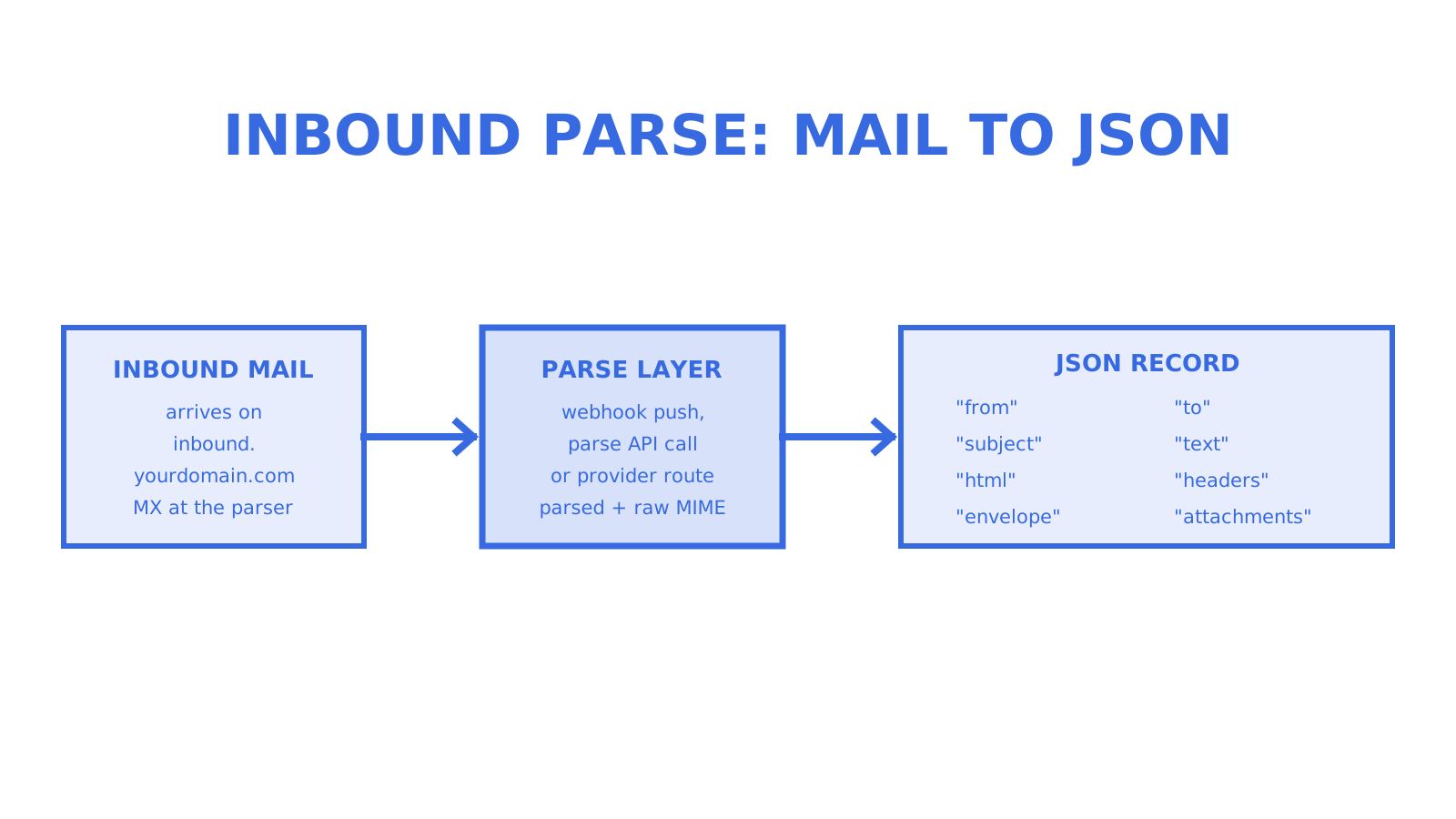
For most developer teams, we recommend a webhook-based inbound parse for real-time workflows (support tickets, replies, alerts) and a dedicated parse API for file-to-JSON conversions of stored or forwarded messages. Choose parsed mode when you want structured fields fast, and raw MIME when you need the exact original. Set up MX records on a subdomain first, then copy a working example rather than building a parser from scratch.
TL;DR
- Webhook-based inbound parse delivers real-time structured data, ideal for support tickets and alerts, while parse API suits batch conversions of stored messages.
- Setting up reliable mail flow requires isolating a dedicated subdomain and verifying DNS MX records before testing message receipt.
- Parsed JSON fields include sender, recipient, subject, text, HTML, headers, and attachments, with raw MIME available for signatures or complex threads.
- Secure webhooks by verifying HMAC signatures, checking timestamps, and designing idempotent handlers to prevent duplicates and handle retries.
- Mailbox-first APIs enhance multi-tenant workflows by providing tenant-scoped inboxes, API keys, and event-driven delivery, reducing integration complexity.
What an inbound email parsing API actually does
An inbound email parsing API takes mail arriving at your domain and turns it into something your code can act on, without you writing a MIME decoder. Three patterns cover almost every setup:
- Webhook push: the provider posts parsed fields to a URL you host the moment mail arrives, which gives low latency but means you need a public, always-on endpoint.
- Parse REST API: you submit a file or raw message on demand and get back JSON, which suits batch jobs and backfills but adds polling or manual triggering.
- Provider inbound routes: parsed and raw modes sit side by side, letting you take structured fields for most messages and fall back to raw MIME when a message needs exact reconstruction.
Real-time support and alerting flows favour webhooks. Migrations, archives and bulk conversions favour a parse API you call when you’re ready.
Essential setup: MX records, subdomains and pitfalls
Getting mail to your parser reliably starts with DNS, and the safest path is isolating inbound parsing on its own subdomain so you never touch records your team already depends on for normal mail.
- Create a subdomain, such as inbound.yourdomain.com, dedicated to parsing.
- Point its MX record at the provider’s inbound host, exactly as documented for your parsing service.
- Verify the receiving domain in your provider’s dashboard before sending test mail.
- Leave your root domain’s existing MX records untouched if staff mailboxes rely on them.
- Send a test message and confirm it arrives at your webhook or shows up via a parse API call.
Common mistakes: pointing the root domain’s MX at the parser (which breaks normal mail), forgetting a trailing dot in some DNS panels, and testing before propagation finishes, which can take anywhere from minutes to a day depending on your registrar.
Pro Tip: Use a DNS checker to confirm your new MX record resolves globally before you trust any test results from your own network.
Parsed JSON fields versus raw MIME payloads
Parsed mode hands you a predictable JSON object instead of a raw MIME blob, and the shape is close to universal across providers. Expect fields for from, to, subject, text, html, an envelope object, a headers map and an attachments array with filename, type and size metadata. SendGrid’s inbound parse webhook posts this kind of parsed data to a URL you configure, and it decodes headers to UTF-8 so you aren’t left guessing at character sets. A dedicated parse API that accepts a .eml or .msg file returns a similar record shape from a single POST call, with sender, recipients, subject, bodies and attachments all in one JSON response.
Raw mode exists for the cases parsed fields can’t cover cleanly: digital signatures, nested forwarded messages, or compliance workflows that need the exact bytes as received. Decoding raw MIME yourself means handling multipart boundaries, quoted-printable and base64 encodings, and inline versus attached parts.
- Stream attachments to temporary storage rather than loading them into memory, especially on messages with many parts.
- Check part count and size before processing, since a message with dozens of embedded images behaves very differently to a plain-text reply.
- Expect attachment metadata (not just content) to matter for routing and audit trails.
A dedicated parse API commonly enforces plan-based limits, such as a cap of 60 parse calls per minute and file size ceilings between 25 and 50 megabytes, which matters when you’re sizing a backfill job.
Securing inbound webhooks and handling retries
Treat every inbound webhook as untrusted input until you’ve verified it. Signature verification is the first gate.
- Compute an HMAC over the raw request body using your shared secret, and compare it to the signature header the provider sends, using a constant-time comparison.
- Check the timestamp header against your server clock and reject requests outside a tolerance window (commonly a few minutes) to block replay attempts.
- Return a 2xx status as soon as you’ve accepted the payload for processing, since providers queue and retry non-2xx responses, and SendGrid notes messages can be dropped after repeated failed delivery attempts over several days.
- Design your handler to be idempotent, so a retried delivery of the same message ID doesn’t create a duplicate ticket or reply.
- Log 413, 429 and 5xx responses with enough context to replay the payload manually, and alert on sustained failure rates rather than single blips.
Pro Tip: Acknowledge receipt and queue the heavy work asynchronously, so your 2xx response never waits on downstream processing that could time out.
Copy-ready examples: webhook handler and parse-API call
A minimal Flask webhook handler reads the posted form data, verifies the signature, and extracts the fields you need:
@app.route("/inbound", methods=["POST"])
def inbound():
    signature = request.headers.get("X-Signature")
    if not verify_hmac(request.get_data(), signature, SECRET):
        return "invalid signature", 401
    data = request.form
    sender = data.get("from")
    subject = data.get("subject")
    text = data.get("text")
    attachments = request.files
    queue_for_processing(sender, subject, text, attachments)
    return "", 200
Posting a saved message to a parse API looks like this with curl, against MailParse’s parsing endpoint:
curl -X POST https://api.mailparse.ai/api/parse \
  -H "Authorization: Bearer YOUR_KEY" \
  -F "file=@message.eml"
A successful call returns a 201 with a record object holding from, to, subject, body and attachments.
- Use ngrok or localtunnel to expose a local webhook endpoint during development.
- Test with messages that include no subject, empty bodies and nested forwarded mail, since these edge cases break naive parsers first.
- Verify signatures locally with a captured payload before going live.
- Confirm attachment streaming works with a multi-megabyte test file.
Routing, threading and downstream workflow patterns
Once parsing works, the harder problem is turning individual messages into coherent conversations and triggering the right automation.
- Route on the envelope recipient address first (support+ticketid@yourdomain.com is more reliable than parsing intent from free text).
- Fall back to regex on subject or body only when the recipient address doesn’t carry enough routing information.
- Preserve the In-Reply-To and References headers from each message so you can map replies to the correct thread rather than starting a new conversation every time.
- Prefer event-driven consumption (webhooks or Server-Sent Events) for anything latency-sensitive, and reserve polling for batch jobs where a delay of minutes is acceptable.
For teams wiring parsed payloads into ticketing systems or CRMs, a transactional email integration guide walks through mapping these fields into application workflows, and SendGrid’s inbound parse webhook documentation lists the standard posted parameters you’ll be routing against in more depth.
When a mailbox-first API reduces the integration work
Webhook and parse-API patterns work well for single-purpose inboxes, but multi-tenant and agent-native products hit friction fast: one catch-all mailbox forwarding to one webhook doesn’t scope cleanly per customer or per agent.
A mailbox-first approach gives each tenant, customer or agent its own persistent mailbox rather than a shared forwarding address, which means:
- Mailbox-scoped API keys limit what any one integration can read or send, instead of one team-wide credential touching every tenant’s mail.
- Real-time delivery via Server-Sent Events or signed webhooks avoids building your own polling loop per mailbox.
- SDKs and CLI tooling cut the boilerplate of wiring signature verification and retry handling for every new integration.
This matters most once you’re running tens or hundreds of mailboxes rather than one inbound address, where per-tenant complexity compounds quickly without mailbox-level isolation.
A production checklist before you ship
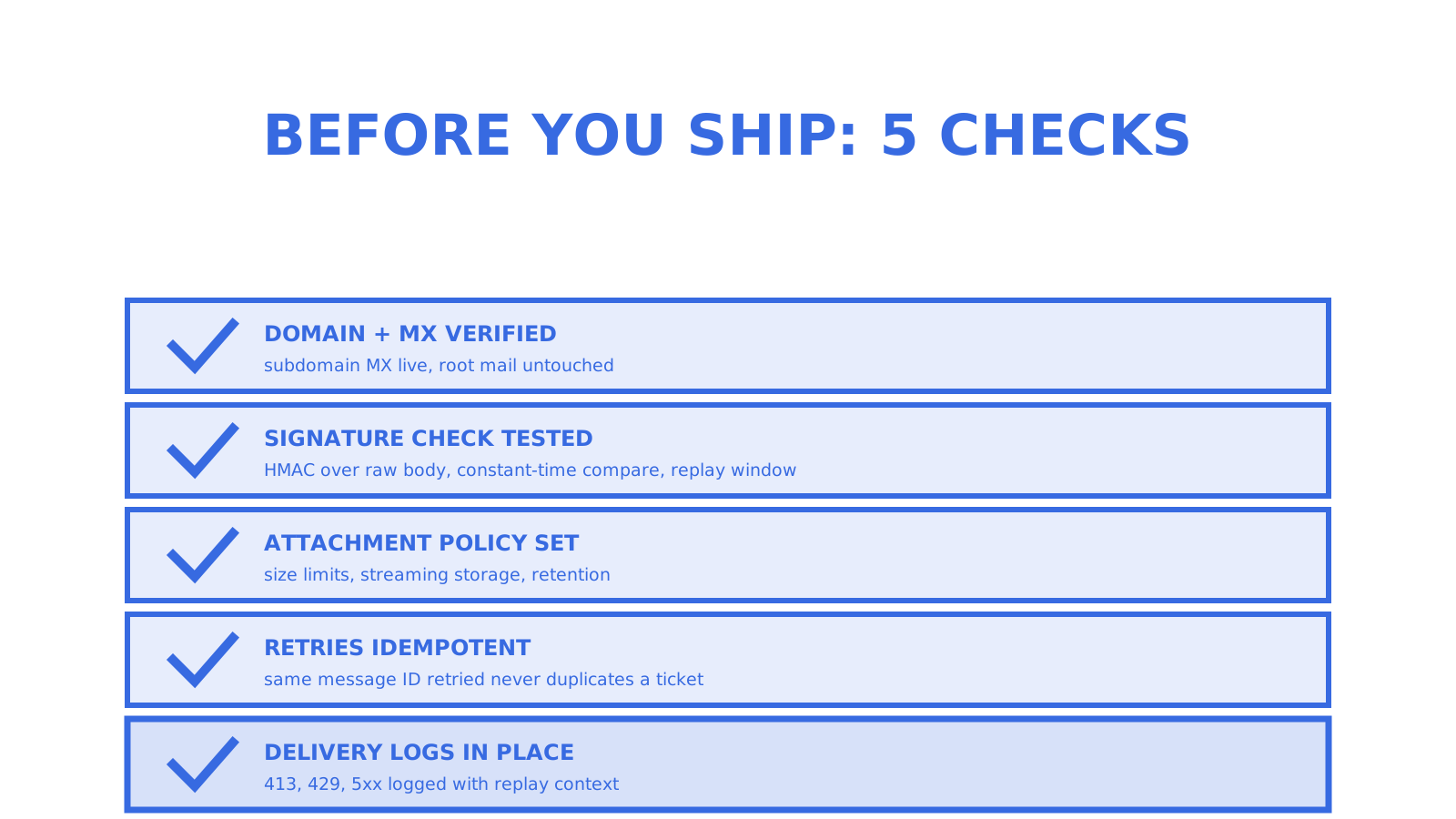
Before any inbound parsing setup goes live, we’d check five things in this order: domain and MX records verified, webhook signature verification tested against a captured payload, an explicit attachment policy (size limits, storage, retention), retry handling confirmed idempotent, and logging in place for failed deliveries.
Once live, the operational priorities shift to logs and metrics (delivery success rates, parse failures), quota monitoring (so you notice before a rate limit bites), and keeping an SDK or CLI in the loop so new integrations don’t each reinvent signature checks from scratch. Most production incidents we’d expect to trace back to one of these five steps being skipped, not to an exotic parsing edge case.
Sendmux: a mailbox-first option for agents and multi-tenant apps
When your use case is agents, multi-tenant platforms or support workflows that need a real inbox rather than a one-off parse, we built Sendmux around persistent mailboxes instead of forwarding rules. Each tenant or agent gets its own address, a mailbox-scoped API key, and delivery through signed webhooks or Server-Sent Events, so you’re not wiring signature verification and retry logic separately for every integration.
The Sendmux inbox product gives you a free tier to start with, and our Pro plan is priced per team with usage-based charges rather than per-seat or per-mailbox fees. If you’re evaluating a full email API for agent builders, start with the mailbox and build outward from there.
FAQ
What’s the difference between parsed mode and raw MIME?
Parsed mode returns structured JSON fields like from, subject and text that your code can use directly, while raw mode delivers the original MIME content for cases needing exact reconstruction, such as signed messages or complex forwarded threads. Most integrations use parsed mode by default and request raw only when they need it.
How do I secure an inbound email webhook?
Verify an HMAC signature sent in a request header against your own computed hash of the raw body, and reject requests with timestamps outside a tolerance window to prevent replay. Respond with a 2xx status once the payload is accepted, since providers retry non-2xx responses and may eventually drop the message.
Should I use a webhook or a parse API?
Use a webhook when you need real-time delivery for workflows like support replies or alerts, and a parse API when you’re converting stored files or running batch jobs on demand. Many teams use both, with webhooks for live traffic and a parse API for backfills.
What fields does a typical parsed email JSON include?
Expect from, to, subject, text, html, an envelope object, a headers map and an attachments array with file metadata. A dedicated EML parser typically returns the same schema whether the source file is .eml or .msg.
How do I test an inbound email parser locally?
Expose your local webhook endpoint with a tunnelling tool such as ngrok, then send test messages covering edge cases like empty bodies, missing subjects and attachments. Inspect the raw payload your handler receives before trusting any downstream processing logic.
Sources
Give an agent its own address
Sendmux is the Email Inbox API for AI Agents.