 myagent.mxBLOG
strategy · transactional vs outreach
Transactional vs Marketing Email: A Practical Guide
Learn the key differences between transactional and marketing emails. Understand their roles, compliance, and how to optimize your email strategy.
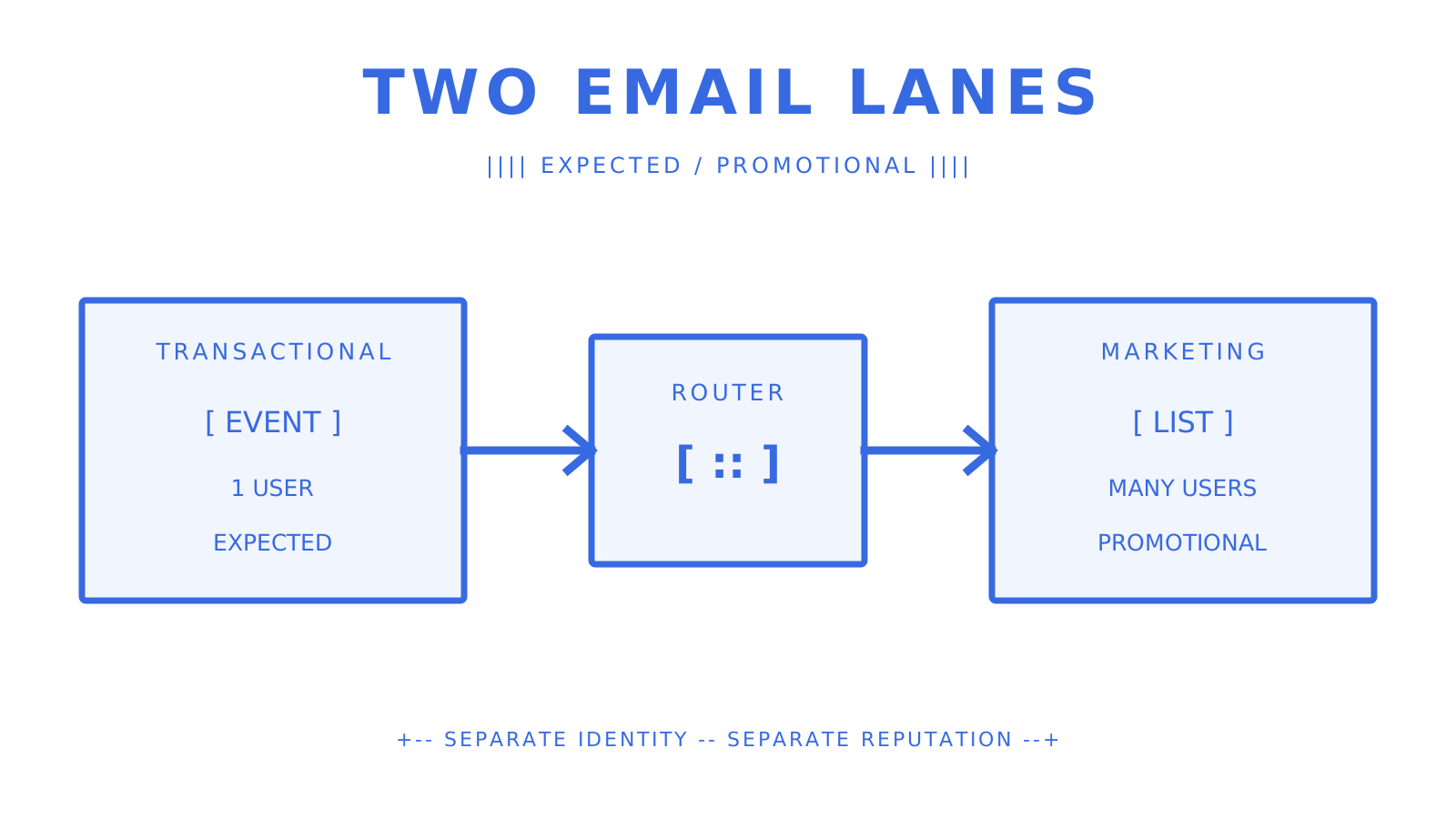
Transactional email is an expected, one-to-one message triggered by a user action. Marketing email is a campaign-driven, one-to-many promotion sent to a list. The fastest classification rule is simple: if the recipient expects the message because of something they just did, treat it as transactional. If you chose to send it, treat it as marketing. That distinction shapes consent, infrastructure, legal compliance under CAN-SPAM and GDPR, and the sending architecture you build. Get it wrong and you risk deliverability, reputation, and sometimes a regulatory fine. Sendmux supports separate sending identities and weighted routing across configured sending accounts, so teams can keep these streams operationally distinct.
Quick orientation before we go deeper:
- Transactional: event-triggered, one-to-one, expected, time-sensitive, generally exempt from CAN-SPAM opt-out requirements when the primary purpose is transactional.
- Marketing: campaign-driven, one-to-many, promotional or engagement-focused, requires a working unsubscribe link and physical postal address under CAN-SPAM.
- The gray zone: lifecycle and hybrid messages that blend both, requiring a primary-purpose test to classify correctly.
When readers compare transactional vs marketing email or transactional email vs marketing email, they are usually asking about the difference between transactional and marketing email. This guide covers the differences between transactional and marketing emails, what are transactional emails, how to use transactional emails, transactional email best practices, examples of marketing emails, the benefits of marketing emails, and the email marketing strategies that keep both streams compliant. The more specific phrase transactional vs outreach describes the same infrastructure boundary when the marketing stream is sales-led.
Key Takeaways
The key rule is this: if the recipient triggered the message, it is transactional. If you decided to send it, it is marketing, and CAN-SPAM’s opt-out and physical-address requirements apply.
| Point | Details |
|---|---|
| Classification rule | Transactional = user-triggered, one-to-one; marketing = sender-initiated, one-to-many. |
| CAN-SPAM compliance | Marketing emails must include a working unsubscribe link and physical address; purely transactional messages are exempt when the primary purpose is transactional. |
| Infrastructure separation | Use separate subdomains and IP pools for each stream to prevent marketing complaints from degrading transactional deliverability. |
| Latency targets | Set workload-specific SLOs; sub-2-second auth and sub-10-second confirmation targets are examples, not universal inbox-delivery benchmarks. |
| Sendmux | Exposes weighted sending accounts, quota windows, custom-domain verification status, delivery logs, and CSV export for teams that need infrastructure separation. |
What is a transactional email, and when do recipients expect it?
Transactional email is an automated, event-triggered message that delivers essential one-to-one information a recipient expects after taking an action. The operative word is expected. Someone resetting a password or placing an order is actively waiting for a response. A delay or failure at that moment is a product failure, not just an email problem.
Core characteristics that define a transactional message:
- Single recipient. Sent to one person based on their specific action, not a segment.
- Event-triggered. Fired by a system event: a purchase, a signup, a failed login, a shipment update.
- Informational primary purpose. The message’s main job is to confirm, notify, or authenticate, not to sell.
- High recipient expectation. The user is actively waiting for it, often within seconds.
- Time-sensitive. A password reset that arrives in 20 minutes may already be useless. If an OTP expires in 5 minutes, a team might set an internal SLO to hand it off in under 2, but the correct target depends on the product and cannot guarantee inbox arrival.
Common examples are order confirmations (“Your order #84321 has shipped”), password reset links, one-time passcodes, shipping notifications, security alerts for new-device logins, and welcome emails sent immediately after account creation. Each one has a clear cause-and-effect relationship between the user’s action and the message.
Transactional emails consistently see higher open rates than marketing campaigns because recipients are primed to look for them. That trust is an asset worth protecting. Cluttering a password reset with a banner ad is the fastest way to erode it.
Subject-line examples for common transactional events:
- Password reset:
Reset your password (expires in 10 minutes) - Order confirmation:
Order #84321 confirmed — here's your receipt - Shipping update:
Your package is out for delivery today - Security alert:
New sign-in to your account from Chicago, IL
What makes a marketing email different, legally and operationally?
Marketing email, also called promotional or commercial email, is batch-and-blast or campaign-driven messaging sent to recipients who share a characteristic: a segment, a behavior cohort, or an entire subscriber base. The sender initiated it; the recipient did not.
Core characteristics:
- One-to-many. The same message, or a personalized variant, goes to a defined list.
- Campaign-driven. Scheduled or triggered by a marketing calendar or lifecycle rule, not a user action.
- Promotional or engagement-focused. The goal is to sell, re-engage, educate, or nurture, not to confirm a transaction.
- Opt-out required by law. Under CAN-SPAM, commercial emails must include a working unsubscribe mechanism and a valid physical postal address. Recipients have 10 business days after opting out for the sender to honor that request.
Typical formats include weekly newsletters, promotional discount emails, product launch announcements, re-engagement campaigns, cross-sell and upsell broadcasts, and seasonal sale emails. For a deeper look at how these fit into a broader email marketing strategy, campaign structure and list hygiene matter just as much as the message.
| Feature | Transactional | Marketing |
|---|---|---|
| Trigger | User action | Sender decision |
| Audience | Single recipient | List or segment |
| Primary purpose | Inform / confirm | Promote / engage |
| CAN-SPAM opt-out required | No (if primary purpose is transactional) | Yes |
| Physical address required | No (if purely transactional) | Yes |
| Consent model (GDPR) | Usually contract or another documented lawful basis | Consent is common, while the exact basis and electronic-marketing rules depend on the jurisdiction |
| Key KPIs | Delivery rate, latency | Open rate, click-through, unsubscribes |
Under GDPR, every processing purpose needs a lawful basis; necessary service messages may rely on contract, while direct marketing can sometimes rely on legitimate interests but must also satisfy applicable electronic-marketing rules. UK PECR generally requires consent for electronic mail to individuals unless the soft opt-in applies. CASL requires express or qualifying implied consent before commercial electronic messages.
When can you include promotional content in a transactional email?
You can, within limits. In the US, the FTC’s primary-purpose test is the governing standard. A message remains transactional when its primary purpose is transactional or relationship-based, even if it contains some promotional content. Once promotional content dominates, the message is commercial and CAN-SPAM’s full requirements apply.
Practical rules for staying on the right side of that line:
- Lead with the transactional content. The order summary, the reset link, or the shipping status must appear first and prominently. Promotional content goes below the fold.
- Keep promotional elements subordinate. A small “You might also like” module at the bottom of a receipt can remain secondary, but no fixed layout makes it automatically safe. A full-width sale banner above the order details points toward a commercial primary purpose.
- Never use the subject line for promotion.
Your order is confirmed — SAVE 20% TODAYshifts the primary purpose toward commercial and risks reclassification. - Do not add an unsubscribe link as a workaround. Adding opt-out language does not make a commercial message transactional. Classification depends on content and purpose, not the presence of a footer link.
A safe receipt email might close with: “Based on your purchase, you may enjoy [related product].” The unsafe version leads with a promotional banner, pushes the receipt down, and uses a subject line that reads like a campaign. Mixing promotional content into transactional mail risks reclassification and can harm deliverability, because mailbox providers build sender reputation by domain and subdomain. A complaint caused by a promotional element in a transactional message damages the reputation of the entire sending domain.
Checklist before sending a hybrid message:
- Does the transactional content appear first and occupy the majority of the message?
- Is the subject line purely informational?
- Is the promotional element clearly secondary (below the fold, smaller visual weight)?
- If this message were reclassified as commercial, does it include an unsubscribe link and physical address?
How should you architect your sending infrastructure for each stream?
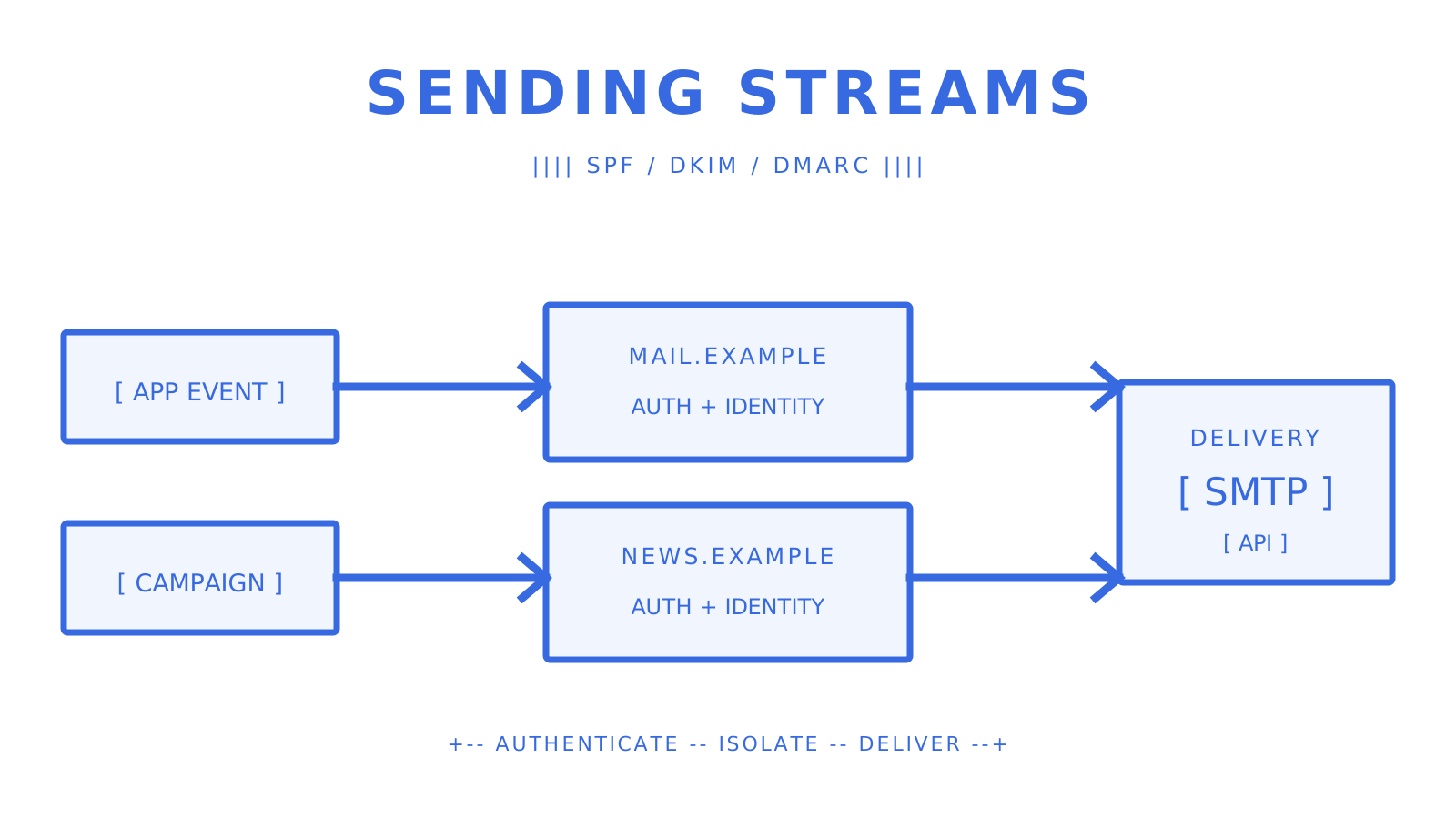
A strong risk-control architecture separates transactional and marketing streams with distinct subdomains, different IP pools at scale, and separate sending identities. That separation protects critical transactional mail from the reputation damage caused by marketing unsubscribes and spam complaints.
Sending method options
SMTP relay is a widely compatible integration path. Standards-track message submission normally uses port 587, while some providers also offer the non-standard port 2525. Your application authenticates and hands the message to the relay. This approach suits low-to-moderate volume transactional sends and teams that need protocol-level compatibility with existing mail clients.
Transactional HTTP API gives you structured requests and responses, supports controls such as Idempotency-Key, and can expose detailed delivery events. For high-volume or latency-sensitive flows, an API is often easier to instrument than a long-lived SMTP integration; actual latency still depends on the complete delivery path.
Hybrid SMTP+API works for platforms that need protocol access for some senders, such as legacy integrations or IMAP clients, while routing high-priority events through a low-latency API path.
Authentication checklist
Every transactional subdomain needs its own authentication records:
- SPF: Publish the exact TXT policy required by each active sender for
mail.yourdomain.com; do not copy provider IP ranges unless that provider documents the approach. - DKIM: Sign outbound messages with a 2048-bit key scoped to the transactional subdomain.
- DMARC: Start with
p=noneto monitor, then move top=quarantineorp=rejectonce alignment is confirmed. - Bounce handling: Configure a dedicated return-path address and process bounces automatically to keep your list clean.
For marketing streams, RFC 8058 one-click unsubscribe (List-Unsubscribe-Post) is increasingly expected by Gmail and Yahoo for bulk senders. Transactional streams generally do not need it, but adding it to hybrid messages reduces friction for recipients who want to opt out of promotional elements.
Domain and subdomain strategy
| Stream | Subdomain example | Separate IP pool? |
|---|---|---|
| Transactional | mail.yourdomain.com |
Yes, at scale |
| Marketing | news.yourdomain.com |
Yes, at scale |
| Internal / agent | agent.yourdomain.com |
Optional |
A new subdomain takes time to warm. If you are launching a marketing program on one, increase volume gradually. Your transactional subdomain should already be warm from ongoing event-triggered sends, so isolate it from that warmup process.
What does reliable transactional delivery actually require?
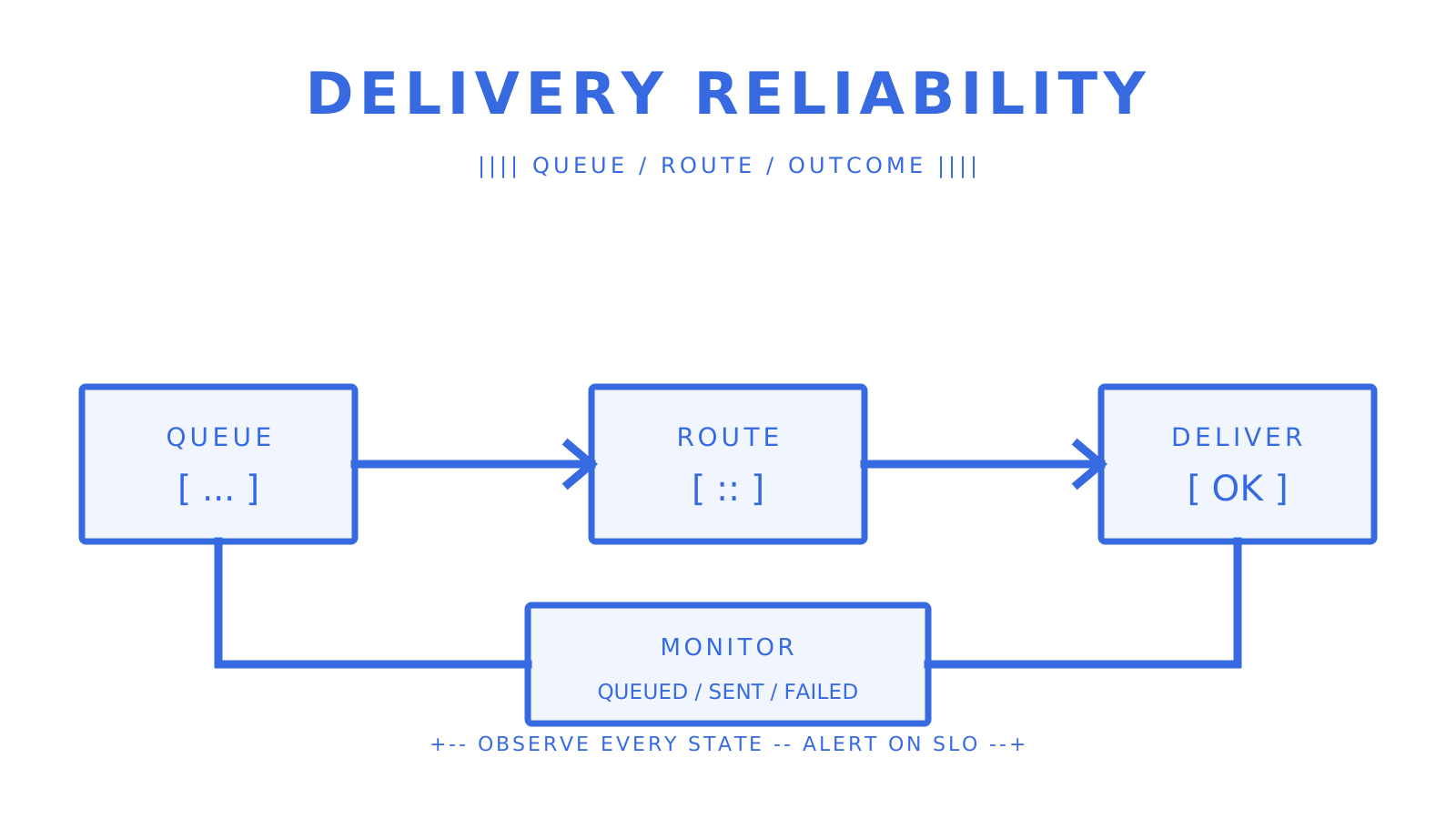
Reliable transactional email is an operational discipline, not a configuration checkbox. Treat it as critical infrastructure, with separate subdomains and IP pools, full authentication, idempotency, and real-time monitoring.
Example internal latency SLOs, not universal inbox benchmarks:
- Password resets and OTPs: a team may target sub-2-second handoff or measured seed-inbox arrival for its own workload.
- Order confirmations and receipts: sub-10 seconds can be an internal objective when users wait for immediate feedback.
- Shipping notifications: sub-60 seconds may be an internal objective, but product needs should set the threshold.
Operational checklist:
- Log every send event: queued, sent, delivered, bounced, deferred, rejected, failed.
- Implement idempotency keys at the application layer to prevent duplicate sends on retry.
- Configure automatic bounce handling: suppress hard bounces immediately, retry soft bounces with backoff.
- Set up real-time alerting on delivery rate drops and latency spikes.
- Maintain an incident runbook: who gets paged, what the rollback path is, how to switch providers.
- Monitor TLS certificate expiry on every SMTP or HTTPS endpoint you operate; certificate failure can block authenticated handoff.
Pro Tip: Measure end-to-end latency from event emission to inbox arrival, not merely the API response. Use seed inboxes across Gmail, Outlook, and Apple Mail to catch provider-specific delays that sending logs cannot show.
Operational mistakes like expired certificates, misaligned SPF/DKIM records, and mixed IP pools are among the most common causes of complete transactional delivery failure. Separate lanes and active monitoring are the mitigation.
How should you design transactional email content?
Transactional email design follows a different logic from marketing creative. The goal is quick comprehension, not visual impact. Recipients open these messages to find a piece of information and act on it. Anything that slows that process is a liability.
Content hierarchy for a transactional message:
- Subject line: Informational, specific, no promotional language. Include the key fact (order number, action required, status).
- Sender name: Use a recognizable brand name or product name, not a generic
noreply@. - Primary action or key detail: The reset link, the order summary, the tracking number. This goes first, above the fold.
- Secondary information: Estimated delivery date, support contact, account details.
- Footer: Legal text, physical address if required, plain-text link to web version.
Design guidance:
- Keep HTML minimal. Heavy image-based layouts break in plain-text fallback and slow rendering on mobile.
- Use a single CTA. Two buttons competing for attention in a password reset email is a UX failure.
- Always include a plain-text alternative. Some corporate mail clients strip HTML entirely.
- Avoid unnecessary tracking pixels and remote assets in critical transactional mail. Email clients commonly block scripts, while extra remote requests can slow rendering and add privacy or filtering concerns.
- For international recipients, localize timestamps to the user’s timezone and format dates per locale (MM/DD/YYYY vs. DD/MM/YYYY).
Accessibility matters here too. Use at least WCAG 2.1 AA contrast for text, give informative images equivalent alt text, use alt="" for purely decorative images, and structure the message with semantic HTML so screen readers can navigate it.
What KPIs should you track for each email stream?
Different streams need different metrics. Tracking marketing KPIs on a transactional stream, or vice versa, gives you the wrong signals.
For transactional streams, delivery rate and time-to-inbox are useful service indicators. If your password-reset SLO is 5 seconds, a sustained breach can justify an automated alert, but that threshold must come from your product’s measured objective. For marketing streams, the operational levers are engagement KPIs such as open rate, click-through rate, and revenue per send, with unsubscribe rate as a health signal.
- Set delivery rate alerts first. If your transactional delivery SLO is 98%, treat a sustained drop below that threshold as an incident.
- Track deferred messages separately. Deferrals that resolve within minutes are acceptable; those that age past an hour need investigation.
- Monitor complaint rate continuously for marketing. Google recommends keeping reported spam below 0.1% and avoiding 0.3% or higher; investigate movement toward either threshold.
- Measure SLA attainment for auth flows. Track the percentage of password resets delivered within your target window, not just average latency.
For marketing campaigns, a practical guide to building effective email campaigns covers A/B testing and segmentation approaches that directly affect these KPIs.
How does international compliance differ from US rules?
CAN-SPAM regulates commercial email through truthful identification, a valid postal address, an opt-out mechanism, and prompt processing of opt-outs; it does not create a blanket right to email anyone. Most of the rest of the world operates on opt-in frameworks, and the gap matters if any of your recipients are outside the US.
GDPR (European Union): Every marketing purpose needs a lawful basis, and separate electronic-marketing rules may require consent. Necessary transactional email may rely on contract, while other processing needs its own documented basis; transparency and data-subject rights still apply. Fines under GDPR can reach €20 million or 4% of global annual turnover, whichever is higher.
CASL (Canada): Requires express or implied consent before sending commercial electronic messages. Implied consent has a time limit (typically 2 years from a business relationship). Violations carry fines up to CAD $10 million per violation.
PECR (United Kingdom): PECR generally requires consent for marketing email to individuals, with a limited soft opt-in for an organisation’s own similar products or services when the required notice and opt-out are provided.
Australia’s Spam Act 2003: Requires consent, accurate sender identification, and a functional unsubscribe facility. The Act sets civil-penalty ceilings in penalty units based on the provision, entity type, prior record, and number of contraventions, so the former flat AUD $1.1 million-per-day shorthand is not a reliable current statement.
The practical implication: if your list includes EU, Canadian, or Australian recipients, CAN-SPAM compliance alone is not enough. You need consent records, a privacy policy, and a suppression list that reflects opt-outs across all applicable regimes.
How should you manage user consent for both email types?
Consent management is not a one-and-done checkbox. It is an ongoing operational process that affects your signup flows, preference center, suppression lists, and sending logic.
For transactional email, do not describe consent as automatically implicit. Necessary service messages may instead rely on contract or another lawful basis, depending on jurisdiction. Explain what you send and why, minimise the data used, and keep promotional processing separate.
For marketing email, collect valid opt-in where the applicable law requires it. Use a separate, unchecked choice for marketing communications rather than bundling it with terms acceptance. Where another route such as a documented soft opt-in or qualifying implied consent applies, record the conditions and expiry.
Operational best practices:
- Maintain a suppression list that is honored across all sending systems. An unsubscribe from one campaign must suppress all future marketing sends, not just that campaign’s list.
- Build a preference center that lets recipients choose which marketing categories they receive. Granular preferences reduce unsubscribes by giving people a middle option between “all” and “nothing.”
- Timestamp and source every consent record. Retain the signup date, form version, exact language shown, and other evidence that is lawful and necessary; an IP address is personal data and should not be collected by default without a defined need and retention period.
- For marketing automation flows, check consent status at send time, not just at list-build time. A contact who unsubscribed after entering a drip sequence should not receive the next message in that sequence.
- Never add transactional contacts to marketing lists without a separate opt-in. The fact that someone gave you their email to receive a receipt does not authorize you to send them a newsletter.
What happens when you misclassify an email?
Misclassification creates three kinds of consequences: legal, deliverability, and reputation. Each one compounds the others.
Legal consequences: Sending a commercial message without a working unsubscribe mechanism or valid physical postal address violates CAN-SPAM. The FTC and other authorised enforcers can pursue penalties, and more than one person can be legally responsible for a violating message. Misclassifying a marketing email as transactional to avoid opt-out requirements is not a gray area; it is a deliberate violation.
Deliverability consequences: When a marketing campaign runs through your transactional subdomain and generates spam complaints, those complaints damage the reputation that your password resets and OTPs depend on. Gmail and Outlook use domain and IP reputation signals that do not distinguish your intent from your recipients’ experience. Google recommends keeping spam rates below 0.1% and avoiding 0.3% or higher; complaints on a transactional subdomain can contribute to filtering that delays or blocks critical messages.
Reputation consequences: Recipients lose trust when a transactional message contains promotional content they did not expect. They mark messages as spam, disengage, and tell others. Damage to inbox reputation is harder to recover from than a deliverability dip because it reflects real human behavior, not a technical misconfiguration.
How do you classify borderline and hybrid emails?
Some messages genuinely sit between the two categories. Lifecycle emails are the most common example: a 7-day onboarding sequence triggered by signup is event-driven (transactional trigger) but promotional in purpose (driving feature adoption). An abandoned-cart email is triggered by user behavior but is clearly commercial in intent.
The FTC’s primary-purpose test is your classification tool. Ask three questions:
- What is the dominant purpose of the message? If a recipient would describe it as “a promotion” or “an ad,” it is commercial.
- What appears first and most prominently? Transactional content must lead and dominate for the transactional exemption to apply.
- Would a reasonable recipient expect this message based on their action? If the answer is no, treat it as marketing.
Abandoned-cart emails are triggered by behavior, but their primary purpose is to recover a sale. They are commercial messages and require CAN-SPAM compliance. For onboarding sequences, apply the primary-purpose test to the actual subject line, placement, and content. Instructional material does not automatically make a sequence transactional; upgrade and add-on promotion points toward a commercial purpose.
When in doubt, include the unsubscribe link and physical address. Adding them to a borderline message costs little; omitting them from a message that proves commercial can cost far more.
The split matters more than most teams realize
Most teams treat the transactional-versus-marketing distinction as a compliance checkbox. In practice, it is an infrastructure decision with compounding consequences. Teams that separate subdomains, authenticate sending identities, and monitor each stream independently avoid having to untangle a reputation problem caused by a campaign in the wrong lane.
The investment that pays off fastest is not better subject lines or more sophisticated segmentation. Everything else is optimization. That is the foundation.
Sendmux gives your transactional stream a dedicated, reliable lane
Sendmux exposes routing weights and per-second, per-minute, per-hour, and per-day quota windows for configured sending accounts. Its sending path filters blacklisted or quota-exhausted accounts and selects available accounts in weighted order. The Management API centralises custom-domain records and verification status, while delivery logs and CSV export keep message outcomes observable.
For SaaS platform builders, mailbox-scoped credentials can grant exact permissions such as email.send, email.receive, mailbox.read, and mailbox.settings.update. Outbound delivery changes arrive as signed webhooks using HMAC-SHA256; mailbox SSE is reserved for inbound events such as message.received. Pro costs $7 per team each month plus usage, including $0.000500 for each provider-accepted recipient through an owned or connected provider. There is no separate seat or mailbox fee.
Use the current OpenAPI 3.1 contract and first-party SDKs for TypeScript, Python, Go, PHP, Ruby, and Rust when you need a published interface rather than a copied example.
Sources
- CAN-SPAM Act compliance guide for businesses — FTC
- Transactional Email Best Practices | Mailflow Authority
- Transactional Email Best Practices: A Practical Guide for 2026
- Transactional Emails: Best Practices, Examples, and Deliverability Guide
- CAN-SPAM Act compliance guide — FTC
- GDPR Article 6 lawful bases
- GDPR Article 83 penalties
- CASL requirements and consent — CRTC
- Electronic mail marketing under PECR — ICO
- Avoid sending spam — ACMA
- Spam Act 2003 — Federal Register of Legislation
- Email sender guidelines — Google
- RFC 6409 message submission
- RFC 8058 one-click unsubscribe
- W3C image alternatives
- Google SRE service-level objectives
FAQ
What qualifies as a transactional email?
A transactional email is an automated, one-to-one message triggered by a specific user action, such as an order confirmation, password reset, OTP, or shipping notification. The defining characteristic is that the recipient expects it because of something they just did.
Can a transactional email include promotional content?
Yes, but the transactional content must appear first and dominate the message. Under the FTC’s primary-purpose test, a message retains its transactional classification only when the promotional elements are clearly subordinate, and the subject line must remain informational.
What are the four main types of email a business sends?
Most businesses send transactional emails (receipts, alerts, resets), marketing/promotional emails (campaigns, newsletters), lifecycle emails (onboarding, re-engagement sequences), and operational emails (internal notifications, system alerts). The transactional vs. marketing distinction is the most legally and technically consequential of these.
Can you give an example of a transactional email?
A password reset email is the clearest example: it is sent to one person, triggered by their request, contains a time-sensitive link, and the recipient is actively waiting for it. Order confirmations, shipping updates, and one-time passcodes follow the same pattern.
What happens if you send marketing email through a transactional stream?
Marketing complaints generated by that traffic damage the reputation of your transactional subdomain and IP pool, which can delay or block your most critical messages like password resets and OTPs. It also risks CAN-SPAM violations if the commercial messages lack the required unsubscribe mechanism and physical address.
Give an agent its own address
Sendmux is the Email Inbox API for AI Agents.