 myagent.mxBLOG
apis & sending · outlook oauth smtp
Developer Checklist: 3 Pre Send Checks for Outlook OAuth SMTP
Developer checklist for Outlook OAuth SMTP: three pre send checks (token audience, Authenticated SMTP, exact UPN), XOAUTH2 formatting, STARTTLS details,...
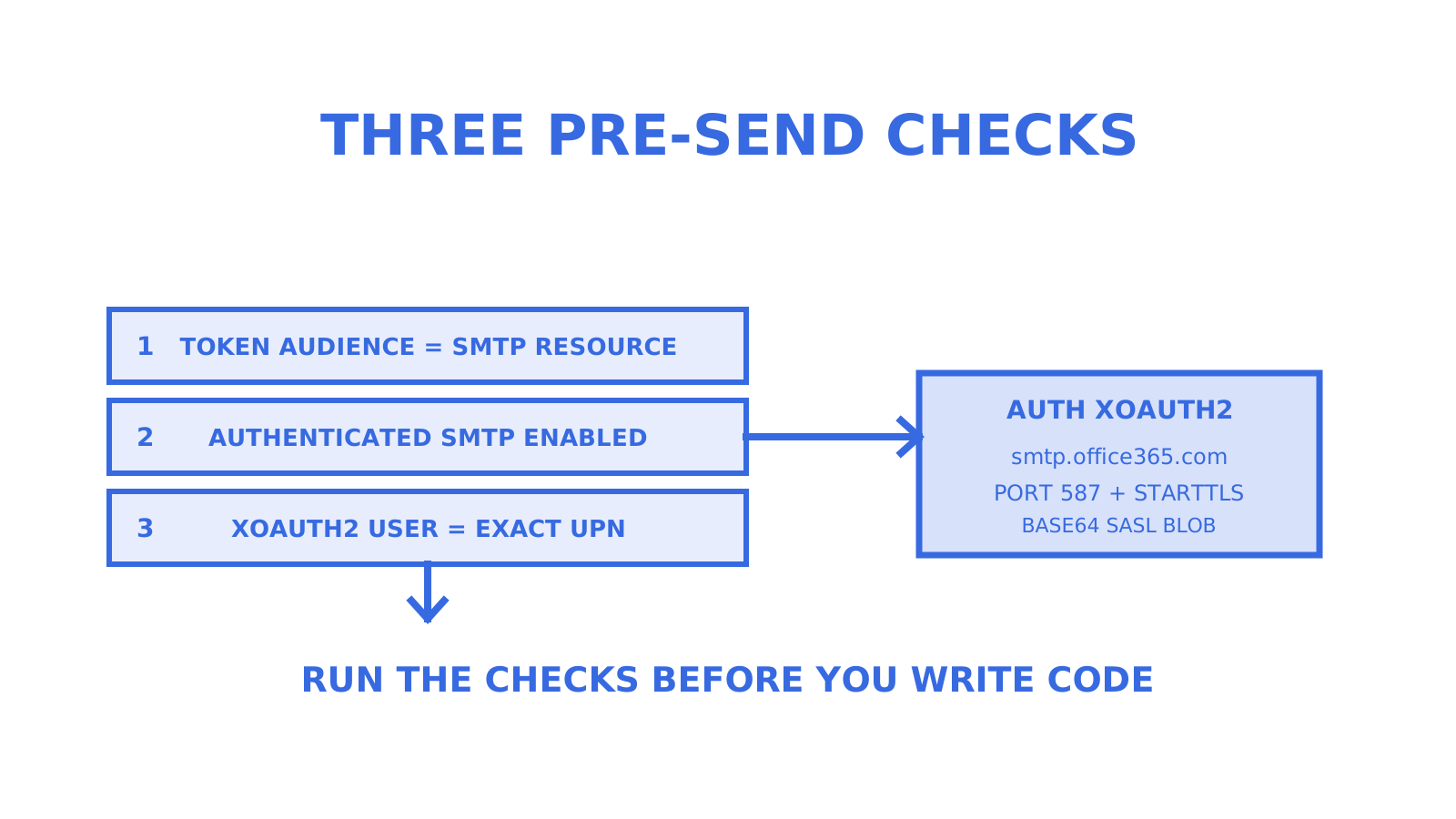
Yes, Exchange Online supports SMTP with OAuth using AUTH XOAUTH2. For interactive apps, request the delegated SMTP.Send scope. For unattended services, use client credentials with Exchange-side mailbox scoping. Before writing any code, confirm three things: the token’s scope and audience match the SMTP endpoint, Authenticated SMTP is enabled on the sending mailbox, and the XOAUTH2 username is an exact match for that mailbox’s UPN.
TL;DR
- SMTP with OAuth using XOAUTH2 is supported in Exchange Online, but requires correct tenant, mailbox, and permission configuration before use.
- For interactive apps, delegated OAuth with device or authorization code flows is recommended, while app-only client credentials flow suits unattended services with proper RBAC scoping in Exchange Online.
- Troubleshooting common authentication failures involves verifying token audience, SMTP enabled status, service principal registration, and exact mailbox username match.
- High-volume sending with OAuth is a distinct process, requiring separate configuration pathways from small-scale setups, especially when scaling beyond a few mailboxes.
- Although SMTP OAuth is viable, Microsoft’s deprecation guidance points automated senders towards High Volume Email or Azure Communication Services Email, and Graph’s sendMail API is the natural fit for new mailbox-level integrations.
Prepare your Azure app registration, licensing and Exchange permissions
Before touching SMTP code, get the tenant side right. Before writing code, check the permission set and the mailbox SMTP AUTH setting; these are the first places to look when authentication fails unexpectedly.
- Register the app in Microsoft Entra and record the Tenant ID and Client ID.
- Choose a client secret for simpler setups or a certificate for better security posture in production.
- Decide early whether you need delegated or app-only flow, since this changes the scope you request and the Exchange-side RBAC work later.
- Add
offline_accessif your app needs refresh tokens rather than re-prompting a user. - Confirm the sending mailbox holds an Exchange Online licence and has Authenticated SMTP enabled.
Enabling Authenticated SMTP is a mailbox-level flag that Microsoft’s own guidance treats as a precondition, not an optional extra. An explicitly set mailbox value overrides the organisation default, so checking only the tenant policy gives a false sense of readiness.
Delegated OAuth flow for interactive apps
Delegated OAuth suits apps where a human signs in once and the app sends on their behalf afterwards. Request the scope https://outlook.office.com/SMTP.Send, and add offline_access when you need the session to survive beyond the initial token’s lifetime. According to Microsoft Learn’s OAuth authentication guide, this is the supported path for IMAP, POP and SMTP clients that still rely on those protocols rather than Graph.
Which consent flow you use depends on the device, not preference:
- Use device code flow for CLI tools, headless services or anything without a browser handy.
- Use authorisation code with PKCE for desktop and mobile apps that can open a browser.
- Call Microsoft Graph’s
/meendpoint once authenticated to resolvemailoruserPrincipalName, and cache that value alongside the refresh token. - Build the XOAUTH2 SASL string using that cached username and a current access token issued for the SMTP resource: access tokens are single-resource, so the Graph-audience token used for /me will not authenticate SMTP.
- Open a STARTTLS connection and issue
AUTH XOAUTH2with the base64-encoded string.
For limited-input devices, use the device code flow to obtain consent and acquire each resource-specific access token through your MSAL-supported flow: Graph and SMTP are separate resources, so they take separate access tokens.
One operational detail worth flagging: Microsoft’s comparison shows the smtp.office365.com client-submission path does save sent messages to the Sent Items folder, but Graph’s sendMail gives you richer per-message error detail over a single authentication model, which is why it tends to be the better fit for new integrations.
Pro Tip: Re-resolve the username via /me only on SMTP authentication failure, not on every send, to avoid unnecessary Graph calls.
App-only client credentials flow for unattended sending
Unattended services, schedulers and agent workloads cannot sit through an interactive consent prompt, so they use client credentials instead. Request a token against https://outlook.office365.com/.default and grant the SMTP.SendAsApp permission in Azure, which requires admin consent.
That Azure grant is not the end of the job. Exchange Online enforces its own authorisation layer independently of Azure AD, so you still need to:
- Register the app’s service principal inside Exchange Online.
- Scope it to specific mailboxes with the documented service-principal registration plus mailbox-level permissions, never a blanket tenant grant.
- Verify the scoping with the service-principal and mailbox-permission commands Microsoft documents for SMTP app-only onboarding.
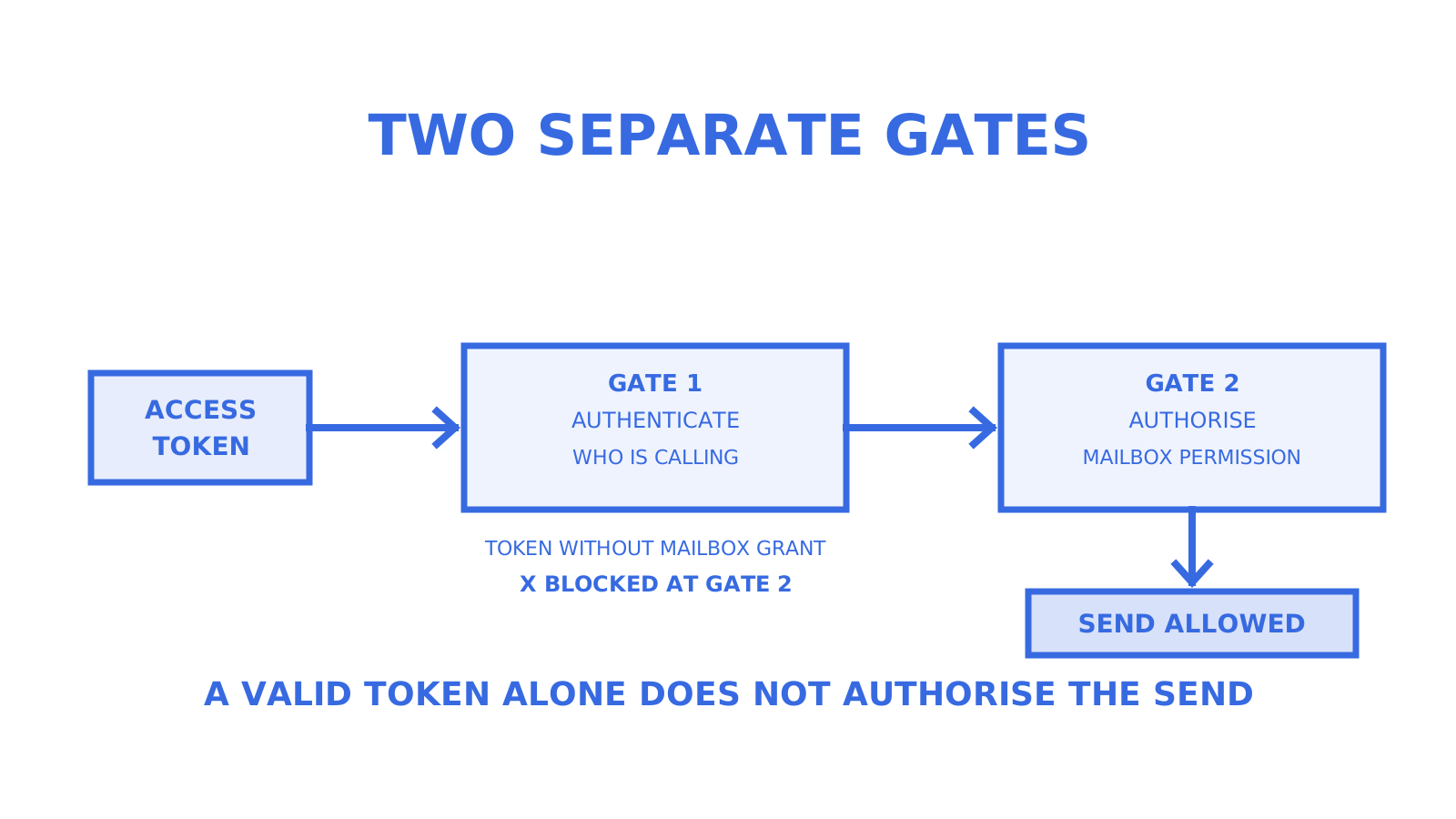
In practice, a valid access token authenticates the connection but does not authorise it. Exchange checks mailbox-level permissions as a separate step, and a token without a matching mailbox grant will still fail at the SMTP layer with an authorisation error rather than a token error.
Pro Tip: Scope every app-only service principal to the smallest mailbox allowlist that does the job, and review that allowlist whenever a service changes ownership.
Checking Authenticated SMTP at the tenant and mailbox level
Security defaults and Conditional Access policies can silently block SMTP AUTH even when your app registration and token are flawless, so check Exchange settings before chasing code bugs.
- Run
Get-TransportConfigto see the organisation-wide SMTP AUTH posture. - Run
Get-CASMailbox -Identity <mailbox> | Select SmtpClientAuthenticationDisabledto check the mailbox flag. - Treat
$trueas disabled,$falseas enabled, and$nullas inheriting the organisation setting, per Microsoft’s documentation on the setting’s precedence. - Remember an explicitly set mailbox value overrides the organisation default, while a null value inherits it.
- For shared mailboxes, use the mailbox’s email address itself as the XOAUTH2 username, since Microsoft documents shared mailbox submission with that exact address.
Microsoft’s stated operational recommendation is to disable SMTP AUTH tenant-wide by default and enable it only on the mailboxes that genuinely need it.
Connecting to smtp.office365.com with XOAUTH2
The connection details are fixed and worth pinning to a config file rather than memory: smtp.office365.com on port 587, with STARTTLS mandatory before any authentication command runs.
The XOAUTH2 string itself follows a specific format: user={UPN}\x01auth=Bearer {access_token}\x01\x01, base64-encoded as a single blob before it goes over the wire. The \x01 characters are the SASL control-A separators, and supplying the wrong address or format here is a common cause of a silent authentication failure.
| Parameter | Value |
|---|---|
| Host | smtp.office365.com |
| Port | 587 |
| Encryption | STARTTLS |
| Auth mechanism | AUTH XOAUTH2 |
| Username field | UPN or mail (from Graph /me) |
Treat tokens the way you would treat a password: never write them to logs, error reports or crash dumps. If you requested offline_access, build a refresh path that runs before the access token expires rather than reacting to a failed send. And if your use case allows it, Microsoft’s own guidance suggests Graph’s sendMail as a simpler alternative with Sent Items support built in.
Fast triage when XOAUTH2 authentication fails
A 535 or “client not authenticated” error comes down to a handful of recurring causes to check. Work through them in order rather than guessing.
- Decode the access token (a tool like jwt.ms works well) and confirm the audience matches the SMTP resource, not Graph or another API.
- Confirm the effective SMTP AUTH state: check the mailbox flag first (an explicit value overrides the organisation default), then the organisation setting.
- For app-only tokens, confirm the service principal is actually registered in Exchange and holds mailbox-level permission scoped to that mailbox.
- Check basic network and TLS connectivity to port 587 before assuming the problem is authentication at all.
- Verify the XOAUTH2 username is an exact match for the mailbox’s UPN, not an alias or display name.
The recurring app-only failure causes to check are: disabled SMTP AUTH, wrong token audience, an unregistered service principal, and a mailbox missing from the app’s allowlist.
Check the token audience first when a token looks valid but SMTP rejects it.
What Microsoft’s high-volume OAuth guidance changes
High-volume sending is not just “the same setup, more often.” Microsoft documents a distinct high-volume OAuth scenario with its own account, permission and access-control requirements, and treating it as interchangeable with ordinary delegated mailbox SMTP is a common source of confusion once volumes grow.
If you’re scaling past a handful of mailboxes, assume the high-volume configuration path and the ordinary mailbox SMTP path are different systems with overlapping syntax, not one system with a volume dial.
For teams building platforms rather than single integrations, this is also where the Exchange-side RBAC work from the app-only section stops scaling cleanly, since each new mailbox or tenant typically means another scoping step. Mailbox-first infrastructure such as Sendmux and myagent.mx exists partly to fill that gap: it handles provider OAuth once per connected account rather than once per integration.
Why most teams reach for SMTP when they should reach for Graph
The honest take: SMTP OAuth is well documented and works, but it is the legacy path rather than the first choice for new builds. Microsoft’s deprecation guidance for basic authentication points automated senders towards High Volume Email or Azure Communication Services Email, and Graph’s sendMail is the natural API-first option for mailbox-level sends, with richer error detail and one authentication model instead of two (Azure AD plus Exchange RBAC).
Where SMTP still earns its place is when you have an existing SMTP client stack, a library that only speaks SMTP, or a constrained device where adding a Graph dependency is more work than it is worth. In those cases, the app-only RBAC scoping described above is not optional complexity, it is the actual security boundary that stops a compromised app from sending as every mailbox in the tenant.
A valid token and a working send are two separate problems in Exchange Online. Treat the Exchange-side authorisation step as seriously as the Azure AD consent step.
Where Sendmux fits for agent and unattended sending
If your sending logic already lives behind an agent, a scheduler or a multi-tenant platform, Sendmux gives you one place to connect Outlook, Gmail or any custom SMTP provider instead of rebuilding OAuth plumbing for each one. Typical uses include agent testing, unattended background workflows and routing outbound mail across several providers with weighted delivery groups and automatic disabling of failing accounts.
- Connect Microsoft 365 as one of several sending providers through Sendmux, without per-provider OAuth code for each new integration.
- Give an agent its own working mailbox, free, at Myagent, with no DNS setup required.
- Review the full product overview for SDKs, SMTP and API options across TypeScript, Python, Go, PHP, Ruby and Rust.
FAQ
Does SMTP support OAuth?
Yes. Exchange Online supports SMTP authentication using OAuth through the XOAUTH2 mechanism, documented in Microsoft’s SMTP OAuth guide. Basic authentication for SMTP is being deprecated rather than already removed: Microsoft’s current timeline disables it by default at the end of December 2026, with a final removal date to be announced.
How do I enable SMTP AUTH in Outlook or Exchange Online?
Use Set-CASMailbox -Identity <mailbox> -SmtpClientAuthenticationDisabled $false to enable Authenticated SMTP on a specific mailbox, as described in Microsoft’s Exchange Online documentation. The mailbox-level setting takes precedence over whatever the organisation default is set to.
Does Microsoft 365 support OAuth for sending email?
Yes, through both SMTP with XOAUTH2 and Microsoft Graph’s sendMail endpoint. Microsoft’s guidance names Graph alongside High Volume Email and Azure Communication Services Email as modern paths for automated sending, with SMTP OAuth remaining supported where SMTP behaviour is a hard requirement.
Is SMTP authentication being discontinued in Microsoft 365?
Basic authentication for SMTP follows a published retirement timeline rather than being already removed, while authenticated SMTP using OAuth remains supported and is the path documented by Microsoft for apps that still need SMTP specifically. Microsoft recommends disabling SMTP AUTH tenant-wide and enabling it only on the mailboxes that genuinely need it.
Give an agent its own address
Sendmux is the Email Inbox API for AI Agents.