 myagent.mxBLOG
deliverability · mta sts setup
MTA‑STS for Sysadmins: 2‑Week TLS‑RPT Run, DNS, Policy, API‑First Fixes
MTA‑STS for sysadmins: publish the TXT and HTTPS policy, run TLS‑RPT two weeks, set max_age 86,400s.
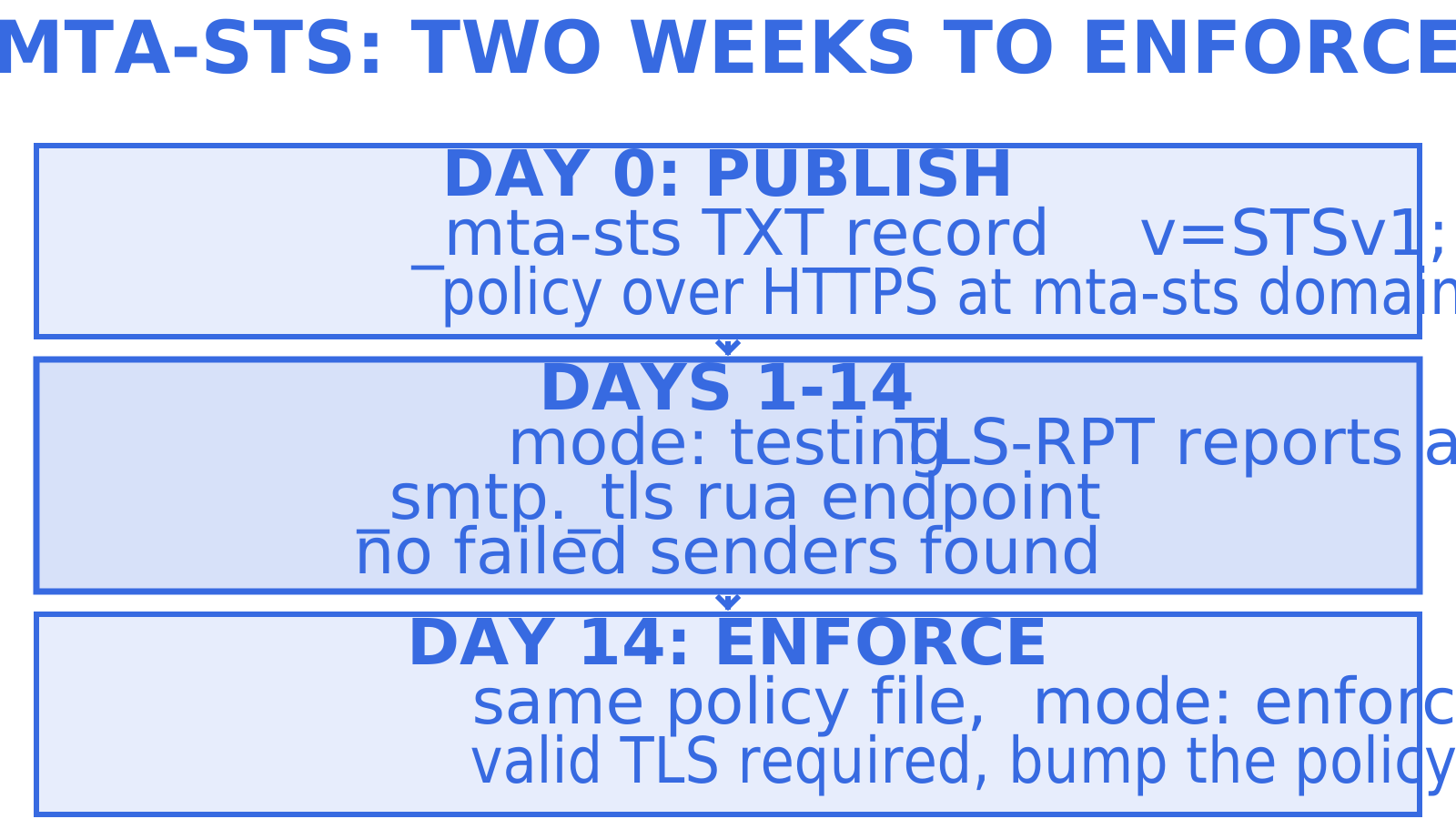
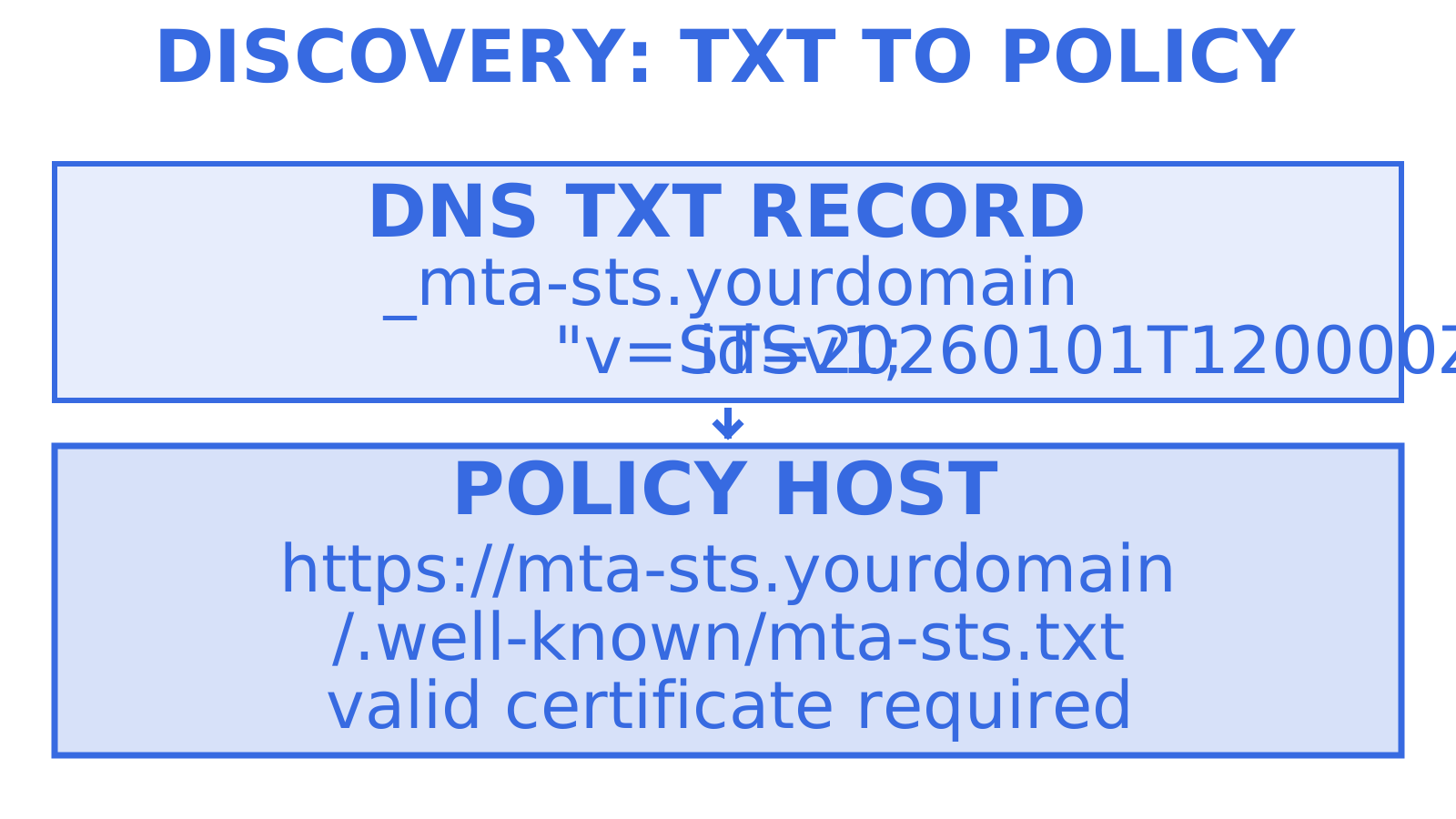
To enable MTA-STS you need two things published and reachable: a _mta-sts.<domain> DNS TXT discovery record, and a policy file served over HTTPS at https://mta-sts.<domain>/.well-known/mta-sts.txt. Start the policy in mode: testing, turn on TLS-RPT, and watch the reports for at least two weeks before moving to enforce, updating the policy id on every policy change.
TL;DR
- Check wildcard MX pattern validity, mismatched DNS records, and expired certificates on the hosting or MX servers; valid wildcard patterns are allowed by RFC 8461.
- A two-week monitoring period in testing mode is recommended before switching to enforce, with TLS-RPT reports guiding the transition.
- The discovery TXT record at
_mta-sts.<domain>must include a uniqueid, which should be bumped with each policy update to advertise the new policy to senders. - Serving the policy file over valid HTTPS at the specified path with a correct certificate is required for fresh retrieval; a valid cached policy can still apply when retrieval fails.
- Structured delivery logs and domain verification tools support troubleshooting and incident response; investigate TLS-RPT reports separately rather than assuming they identify an individual message.
Quick checklist before you touch DNS
Work through these in order, and don’t skip the monitoring window no matter how clean the policy looks on paper.
- Stand up an HTTPS host for
mta-sts.<domain>and uploadmta-sts.txtto/.well-known/. - Publish the
_mta-sts.<domain>TXT record withv=STSv1and a freshid. - Publish
_smtp._tls.<domain>TXT for TLS-RPT with at least oneruaendpoint. - Confirm every MX host presents a valid certificate and supports TLS 1.2 or later.
- Fetch the policy manually to confirm it resolves and parses before you rely on it.
- Run in
testingmode for a minimum of two weeks while TLS-RPT reports accumulate, then move toenforce.
Publish the policy and the discovery record in the documented order, then complete the monitoring period before enforcement. Publishing both without reviewing TLS-RPT reports leaves potential delivery failures untested.
How to write the mta-sts.txt policy file
The policy file lives at a fixed path: https://mta-sts.<domain>/.well-known/mta-sts.txt, and it has to be served over valid HTTPS. Sending mail servers fetch it using HTTPS rather than plain HTTP. A broken or expired certificate on that host prevents a fresh policy fetch; senders with a valid, non-expired cached policy must continue to apply that policy.
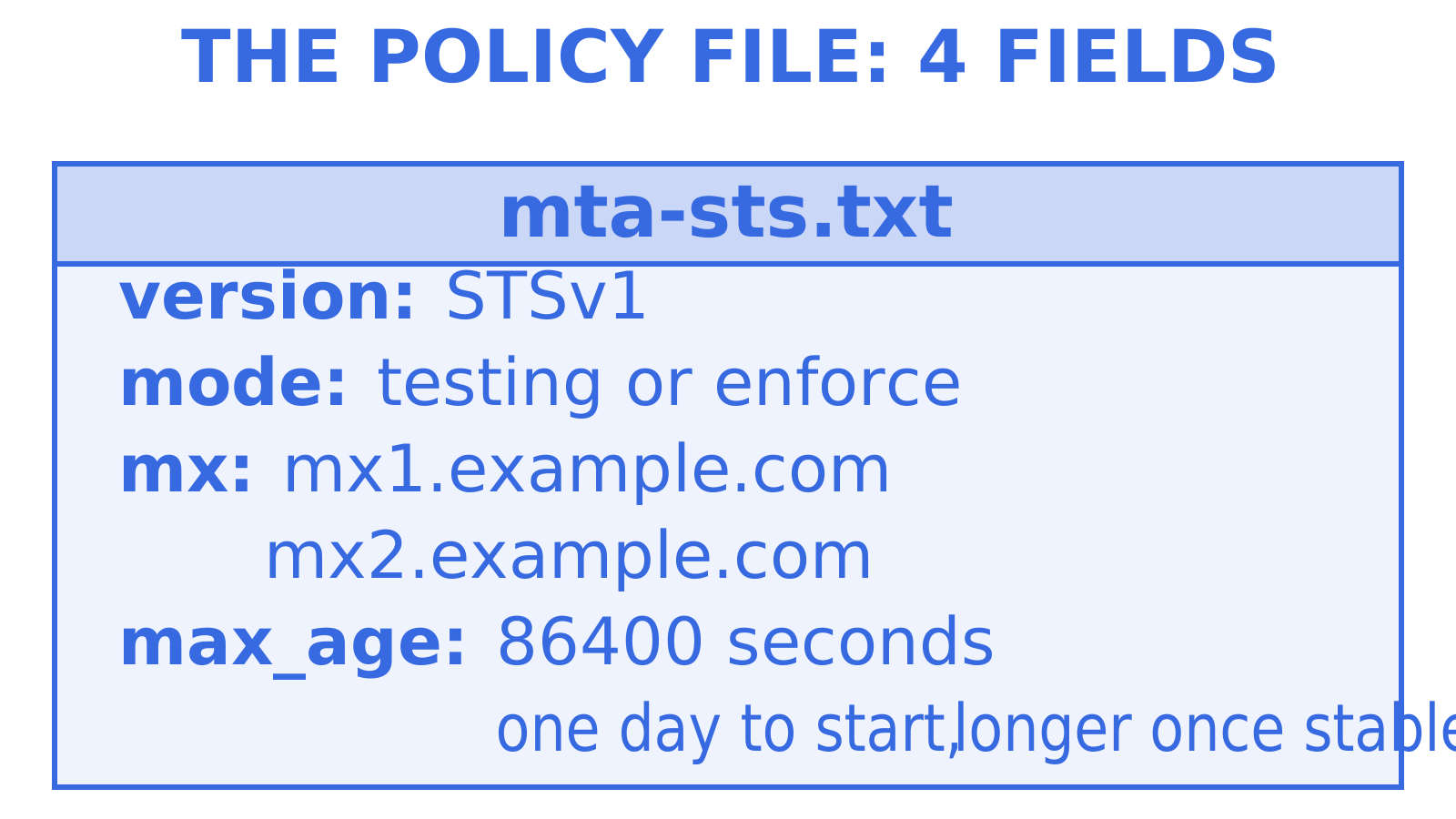
The policy file’s four core fields, laid out in RFC 8461, are version (always STSv1), mode (testing, enforce or none), one mx line per MX host, and max_age in seconds. The RFC also permits extension fields; mode: none does not require an mx entry. An example testing policy looks like this:
version: STSv1
mode: testing
mx: mx1.example.com
mx: mx2.example.com
max_age: 86400
Once you’ve watched TLS-RPT reports for a couple of weeks and resolved unexpected failures, update the HTTPS policy file to mode: enforce, then publish a new policy id in the DNS TXT record. Keep the old policy usable while DNS TTLs expire so senders using cached discovery records can still deliver mail.
List your MX hosts as explicit fully qualified domain names rather than wildcard patterns where that fits your provider’s setup. UK government security guidance, credited to the Government Cyber Unit, recommends explicit MX entries to limit the trusted hosts and identifies the National Cyber Security Centre’s Mail Check service for report analysis. RFC 8461 nevertheless permits a leftmost wildcard such as *.example.net; Microsoft’s Exchange Online guidance uses a scoped wildcard. Check the permitted pattern against your actual MX hosts rather than treating every wildcard as an invalid policy.
How to publish the DNS discovery record
The discovery record sits at _mta-sts.<domain> as a TXT record, and its value is short: v=STSv1; id=20260101T120000Z. According to Microsoft’s MTA-STS guidance, this record and the HTTPS-hosted policy file are the two required components, and both have to exist before any sender will treat your domain as MTA-STS enabled.
The id value is up to 32 alphanumeric characters, but a UTC timestamp works well as an operational label for the policy version. Senders cache a policy for the max_age you set in the file itself; the DNS TTL affects discovery of both the initial policy and later updates. Microsoft’s example uses a 3,600 second TTL; if you choose a longer TTL, such as 86,400 seconds, account for the longer update-discovery window. Update the HTTPS policy, then bump the id on every policy change to advertise the new version. A sender may retain the old id while its DNS record is cached, but RFC 8461 also recommends proactive policy refresh before max_age expires; seeing a new id or reaching expiry are not the only occasions on which a sender can re-fetch the file.
How to set up TLS-RPT and choose a rua endpoint
TLS-RPT is what turns MTA-STS from a blind bet into something you can actually monitor. Publish a TXT record at _smtp._tls.<domain> with v=TLSRPTv1 and one or more rua destinations:
- A
mailto:address, such asrua=mailto:tls-reports@example.com, for reports delivered as email attachments. - An
https://endpoint if your tooling can ingest reports directly over HTTP instead.
A mailto destination can use an existing mailbox if it accepts the TLS-RPT report attachments reliably; check that before relying on it. RFC 8460 defines the aggregate report schema, which covers failures across DNS resolution, STARTTLS negotiation and MTA-STS policy validation, not just generic bounces. Prioritise certificate and STARTTLS negotiation failures before switching to enforce: failed policy validation can delay delivery, and RFC 8461 recommends treating delivery failures as transient and retrying rather than assuming immediate permanent mail loss.
Validating your setup before you flip to enforce
Run through these checks manually before trusting the policy with real traffic:
- Fetch the policy file with
curl -v https://mta-sts.<domain>/.well-known/mta-sts.txtand confirm a200response along with the exactversion,mode,mxandmax_agefields you expect. - Query both discovery records with
dig +short TXT _mta-sts.<domain>anddig +short TXT _smtp._tls.<domain>and check the values match what you published. - Test each MX host’s TLS behaviour directly with
openssl s_client -starttls smtp -connect mx1.example.com:25, checking the negotiated protocol version and that the certificate’s SANs include the MX hostname. - Run a public MTA-STS checker against your domain as a second opinion alongside the manual review; check any reported formatting or policy error against the specification.
- If you run Postfix, check your version and configuration against its TLSRPT and MTA-STS support. MTA-STS can use
smtp_tls_policy_mapsplugins, while TLSRPT support requires the documented build and runtime configuration. Use the resulting mail logs to inspect policy attributes and your outbound queue.
Pro Tip: Keep the policy in testing and watch at least one full TLS-RPT reporting cycle land before you ever consider enforce, even if every manual check above comes back clean.
Diagnosing issues TLS-RPT will surface
TLS-RPT reports describe categories of connection and policy failures; review the reported details when diagnosing these issues:
- Certificate failures on
mta-sts.<domain>or on the MX hosts themselves: renew the certificate or fix the binding. Hosting the policy file on a static site or CDN with automatic TLS renewal can help maintain its HTTPS certificate, but still monitor renewal and delivery failures. - Policy and DNS mismatch: if the
mxentries in your policy don’t match your actual MX records, reconcile one against the other rather than guessing which is stale. - Wildcard MX entries: explicit MX hosts follow the security guidance above, but a valid leftmost wildcard pattern is permitted by RFC 8461. Check that the pattern matches the receiving MX records; do not diagnose an invalid policy from the presence of a wildcard alone.
- Stale
idafter a change: if you edited the policy but forgot to bump theid, some senders will keep serving mail against the old cached copy untilmax_ageexpires.
Include a change control step that checks all four of these before any DNS or MX edit ships, then review the resulting TLS-RPT reports.
Rollout timing and ongoing maintenance
The UK Government Cyber Unit’s guidance recommends running testing for at least two weeks while TLS-RPT reports accumulate, then switching to enforce once unexpected failures are resolved; it refers operators to NCSC Mail Check for report review. The example testing policy here uses max_age of 86,400 seconds, a day; that bounds the cached policy’s stated lifetime rather than guaranteeing early rollback. Choose any longer max_age with the cache and update-delay trade-off in mind.
Keep certificate renewal and the policy id update workflow in your maintenance plan. First, automate certificate renewal for the mta-sts subdomain and monitor it, since a lapsed certificate prevents fresh policy discovery; a valid cached policy can still apply. Second, document the id update workflow so whoever touches MX records or the policy file knows to advertise the new version and check for stale caches. Add an MTA-STS check to your on-call playbook alongside the usual MX and SPF checks.
How an API-first mailbox platform supports troubleshooting
An API-first mailbox platform can provide data for an MTA-STS troubleshooting investigation, but TLS-RPT reports aggregate sessions rather than identifying an individual failed message. Sendmux exposes per-mailbox incoming logs, team-level delivery logs with provider and outcome information, signed webhooks, and domain verification status through its public APIs. Compare the report’s domain, sending MTA and reporting period with relevant delivery logs; this is an investigation, not an automatic exact-message match. Mailbox-scoped credentials and scoped API keys have different capabilities: do not assume access to domain verification or team delivery logs is confined to one mailbox, and grant only the documented permissions your integration needs.
An operational trade-off worth naming
MTA-STS specifies encrypted transport between MTAs using a receiving domain’s policy. Review both the initial rollout and later policy updates: an enforced policy can delay mail when the receiving MX setup or its certificates fail the advertised policy checks. Testing mode and TLS-RPT help you identify those failures before enforcement; they do not guarantee that failures will never occur.
FAQ
What is MTA-STS and what problem does it solve?
MTA-STS lets a domain publish a policy telling sending mail servers to require valid, authenticated TLS when delivering mail to its receiving MX hosts. It helps protect against downgrade attacks that strip STARTTLS, within the threat model defined in RFC 8461, and works alongside TLS-RPT rather than replacing it. You can read more on STARTTLS downgrade risks and why enforced transport matters.
How long should MTA-STS stay in testing mode?
Recommended practice is at least two weeks in testing mode while you collect TLS-RPT reports and review traffic from your regular senders, following the guidance linked below. Elapsed time alone does not prove the policy is safe. Resolve unexpected STARTTLS or certificate failures before moving to enforce, then update the HTTPS policy and its DNS policy id.
Where exactly does the MTA-STS policy file need to live?
It has to be served over valid HTTPS at https://mta-sts.<domain>/.well-known/mta-sts.txt, exactly that path, as specified in Microsoft’s MTA-STS documentation. A certificate problem on that host or an incorrect path prevents a fresh policy fetch; senders with a valid, non-expired cached policy still apply that policy.
What causes most MTA-STS validation failures?
Check for malformed mx patterns, a mismatch between the policy’s mx entries and actual DNS MX records, and expired certificates on either the MX hosts or the mta-sts subdomain. Valid leftmost wildcard patterns are permitted by RFC 8461; a wildcard alone does not make a policy invalid. Checking DNS, domain verification and certificate binding together, as covered in our domain verification guidance, gives you a setup checklist without assuming which cause is most frequent.
Do I need TLS-RPT if I’m only running MTA-STS in testing mode?
Yes, enable TLS-RPT during testing to receive aggregate reports from participating senders about STARTTLS negotiation, certificate and policy-validation failures. Testing mode alone does not generate those reports. RFC 8460 defines the report schema so operators can investigate failures before enforcement, but reports do not identify an individual failed message.
Sources
- RFC 8461 — SMTP MTA Strict Transport Security
- Enhance mail flow with MTA‑STS | Microsoft Learn
- Set up TLS‑RPT and MTA‑STS | UK Government Cyber Unit
Get help moving from testing to enforce without surprises
Review TLS-RPT reports for the reported domain, sending MTA, time period and failure type, then compare those findings with relevant send attempts and provider outcomes where logs are available. Aggregate reports do not identify a particular message. For consultancy-grade help with authentication setup and ongoing monitoring across SPF, DKIM and DMARC alongside MTA-STS, Digistrat’s deliverability guidance describes its technical review services; assess those services against your requirements.
For teams building or operating their own sending infrastructure, Sendmux exposes delivery logs, domain verification status and signed webhooks through public APIs. Keep TLS-RPT report analysis separate and compare domains, MTAs, time periods and available delivery outcomes; Sendmux’s public interfaces do not establish that a TLS-RPT alert and an individual message are automatically linked in one place. Review the documented permissions when coordinating an MTA-STS rollout across one domain or a fleet. Check the Sendmux product’s mailbox and delivery interfaces, or review the current Myagent sign-up options.
Give an agent its own address
Sendmux is the Email Inbox API for AI Agents.