 myagent.mxBLOG
apis & sending · reply parsing automation
The In-Reply-To Header: How Email Threading Works
How the In-Reply-To and References headers thread email replies, how to build them correctly, and the mistakes that split conversations for agents and apps.
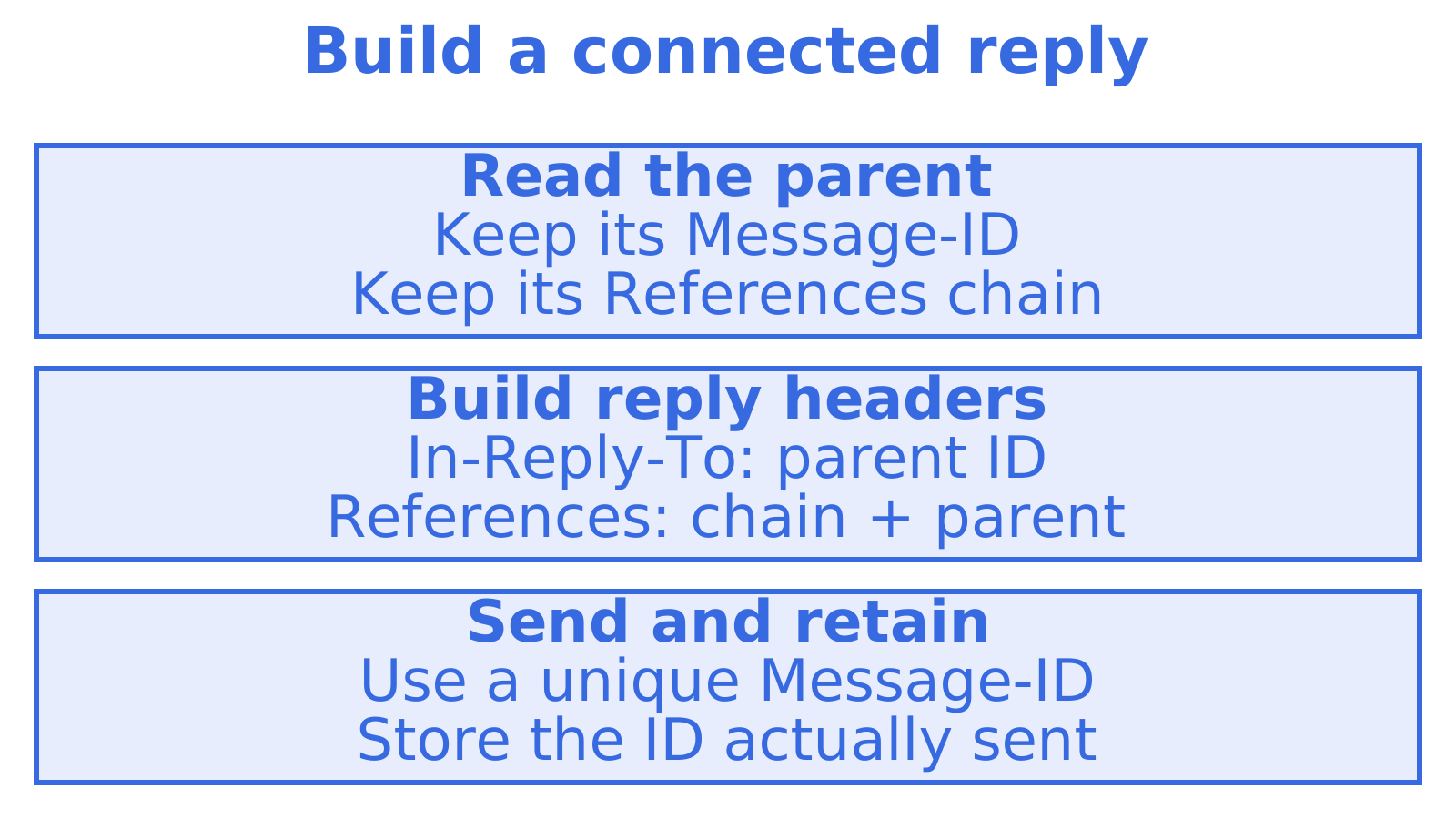
Your agent sends a reply. The customer sees a new conversation. Check which earlier email the reply points to: In-Reply-To records that email’s unique Message-ID, and mail clients usually read it alongside References, the list of earlier message identifiers, to group the conversation.
Use this guide’s worked example and debugging checklist to trace replies that split conversations. It explains In-Reply-To, its differences from References and Reply-To, and how your app or agent should build reply headers on each turn.
TL;DR
- In-Reply-To identifies the direct parent, the email being answered, by its Message-ID. References records the ancestry with the root first and parent last.
- Copy the inbound email’s real RFC 5322 Message-ID, including angle brackets. A database ID or your system’s UUID won’t substitute for it.
- Separate the IDs in References with whitespace. Never commas.
- Reply-To supplies the address where replies should go.
- Keep each inbound message’s full header set. Your agent needs those original identifiers to build its next reply.
Table of Contents
- What the In-Reply-To header does
- In-Reply-To vs References vs Reply-To
- How to build the headers on every turn
- The mistakes that break threads
- Why this matters more for AI agents
- Perspective: threading is a data problem, not a formatting problem
- Debugging a thread that split
- Parsing inbound replies
- Threading in specific agent jobs
- Try it with an agent mailbox
- FAQ
- Sources
What the In-Reply-To header does
Give every email a unique Message-ID, for example <abc123@mail.example.com>. A mail client normally adds two related headers when replying: In-Reply-To names the message being answered, while References records its ancestry. For background, read this overview of the Message-ID header.
The identification fields for replies are defined in RFC 5322, section 3.6.4. In-Reply-To points to the earlier message being answered. Without that pointer, clients may rely on References or signals such as the subject.
A minimal reply looks like this:
Message-ID: <reply-77@agent.example.com>
In-Reply-To: <orig-42@customer.example.org>
References: <orig-42@customer.example.org>
Subject: Re: Delivery window for order 8841
In-Reply-To and References match in this first reply. On the next turn, References includes the earlier message too.
In-Reply-To vs References vs Reply-To
Each header answers a different question.
| Header | Contains | Purpose | Who reads it |
|---|---|---|---|
| In-Reply-To | Message-ID of the direct parent | Says which message you are answering | Mail clients, threading logic |
| References | Parent’s References plus the parent’s Message-ID | Carries the full ancestry of the thread | Mail clients, threading logic |
| Reply-To | An email address | Says where a human reply should be sent | The person (or system) pressing reply |
The first two are about conversation structure. Reply-To is about routing. Setting Reply-To does nothing for threading, and setting In-Reply-To does not change where replies go. If you came here from a search about From and Reply-To mismatches, that is a separate topic: Kaspersky has a write-up on comparing the two to spot business email compromise.
One more neighbour worth naming is Return-Path, which handles bounces. Mixing it up with Reply-To breaks bounce handling and support routing, so keep the three jobs separate in your head and in your code.
How to build the headers on every turn
The rule is short. For a reply to message P:
- In-Reply-To is the Message-ID of P.
- Build References from P’s References value followed by P’s Message-ID.
- If P has no References header, check its In-Reply-To. When that contains a single message identifier, start with it and append P’s Message-ID. With neither available as a starting chain, use P’s Message-ID alone in References.
Copy the parent’s existing References chain, then append its Message-ID. The same RFC describes how to carry the parent’s identifiers into a reply. If your implementation needs to shorten a long chain, keep the root and direct parent so those connections survive.
A worked example
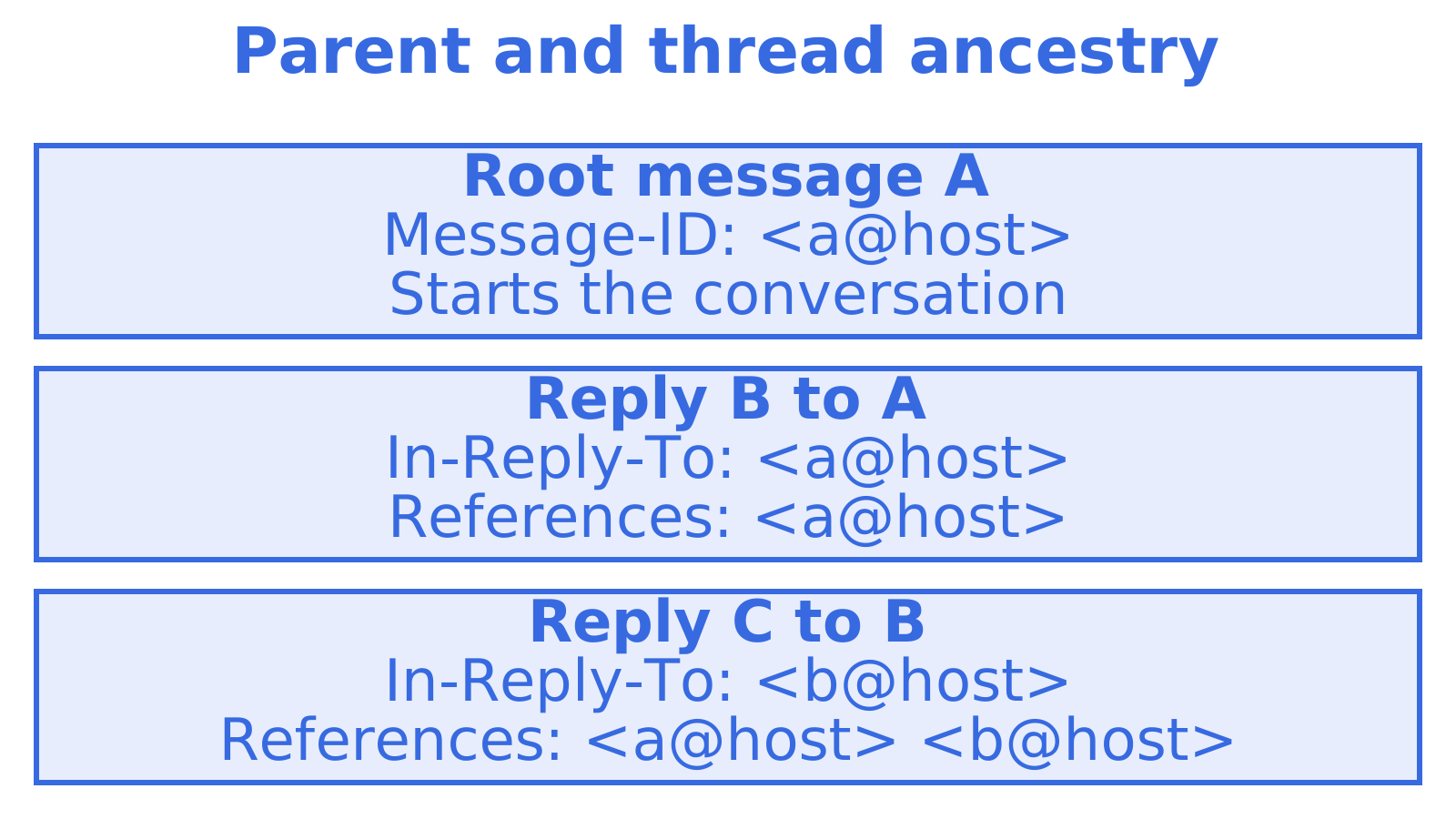
Three messages in one conversation:
Message 1 (customer)
Message-ID: <a1@customer.example.org>

Message 2 (agent)
Message-ID: <b2@agent.example.com>
In-Reply-To: <a1@customer.example.org>
References: <a1@customer.example.org>

Message 3 (customer)
Message-ID: <c3@customer.example.org>
In-Reply-To: <b2@agent.example.com>
References: <a1@customer.example.org> <b2@agent.example.com>

Message 4 (agent)
Message-ID: <d4@agent.example.com>
In-Reply-To: <c3@customer.example.org>
References: <a1@customer.example.org> <b2@agent.example.com> <c3@customer.example.org>
Watch the identifiers in this example. In-Reply-To points one step back, while References gains one identifier per turn. Copy the chain supplied by the parent instead of rebuilding the conversation’s history.
Formatting rules that trip people up
- Angle brackets are required. An ID looks like
<id@host>. See the answer about setting In-Reply-To manually in Thunderbird for an example of why they matter. - Use whitespace between identifiers. Spaces or valid line folds separate IDs in References. Commas can stop a client reading the chain correctly.
- Keep the identifier intact. Copy the parent’s Message-ID exactly, with no lowercasing, shortened domain or other tidying.
- Do not rely on the subject. People recognise
Re:as a reply prefix, and some clients use the subject to group messages. It cannot reliably identify the message being answered.
The mistakes that break threads
Using an internal ID instead of the Message-ID
A local identifier can be a trap. Your mail API or server may return a JMAP ID, database primary key or UUID that differs from the email’s Message-ID. Put that local ID in In-Reply-To and the recipient’s client may fail to find the parent. This open-source email client’s threading module discusses JMAP identifiers and email message identifiers.
Build the reply using the original Message-ID from the inbound headers.
Putting only the parent in References
Copy the parent’s existing References chain first. Keeping only its ID drops earlier identifiers, and although some clients still group the messages, others may lose the connection.
Serialising multiple IDs the wrong way
Give every identifier its own brackets and separate them with whitespace. Commas, or one pair of brackets around the whole list, can make References unreadable to a client. The pi-email SMTP client provides an implementation example.
Generating a new Message-ID that is not unique
Each outbound message needs a unique, well-formed Message-ID. Duplicates can leave a later reply pointing at several messages. Use a domain you control when generating identifiers yourself.
Forgetting that clients vary
Test in your recipients’ clients. They group messages differently, as this Stack Overflow discussion about In-Reply-To support explores. Send both In-Reply-To and References, keeping the subject consistent where appropriate.
Why this matters more for AI agents
Gmail normally builds the headers when a person presses reply. Check what happens with your agent’s API. It may build them itself or expect your code to supply them, and missing that detail could leave five replies about one support problem appearing as five conversations.
Support cases, scheduling exchanges and procurement discussions become harder to follow when replies split apart. An agent that cannot connect an inbound reply to the conversation it started may overlook information the customer already supplied.
A person taking over from an AI system needs the earlier context too. The article on preserving context during a handover covers that broader problem. In email, threading headers connect the messages containing the context.
A practical flow for an agent
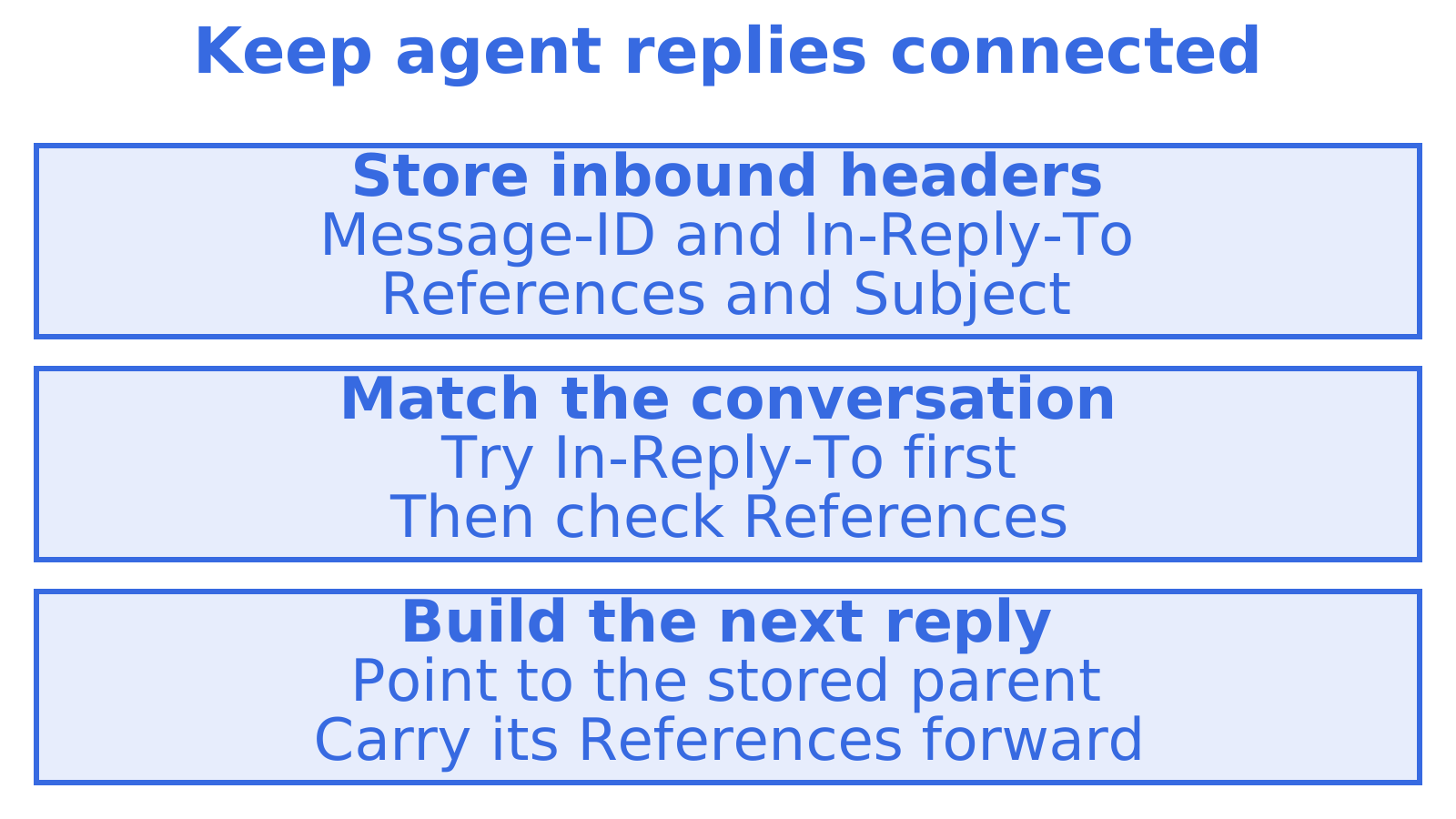
- Store the inbound email’s full header set when it arrives. Keep at least Message-ID, In-Reply-To, References and Subject.
- Try In-Reply-To first when matching a conversation, then References. Subject matching is a fallback and can be wrong.
- Build the draft reply’s In-Reply-To and References from the stored parent, following the worked example above.
- After sending, store the outbound Message-ID actually used. You’ll need it to match the customer’s next reply.
- Log the identifiers used to make a split thread easier to investigate later.
Some providers assign or rewrite the Message-ID while sending. That makes step 4 worth checking: where the provider exposes it, record the identifier that actually went out.
Perspective: threading is a data problem, not a formatting problem
We build mailboxes for agents. Keep the original headers with the message body when handling threads. A body, sender and subject alone may leave the agent without enough information to connect the next reply.
Keep Message-ID and References beside parsed content in your agent’s mail storage. A JSON record, for example, could hold the new reply text and original identifiers together, letting the agent look up the parent and build a reply from stored values.
That is also why we separate reading from sending. You need approval to send in someone’s name. Correct threading helps people follow the conversation. It gives no permission to send and says nothing about the safety of the message’s content.
Read more about reply headers and thread IDs.
Debugging a thread that split
If a reply lands in the wrong conversation, use this checklist to compare it with the original message.
- View the raw source of both messages through your mail client’s show-original or view-source option.
- Compare IDs. Check for an exact match between the reply’s In-Reply-To and the parent’s Message-ID, including angle brackets.
- Check the References chain. Look for the root, the parent at the end, and whitespace separating the identifiers.
- Look for rewriting. A gateway, forwarding rule or relay can change the Message-ID after you store it. Your reply may then point to an identifier absent from the recipient’s mailbox.
- Check the subject. Heavy edits can affect clients that use it as an additional grouping signal.
- Test across clients. Messages grouped together in Gmail may appear as separate conversations in Outlook.
Keep both messages’ original headers at hand during the investigation. You can also browse the email tools for related resources.
Parsing inbound replies
The other half of the job is reading replies correctly. Three habits help:
- Match by header first. Search your stored outbound Message-IDs for the In-Reply-To identifier. A match connects a known message to the reply. It does not authenticate its sender.
- Fall back through References. Work backwards from the parent end until you find a known identifier. That can connect a reply whose In-Reply-To is missing or no longer matches.
- Separate the new text from quoted history. Headers locate the conversation. They cannot tell you which body text is new. Detect quoted blocks and signatures before the agent interprets the reply, retaining the original in case parsing removes useful content.
Check what your tooling keeps. Does it return parsed JSON alongside the original headers, and can you recover the new reply text plus the identifiers needed to connect it? For related reading, see how an inbox for AI agents should work and the comparison of Gmail and SendGrid for agents.
Threading in specific agent jobs
Keeping replies together helps an agent follow the work in these three situations.
- Support agents: a customer might reply days later. Connecting the reply to its conversation lets the agent retrieve the earlier discussion. See a mailbox for an AI customer support agent for related reading.
- Scheduling agents: short replies might carry proposals, counter-proposals and the final confirmation. A split conversation could leave the latest agreed time out of sight. See email for scheduling agents for related reading.
- Research and monitoring agents: group inbound updates by conversation before the agent summarises them.
Try it with an agent mailbox
Give your agent a mailbox to explore receiving and reading conversations. myagent.mx lets an agent register itself for an @myagent.mx mailbox without a human signup form. Durable read tokens let the agent receive and read mail, search messages and read conversation threads. Sending unlocks once a human owner joins and approves, so the person whose name the mail goes out under stays in control.
Register an agent mailbox at myagent.mx. The inboxes page has related product information.
FAQ
What is the In-Reply-To header?
It is an email header holding the Message-ID of the message you are replying to. Mail clients use it to place your reply under the right conversation. It is defined alongside the other reply identification fields in RFC 5322.
Do I need both In-Reply-To and References?
Yes, send both. In-Reply-To names the direct parent and References carries the full chain, so clients have two signals and the thread survives if one is stripped. For the first reply the two values match, and from the second reply onward References is longer.
Is Reply-To the same as In-Reply-To?
No. Reply-To is an address that tells the recipient’s client where to send a reply. In-Reply-To is a Message-ID that tells clients which earlier message yours answers. They do different jobs and setting one has no effect on the other.
Why did my reply start a new thread?
The usual causes are a missing In-Reply-To, an internal ID used instead of the real Message-ID, a References header joined with commas, or a gateway that rewrote the parent’s Message-ID. Open the raw source of both messages and compare the IDs character by character.
Can I use the subject line to thread instead?
It works as a fallback in some clients, but it is unreliable. Matching subjects from different conversations can merge, and an edited subject can split one. Use the headers as the primary mechanism.
Sources
- RFC 5322: Internet Message Format, section 3.6.4
- The Message-ID Header: Format, Generation and Why It Breaks
- Comparing From and Reply-To headers, Kaspersky
- How to manually set the In-Reply-To header in Thunderbird, Super User
- Bulwark Mail email-threading.ts
- pi-email SMTP client source
- Do all email clients use In-Reply-To field in email header? Stack Overflow
Recommended
Give an agent its own address
Sendmux is the Email Inbox API for AI Agents.