 myagent.mxBLOG
apis & sending · email to json
Reliable Email to JSON for Developers: Schema Validation & Attachments
Convert raw MIME to validated JSON with a developer focused workflow: prefer schema first parsing, stream attachments to object storage, and follow...
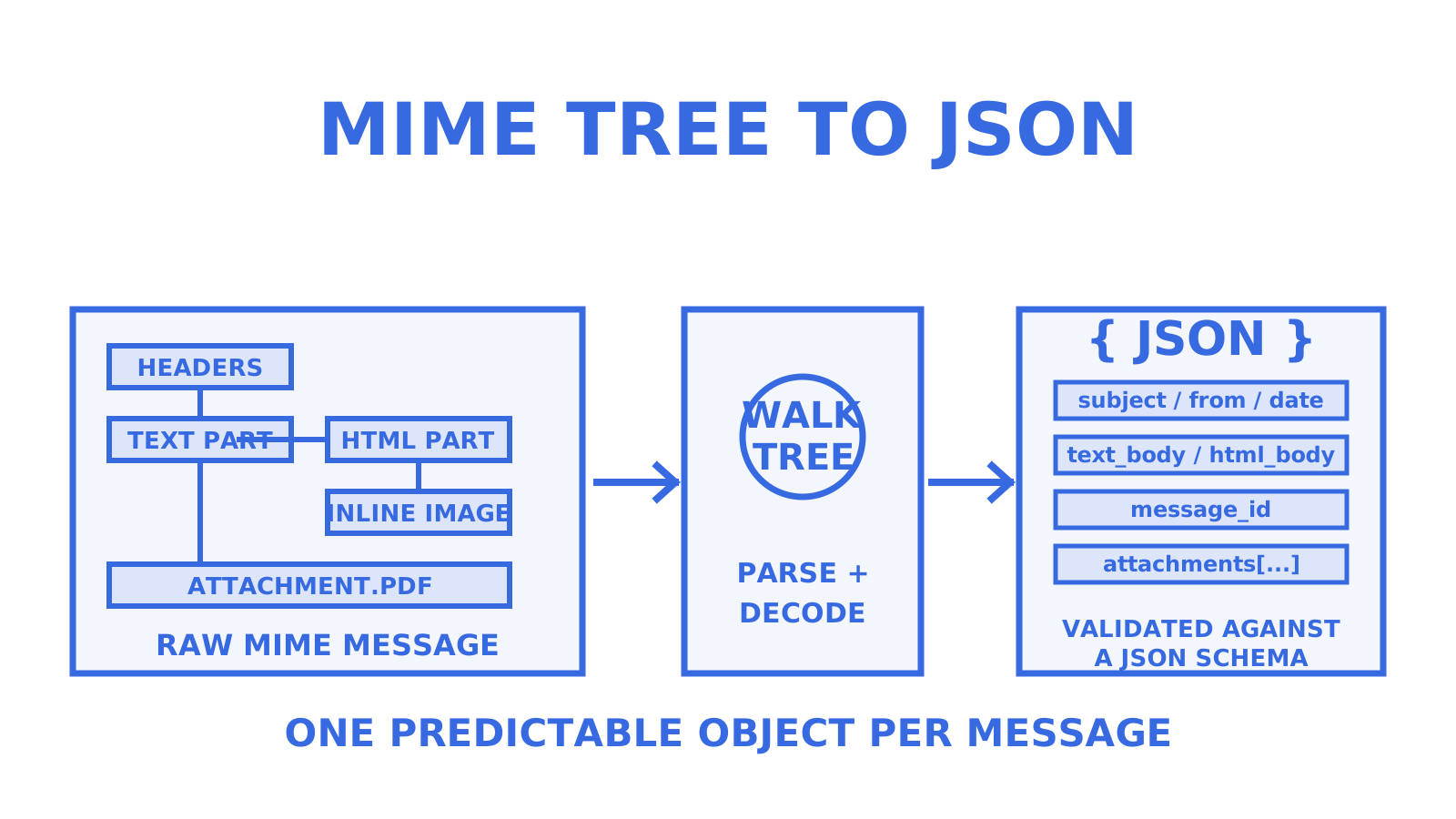
You can convert any RFC 5322/MIME email into a predictable JSON object by either using a schema-first parsing API or a language parser that walks the MIME tree. For production ingestion, especially where email templates vary or volume is high, schema-first parsing is the safer bet. Library parsing suits internal tools and prototypes. Whichever route you take, treat attachments as a separate extraction step and validate the output against a schema before it touches your database.
TL;DR
- Schema-first parsing APIs provide validated and typed JSON output suitable for high-volume production environments, handling template variations and errors explicitly.
- Language parser libraries like Python’s email package offer RFC-compliant tree walking for internal tools, but require custom logic for validation, extraction, and attachment routing.
- Attachments should be modeled as separate metadata with signed URLs or identifiers, avoiding inline base64 within the main JSON payload to optimize size and processing speed.
- During extraction, handle nested multiparts and character set mismatches carefully, and treat malformed MIME as common rather than exceptional, to ensure robust parsing.
- Implement security measures such as attachment validation, HTML sanitization, message size caps, and webhook signing to prevent malicious payloads and ensure reliable, scalable ingestion.
Table of Contents
- Main approaches to convert email to JSON
- A compact walkthrough: raw MIME to JSON in Python
- How to include attachments in your email-to-JSON pipeline
- Categories of libraries and services to consider
- Production notes from the Sendmux team
- Parsing MIME structure: headers, multipart bodies and encodings
- Common pitfalls: charsets, malformed MIME and nested multiparts
- Handling inline images and embedded content
- Preserving email threading and context in JSON
- Email encoding standards and character sets in depth
- Security considerations when parsing email to JSON
- Performance when processing large volumes of email
- Comparing popular tools for email to JSON conversion
- When schema-first parsing earns its keep
- A production path with Sendmux and myagent.mx
- Sources
- FAQ
Main approaches to convert email to JSON
Three approaches cover almost every use case, and they differ mainly in how much brittleness you’re willing to tolerate.
A schema-first parsing API accepts raw MIME, applies a defined schema, and returns typed JSON with validation errors flagged rather than silently swallowed. This matters because email templates change without notice: a vendor tweaks their invoice layout, and a regex-based parser breaks quietly while a schema-validated one throws a clear error.
Language parser libraries, such as Python’s email package, give you an object model for walking headers, multipart bodies and encodings, but you own the extraction logic and the edge-case handling.
A regex or template approach is fine for a single, fixed sender format you control end to end, but it tends to fail the moment a sender changes their footer or adds a new header.
- Schema-first API: best for production ingestion, multiple upstream senders, or when you need guaranteed shape.
- Library parser: best for internal tooling, prototypes, or when you already control every sender’s format.
- Regex/template: acceptable only for a single, stable, low-stakes source.
For delivery, you’ll choose between a webhook push (the parser calls your endpoint when mail arrives), polling (you pull messages on a schedule) or a synchronous POST where you send raw MIME and get JSON back in the same request. Webhooks suit real-time pipelines; polling suits batch jobs; synchronous calls suit on-demand parsing inside another workflow.
A compact walkthrough: raw MIME to JSON in Python
Start with a raw MIME string, the kind your mail server or API hands you as bytes. Python’s email package parses this into an EmailMessage tree you can walk part by part, which handles nested multiparts and malformed headers more predictably than line-by-line text parsing; the Real Python reference on the standard library documents the package’s parsing entry points.
from email import message_from_bytes
from email.policy import default
import json

msg = message_from_bytes(raw_mime_bytes, policy=default)

def extract(msg):
    result = {
        "subject": msg.get("subject"),
        "from": msg.get("from"),
        "to": msg.get("to"),
        "date": msg.get("date"),
        "text_body": None,
        "html_body": None,
        "attachments": []
    }
    for part in msg.walk():
        disposition = part.get_content_disposition()
        if disposition == "attachment":
            result["attachments"].append({
                "name": part.get_filename(),
                "content_type": part.get_content_type(),
                "size": len(part.get_payload(decode=True) or b"")
            })
        elif part.get_content_type() == "text/plain" and not disposition:
            result["text_body"] = part.get_content()
        elif part.get_content_type() == "text/html" and not disposition:
            result["html_body"] = part.get_content()
    return result

parsed = extract(msg)
print(json.dumps(parsed, indent=2))
The resulting shape looks like this:
| Field | Type | Notes |
|---|---|---|
| subject | string | Decoded header value |
| from | string | Raw address, normalise separately if needed |
| text_body | string or null | Plain-text part, charset-normalised |
| html_body | string or null | HTML part, if present |
| attachments | array | Metadata only, not binary content |
Before this JSON reaches a database, validate it against a JSON Schema (Draft 2020-12 works well) so a missing field or wrong type fails loudly rather than corrupting a downstream table. Once validated, push it to a webhook endpoint or write it to a queue such as SQS or a Kafka topic for asynchronous processing.
How to include attachments in your email-to-JSON pipeline
Attachments should never be embedded as large base64 blobs inside your main email JSON. Parseur’s documentation on attachment handling shows attachments modelled as a separate array with metadata, linked back to the parent email by an identifier, with binary content extracted through its own pipeline.
A practical JSON shape for each attachment:
name: original filename as sent.content_type: MIME type, such asapplication/pdforimage/png.size: byte size, useful for filtering before download.url or content_id: a short-lived signed URL for download, or theContent-IDfor inline references.is_inline: boolean flag distinguishing inline images from true attachments.
Stream large files to object storage and expose a signed URL rather than inlining bytes, since inline base64 bloats payloads and slows JSON parsing downstream. Run OCR or CSV extraction as a second-stage job once the attachment lands in storage, then write the extracted fields back linked to the original email’s document ID.
Pro Tip: Cap attachment size at ingestion and reject anything above your storage tier’s limit before you spend compute trying to parse it.
Categories of libraries and services to consider
Language standard libraries, like Python’s email module, give you RFC-compliant parsing, an object model and generator support, but leave header normalisation, threading and attachment extraction as work you write yourself. They’re reliable for the parsing step, less so as a full pipeline.
Schema-first Email to JSON APIs handle validation and typed output directly. A request example from a schema-first parsing API shows raw MIME posted with a schema_id, returning typed JSON plus a validation_errors array when the message doesn’t match, which is the kind of deterministic contract that a hand-rolled parser rarely gives you.
- Standard libraries: strong on RFC compliance, weak on validation and attachment routing.
- Third-party parser libraries: often add convenience methods for charset handling but vary in maintenance quality.
- Schema-first APIs: add validation, typed schemas and often both synchronous and asynchronous delivery modes.
For integration, verify webhook signatures, use idempotency keys so retried deliveries don’t duplicate records, and log every parse attempt so template drift shows up as a metric rather than a support ticket.
Production notes from the Sendmux team
Myagent is Sendmux’s front door for AI agents that need a working mailbox, and the patterns above hold up better once you’ve run them against real inboxes at volume.
A few things that matter in production: scope your API keys to a single mailbox rather than using one team-wide key everywhere, sign every webhook payload with HMAC so you can verify it hasn’t been tampered with in transit, and keep delivery logs so a spike in parsing errors shows up before it becomes a customer complaint. Rate limits exist for a reason: design your polling or webhook consumer to respect them rather than retry aggressively.
Scoped keys, signed webhooks and delivery logs turn “it parsed once in testing” into “it parses reliably at volume.”
Parsing MIME structure: headers, multipart bodies and encodings
A MIME email is a tree, not a flat document. The top-level message carries headers (From, To, Subject, Date, and often custom X- headers), and the body can be a single part or a multipart/* container holding several parts, each with its own headers and content type.
Common containers include multipart/alternative (plain text and HTML versions of the same content), multipart/mixed (body plus attachments) and multipart/related (HTML body plus inline images it references). Python’s email package exposes this tree through EmailMessage.walk(), which recursively yields every part so you can inspect each one’s content type and disposition without manually recursing.
Headers themselves need decoding before use. Subject lines and display names are often encoded per RFC 2047 (the =?UTF-8?B?...?= style you see in raw source), and the email package’s policy layer decodes these automatically when you access them through get() rather than reading raw header text.
Body parts carry their own Content-Transfer-Encoding, commonly base64 or quoted-printable, and the parser needs to decode this before you treat the payload as text. Calling get_content() on a part under the modern default policy handles this decoding step along with charset conversion, which is why walking the tree with a proper parser beats regex extraction on raw source: the encoding logic is already solved for you.
Common pitfalls: charsets, malformed MIME and nested multiparts
Charset mismatches are the most frequent source of garbled output. A Content-Type header might declare charset=iso-8859-1 while the actual bytes are UTF-8, or the charset might be missing entirely. Robust parsing code needs to handle these mismatches defensively rather than assuming the declared charset is correct, since a wrong assumption produces silently corrupted text rather than an obvious error.
Malformed MIME is common enough that you should expect it, not treat it as an exception. Missing boundary markers, headers folded incorrectly across lines, or a declared multipart type with no actual sub-parts all show up in real-world mail. Using a policy-based parser rather than manual string splitting means these cases produce a parseable, if imperfect, message object instead of a crash.
Nested multiparts trip up naive extraction logic that assumes a flat structure. A multipart/mixed message can contain a multipart/alternative part, which itself contains text/plain and text/html parts, alongside a separate attachment part at the outer level. Code that expects attachments and body text at the same nesting level will miss content or double-count parts. Walking the full tree with walk() and checking each part’s content type and disposition individually, rather than assuming a fixed depth, avoids this class of bug entirely.
Handling inline images and embedded content
Inline images are attachments that a message body references rather than downloads separately, typically an HTML email showing a logo or product photo inline rather than as a file to open. These arrive as parts with a Content-Disposition: inline header and a Content-ID that the HTML body references via cid: URLs instead of a normal src link.
To reconstruct the image in your JSON output, extract each inline part’s Content-ID, strip the angle brackets it’s usually wrapped in, and match it against cid: references inside the HTML body. Store the inline image the same way you’d store any attachment metadata (name, content type, size, a signed URL) but flag it with is_inline: true so downstream consumers know not to list it as a user-facing attachment.
If your JSON output includes the HTML body verbatim, decide whether to rewrite cid: references to point at your signed URLs before storing it, or leave them as-is and resolve them at render time. Rewriting at parse time is more work upfront but means any system consuming your JSON later doesn’t need to know about the original MIME structure at all, which is generally the cleaner contract.
Embedded content beyond images, such as calendar invites (text/calendar) or embedded PDFs, follows the same pattern: treat it as a typed part with its own content type, extract metadata into the attachments array, and leave binary extraction to a second-stage process rather than trying to parse it inline.
Preserving email threading and context in JSON
Threading context gets lost easily if you extract each message independently without carrying forward the headers that link it to the conversation. The two headers that matter most are Message-ID, a unique identifier for the message itself, and In-Reply-To or References, which point back to the message or messages it’s replying to.
Include all three in your JSON output even when you don’t immediately need them, because reconstructing a thread after the fact from partial data is far harder than storing the link at parse time. A minimal threading shape looks like:
message_id: the message’s own unique identifier.in_reply_to: theMessage-IDof the message being replied to, if present.references: the full chain of priorMessage-IDvalues, in order.
When you compose a reply through an API rather than just parsing inbound mail, the same headers need setting on the way out, not just read on the way in, so the thread stays intact for whoever reads it next. Sendmux’s mailbox API, for instance, returns in_reply_to and references on every received message, which is the same mechanism you would set on the way out.
Quoted history inside the body (the On [date], [sender] wrote: block) is a separate problem from header-based threading. Stripping it before storing the text body keeps your JSON focused on the new content, while the header chain still preserves the full conversational context for anything that needs it.
Email encoding standards and character sets in depth
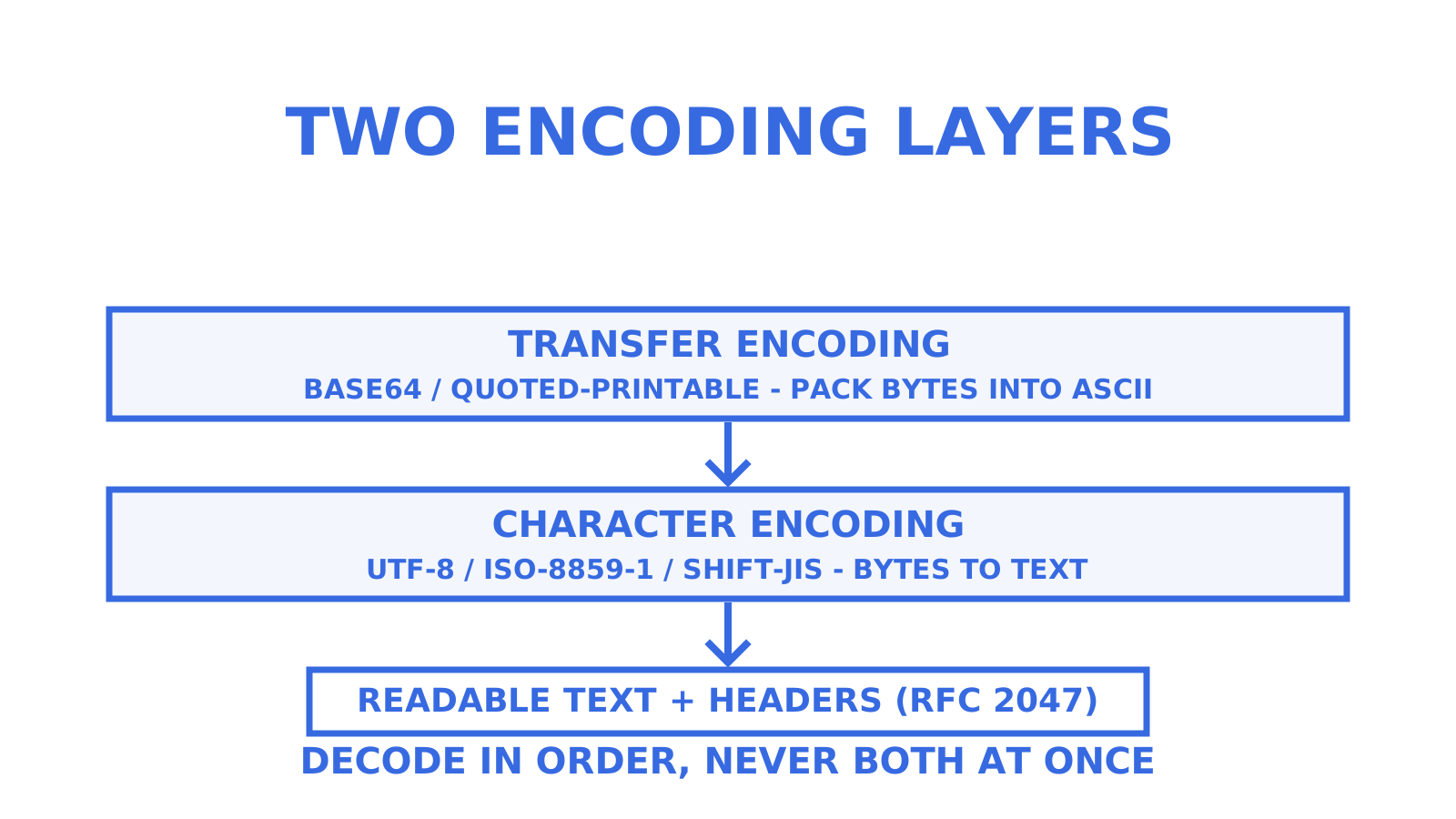
Two separate encoding layers apply to every email, and conflating them is a common source of bugs. The first is transfer encoding, set by the Content-Transfer-Encoding header, which describes how binary or non-ASCII content is packed into the ASCII-safe format that SMTP expects. Base64 and quoted-printable are the two you’ll see most often.
The second is character encoding, set by the charset parameter on Content-Type, which describes how the decoded bytes map to actual characters. UTF-8 is the modern default, but older or regional mail systems still send ISO-8859-1, Windows-1252, or various East Asian encodings such as Shift-JIS or GB2312.
A correctly written parser decodes the transfer encoding first, producing raw bytes, then decodes those bytes using the declared charset to produce text. Python’s email package under the default policy handles both steps automatically when you call get_content(), which is one of the strongest reasons to use a maintained library rather than writing your own decoding logic.
Headers follow a third scheme again: RFC 2047 encoded-words for non-ASCII subject lines and display names, which look like =?UTF-8?Q?...?= in raw source. These need their own decoding pass, separate from body content, and a policy-aware parser handles this transparently through the header access methods rather than requiring manual regex extraction.
When a charset is declared incorrectly, which happens more often than it should, decoding will produce text that looks plausible but contains subtly wrong characters, particularly with accented letters or non-Latin scripts. Falling back to a charset-detection library when the declared charset produces obviously invalid output is a reasonable defensive measure for high-volume pipelines.
Security considerations when parsing email to JSON
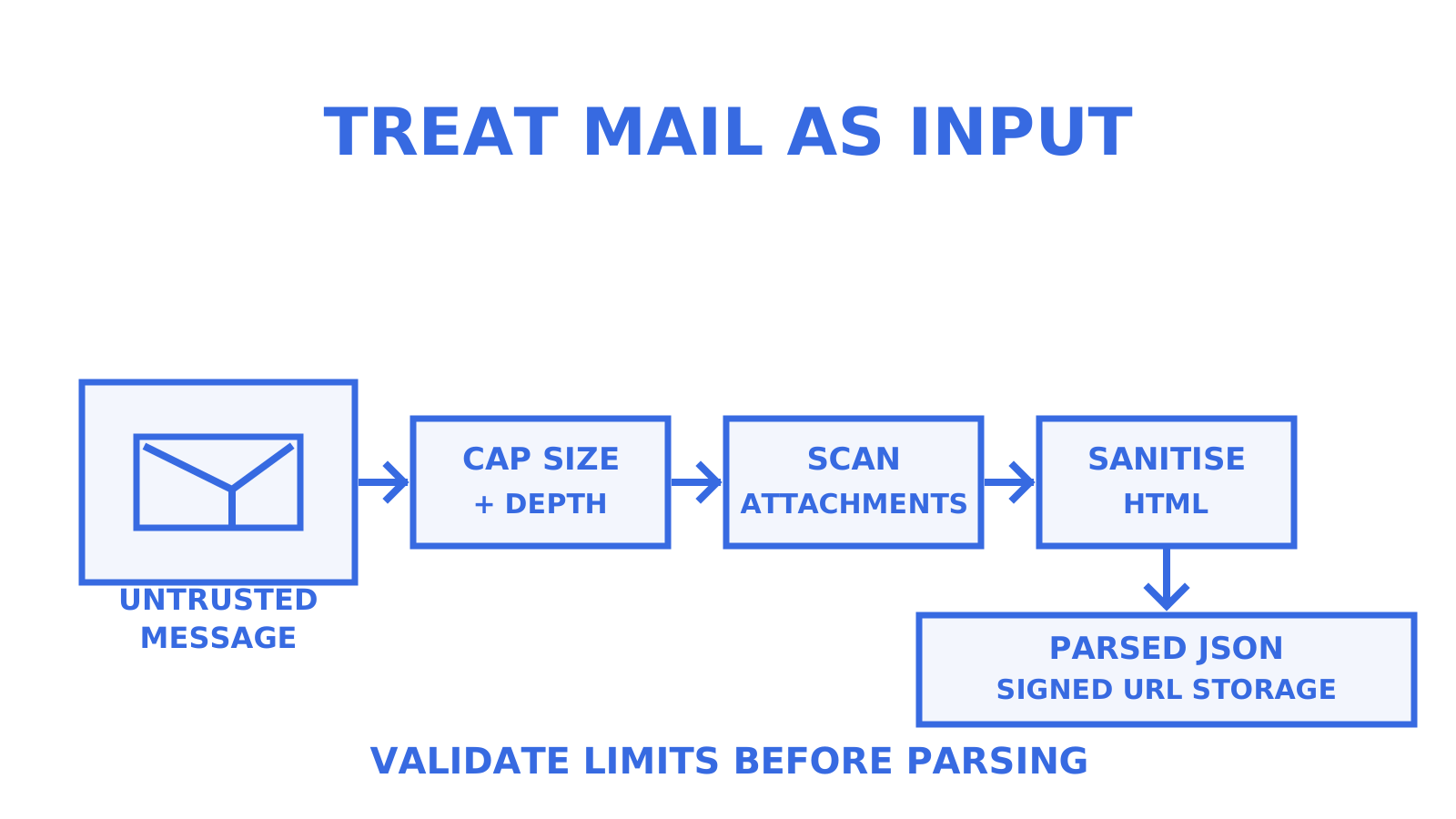
Treat every inbound email as untrusted input, because that’s exactly what it is. Attachments can carry malware, HTML bodies can carry script injection attempts if rendered unsafely, and headers can be forged or malformed in ways designed to break naive parsers.
Scan attachments for malicious content before making them available for download, and never execute or render attachment content directly as part of the parsing step. If your pipeline extracts text from PDFs or images via OCR, run that extraction in an isolated environment rather than inline with your main parsing service, so a malformed file can’t compromise the broader system.
HTML bodies should be sanitised before being displayed anywhere, stripping script tags and dangerous attributes, since a JSON field containing raw HTML is still HTML wherever it’s rendered later. If your JSON output preserves the HTML body for display purposes, sanitise it at parse time rather than trusting every downstream consumer to do it correctly.
Validate structural limits before processing: cap the number of MIME parts you’ll walk, cap attachment size before download, and set a maximum nesting depth for multipart trees. A malformed or deliberately crafted message with excessive nesting or thousands of tiny parts can otherwise consume disproportionate compute for a single message.
Signed webhooks matter here too. Verifying an HMAC signature on incoming webhook payloads, the same pattern Sendmux uses on its own webhook delivery, confirms the parsed JSON actually came from your parsing service and hasn’t been forged or altered in transit.
Performance when processing large volumes of email
Parsing a single email is cheap; parsing thousands per minute is where naive pipelines fall over. The first bottleneck is usually synchronous processing: parsing MIME, extracting attachments and running validation all in the request path that’s supposed to acknowledge receipt quickly. Decouple these: acknowledge receipt fast, then hand the raw message to a queue for parsing.
Batch database writes rather than writing one row per message when volume spikes, and index on message_id early since duplicate delivery (a webhook retried after a timeout, for instance) is common and needs a cheap way to detect it. An idempotency key tied to the message ID avoids double-processing the same email twice.
Attachment extraction is usually the heaviest part of the pipeline, particularly anything involving OCR. Running that as a separate, horizontally scalable worker pool, rather than inline with header and body parsing, means a backlog of image-heavy attachments doesn’t stall the parsing of simpler, attachment-free messages behind it.
Streaming rather than buffering matters for large messages. Reading an entire multi-megabyte MIME message into memory before parsing works fine at low volume, but at scale it’s worth using streaming parsers or at minimum capping message size early and rejecting anything above a sane threshold before it enters your processing path at all.
Comparing popular tools for email to JSON conversion
Python’s built-in email package is the most widely used option for developers who want full control, with solid RFC compliance and an object model that handles multipart trees and encodings correctly, though you write your own extraction, validation and attachment routing on top of it.
Schema-first APIs, such as the pattern shown by MailFrame’s parsing endpoint, trade some control for a deterministic contract: post raw MIME, get back typed JSON validated against a schema you define, with errors surfaced explicitly rather than failing silently downstream.
Automation platforms like Power Automate offer a lower-code path, and a community-documented pattern on StackOverflow shows a synchronous flow-based conversion, useful for teams already inside that ecosystem but less flexible for custom validation logic.
Attachment-specific tools, such as Parseur’s attachment handling, focus specifically on turning attached documents into structured fields, complementing rather than replacing a general email parser. Once you’ve got a JSON output, a JSON formatter and validator is a handy way to sanity-check shape and formatting during development before it hits a schema validator in your pipeline.
When schema-first parsing earns its keep
Schema-first parsing pays for itself once you’re ingesting from more than one sender template, at real volume, or in a system where a silent parsing failure costs more than the setup effort. Library parsing is genuinely fine for prototypes and single-source internal tools, and there’s no need to over-engineer those.
Watch for three signals that it’s time to migrate: parsing error rates creeping upward, attachment failures showing up in support tickets, or charset issues appearing in production data that never showed up in testing. Any one of those is usually cheaper to fix with a schema contract than with another patch to a regex.
A production path with Sendmux and myagent.mx
If you’re building an agent or platform that needs to receive and parse email rather than just convert the occasional message, some platforms provide a mailbox API that returns cleaned message text and HTML directly, alongside raw MIME access when needed, so you don’t have to build the parsing layer described above from scratch.
Mailbox-scoped API keys can keep permissions tight, signed webhooks help confirm delivered payloads haven’t been tampered with, and delivery logs enable tracking parsing reliability over time rather than discovering issues through support tickets. Some SDKs are available for languages like TypeScript, Python, Go, PHP, Ruby and Rust, along with CLI tools and MCP servers for agent-native setups.
For a fast start, Myagent gives an agent its own mailbox on the shared domain in minutes, no card or account setup required, which is a reasonable way to test a pipeline before committing to production infrastructure. Check the product page of the relevant service for the full API reference and quick-start documentation.
Sources
- email — An email and MIME handling package — Python 3 documentation
- Python email library reference — Real Python
- Parseur — Working with email attachments
FAQ
How do I convert an email to JSON?
Parse the raw MIME with a library such as Python’s email package to walk headers, body parts and attachments, then map the extracted fields into a JSON object. For production pipelines with varying sender templates, a schema-first parsing API that validates the output tends to be more reliable than hand-written extraction.
Is there a free API for sending email?
Sendmux’s Free plan includes one team with two mailboxes and a starting credit, with sending capped at a limited number of accepted recipients per UTC day, so small projects and prototypes can send without a paid plan. Pricing beyond those limits moves to the Pro plan, detailed on the Sendmux product page.
How can I extract data from an email?
Walk the MIME tree to separate headers, plain text and HTML bodies, and attachments, decoding each part’s transfer encoding and charset as you go. A tree-walking approach is preferred over regex extraction because it handles malformed headers and nested multiparts more predictably.
What does JSON stand for?
JSON stands for JavaScript Object Notation, a lightweight, text-based format for structuring data as key-value pairs and arrays. It’s the standard output format for email parsing pipelines because it’s easy to validate against a schema and simple for downstream systems to consume.
Should I embed attachments as base64 in my JSON output?
Generally no: large base64 blobs bloat JSON payloads and slow parsing, so a short-lived signed URL pointing to object storage is the more common pattern, as Parseur’s attachment documentation shows. Reserve inline base64 for small files where a separate storage step isn’t worth the overhead.
Give an agent its own address
Sendmux is the Email Inbox API for AI Agents.