---
title: "How to Verify an Email Domain Before You Trust It"
description: "Learn how to verify an email domain effectively with simple commands to ensure trust and security in your communications."
canonical: "https://myagent.mx/blog/verify-email-domain"
publishedAt: "2026-08-25T13:35:42.842Z"
updatedAt: "2026-08-28T11:11:52.525Z"
category: "deliverability"
topic: "verify email domain"
author: "Roshan Jonnalagadda"
authorProfile: "https://myagent.mx/blog/author/roshan-jonnalagadda"
keywords:
- "sender allowlist denylist"
- "email allowlist denylist"
- "verify email domain"
- "domain verification email"
- "verify domain for email"
- "check email domain"
- "confirm email domain ownership"
- "how to verify email domain"
- "email domain validation"
- "dmarc alignment check"
---
# How to Verify an Email Domain Before You Trust It
Learn how to verify an email domain effectively with simple commands to ensure trust and security in your communications.
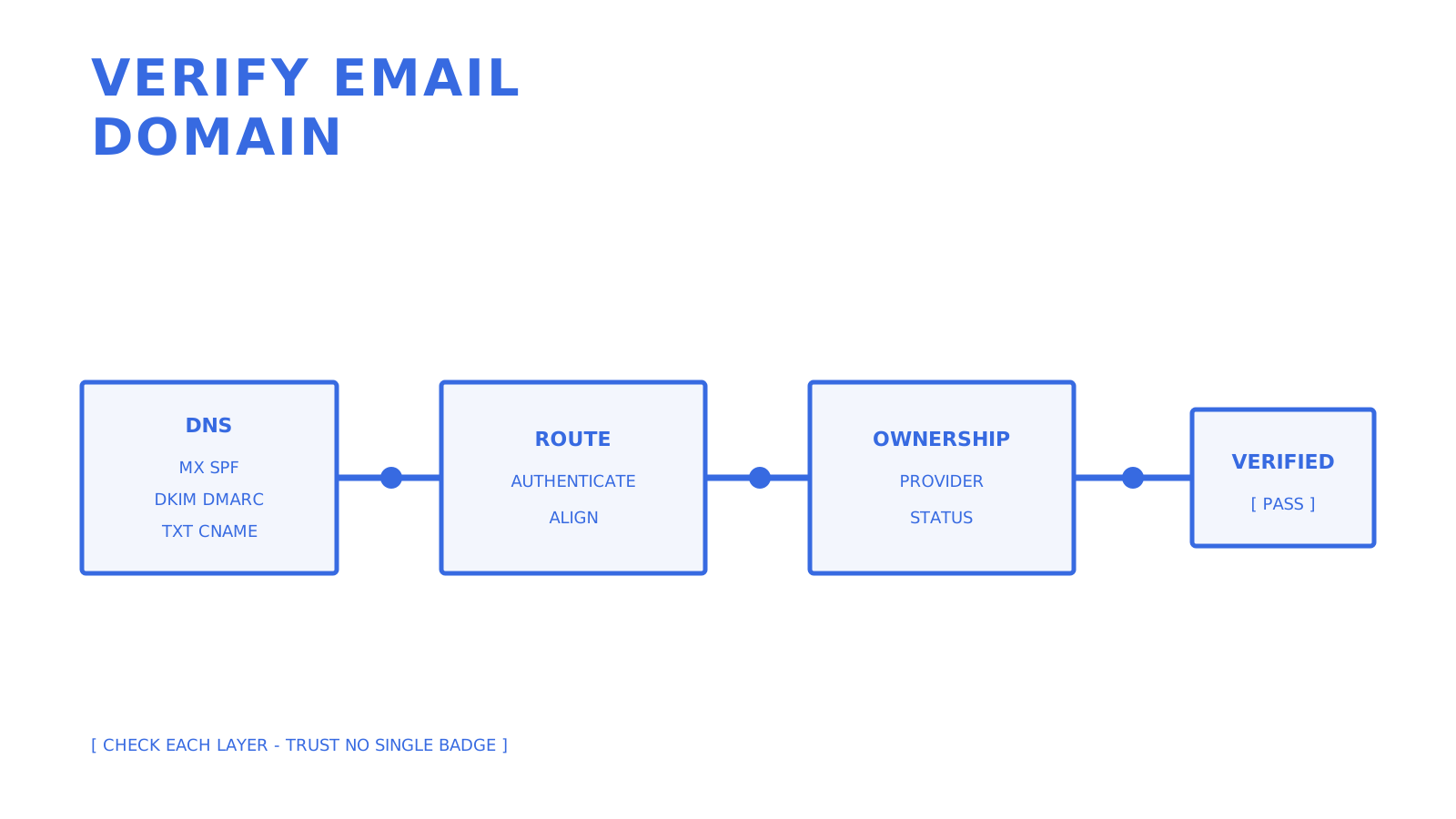
Verify routing, authentication, alignment, and provider ownership as separate checks.
A domain is ready for email only when the records required for its actual job are present and correct. Receiving needs a mail route. Sending authentication uses SPF and DKIM. DMARC evaluates alignment with the visible From domain, while a provider may require an additional TXT or CNAME record to confirm email domain ownership.
If you need to **verify email domain** configuration now, start with `dig MX example.com`, `dig TXT example.com`, and `dig +short TXT _dmarc.example.com`. Then query the exact DKIM selector and ownership record supplied by the email provider. This is **email domain validation**, not proof that the organisation or a particular message is trustworthy.
> **TL;DR:**
>
> - Check mail routing, SPF, DKIM, DMARC, and provider ownership independently; one green result does not stand in for the others.
> - Treat a missing MX carefully because SMTP defines an implicit A or AAAA fallback, even though many hosted services require an explicit MX for their own routing.
> - Publish one SPF policy at a domain and keep the number of DNS-querying terms within the RFC 7208 limit of 10.
> - DMARC passes when at least one passing SPF or DKIM identity aligns with the visible From domain; both mechanisms do not need to align.
> - Use DNS-only checks first and reserve SMTP interaction for authorised cases where its extra evidence is genuinely needed.
## Table of Contents
- [Quick Checks You Can Run Right Now](#quick-checks-you-can-run-right-now)
- [How to Verify Domain Ownership and Authentication Step by Step](#how-to-verify-domain-ownership-and-authentication-step-by-step)
- [What Your Checker Results Actually Mean](#what-your-checker-results-actually-mean)
- [Automating Domain Checks in Signup Flows and Pipelines](#automating-domain-checks-in-signup-flows-and-pipelines)
- [Fixing the Most Common Verification Failures](#fixing-the-most-common-verification-failures)
- [What Years of Domain Verification Actually Teach You](#what-years-of-domain-verification-actually-teach-you)
- [Verified Sending Without the DNS Guesswork](#verified-sending-without-the-dns-guesswork)
- [Sources](#sources)
- [FAQ](#faq)
## Quick Checks You Can Run Right Now
Three terminal commands reveal most of the published DNS state:
- `dig MX example.com` lists explicit mail exchangers and their priorities.
- `dig TXT example.com` shows TXT data at the organisational domain, including an SPF policy when one is published there.
- `dig TXT selector._domainkey.example.com` queries the provider's exact DKIM selector.
Also run `dig +short TXT _dmarc.example.com` for the DMARC policy. A missing MX answer is not automatically "no route, full stop": RFC 5321 defines an implicit MX that falls back to the domain's A or AAAA address. In a hosted product, follow the product's explicit MX requirements even when that protocol fallback exists.
For SPF, multiple records beginning with `v=spf1` produce a permanent error under RFC 7208. The evaluation also limits DNS-querying terms to 10. Extra whitespace alone is not a reliable diagnosis, so inspect the complete policy and its includes rather than rewriting it on sight.
**Pro Tip:** *Compare the answer from your normal resolver with a public resolver such as `8.8.8.8`. Different cached answers can indicate propagation, but the record's TTL and authoritative response are the evidence to inspect.*
## How to Verify Domain Ownership and Authentication Step by Step
Domain verification for email has two distinct purposes: prove control to a provider, and prove that real messages authenticate as intended.
1. **Confirm mail routing.** Query MX first, then check the implicit A or AAAA fallback if no MX is published. A provider-hosted receiving flow may still require its documented explicit MX record.
2. **Publish and validate SPF.** Keep a single SPF policy at the domain. Confirm every required sending source is authorised and count the terms that cause DNS lookups; RFC 7208 permits no more than 10 during one evaluation.
3. **Publish DKIM selectors.** Copy the provider's selector and TXT or CNAME target byte-for-byte. Query that exact name after publication rather than guessing a conventional selector.
4. **Publish DMARC.** A policy can look like `v=DMARC1; p=quarantine; rua=mailto:reports@example.com`. Relaxed alignment permits the same organisational domain, while strict alignment requires an exact domain match.
5. **Confirm provider ownership.** Follow the provider's generated DNS instructions. Amazon SES, for example, uses DNS records for domain identity and DKIM verification, and its documentation says verification can take up to 72 hours.
6. **Send a permitted test message.** Inspect the receiving system's `Authentication-Results` header. DMARC needs at least one aligned passing SPF or DKIM result; requiring both to pass and align is stricter than DMARC itself.
The important **dmarc alignment check** compares the domain authenticated by SPF or DKIM with the [visible From domain](https://mxscan.me/dmarc-alignment-check) according to the selected relaxed or strict mode. An SPF pass for an unrelated return path and a DKIM pass for an unrelated signing domain do not make DMARC pass.
## What Your Checker Results Actually Mean
A checker reports observations, not a universal trust verdict. Interpret each signal at its own layer:
- **SPF and DKIM pass but DMARC fails:** neither passing identity aligned with the visible From domain under the active policy.
- **A catch-all result:** individual-recipient validation remains uncertain because [acceptance does not distinguish one mailbox from another](https://www.emailsherlock.com/verify).
- **A reputation or parked-domain flag:** investigate the data source and context; it is a risk signal, not a protocol-level disqualifier.
- **DNS records look correct but a message fails:** [inspect that message's](https://www.palisade.email/learning/check-dmarc-alignment) `Authentication-Results`, return path, DKIM `d=` domain, selector, and visible From domain.
This is also why **sender allowlist denylist** policy and **email allowlist denylist** policy are separate from DNS authentication. An allowlist is a local trust decision. SPF, DKIM, and DMARC describe authentication and alignment, not whether an application should authorise an action.
## Automating Domain Checks in Signup Flows and Pipelines
Manual `dig` commands work for one domain. A signup flow needs bounded, repeatable checks that distinguish definitive absence from a resolver or transport failure.
- Run DNS checks asynchronously when they can block the interface, and return a pending state for transient resolver failures rather than converting them into a false negative.
- Cache positive and negative answers according to DNS TTL, then schedule a bounded recheck while a customer's records are propagating.
- Use provider status APIs for ownership verification and signed delivery events for message outcomes; ownership state and delivery state are different resources.
Sendmux's [custom domain verification](https://myagent.mx/blog/domain-verification-email) flow checks the DNS records required by the selected domain mode. Its current implementation represents MX, SPF, DKIM, DMARC, provider ownership, and custom MAIL FROM checks separately, and leaves the status unchanged when DNS resolution is indeterminate.
For delivery events, Sendmux signs the exact webhook request body with HMAC-SHA256 in `X-Sendmux-Signature`, includes event and attempt headers, and retries failed deliveries through a durable retry path. Delivery logs are available through the management API with cursor pagination and filters. You can also use CSV export from the dashboard with the current filters.
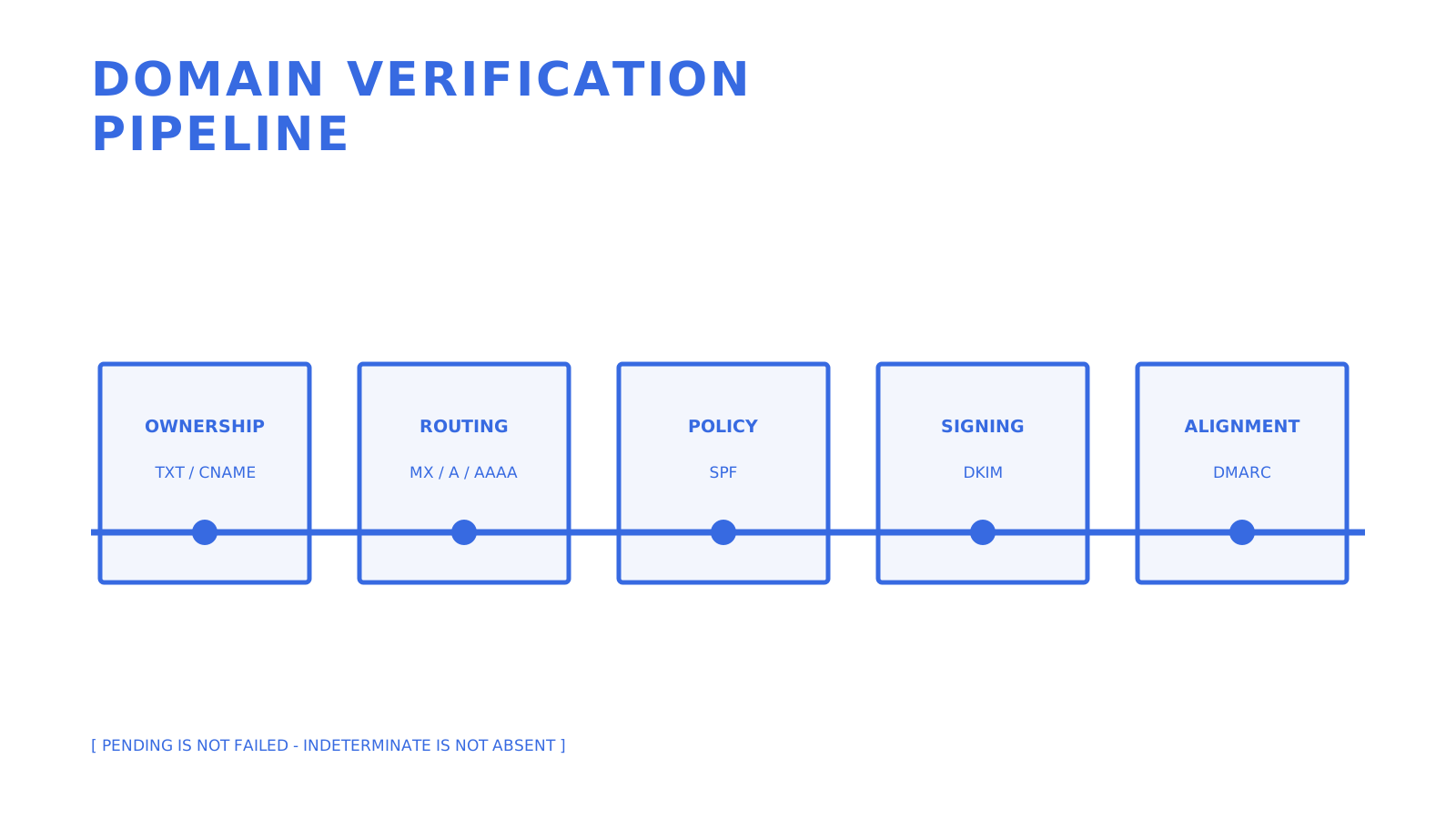
**Pro Tip:** *Give pending, failed, and verified states different operational meaning. A timeout is not proof that the customer's record is absent.*
Keep ownership, routing, policy, signing, and alignment visible as separate gates.
## Fixing the Most Common Verification Failures
Work from authoritative DNS outward before changing records:
1. **Check the authoritative answer and TTL.** Resolver caches can legitimately disagree until their cached TTL expires.
2. **Check the effective record name.** [Some DNS interfaces append the zone automatically](https://docs.stripe.com/get-started/account/email-domain.md#verifying_domain), so confirm the fully qualified name that was actually published.
3. **Remove duplicate SPF policies.** Merge authorised senders into one valid SPF record instead of publishing two `v=spf1` records.
4. **Check DMARC alignment on a delivered message.** Align either a passing DKIM signing domain or a passing SPF-authenticated return-path domain with the visible From domain.
5. **Use the provider's documented window.** If the authoritative answer is correct but status remains pending, compare the TTL and provider guidance before escalating. Amazon SES documents that verification can take up to 72 hours, not a universal 48-hour cutoff.
## What Years of Domain Verification Actually Teach You
Most difficult failures happen at boundaries: a DNS interface publishes a different name than the operator expected, a resolver failure is mistaken for a missing record, or a message passes one authentication mechanism without DMARC alignment. Keep those states observable and avoid compressing them into one green or red badge.
SMTP `VRFY` and recipient probes are not universal truth machines. RFC 5321 permits servers to disable verification for security reasons and to limit or close connections after abusive recipient probing. Use them only with authorisation, respect receiver policy, and do not treat an ambiguous response as proof that a mailbox is fake.
## Verified Sending Without the DNS Guesswork
Sendmux exposes custom-domain creation, DNS record requirements, a verification action, and queryable domain status. Its implementation verifies the record set required for the selected mode, including ownership and authentication records, without collapsing an indeterminate DNS lookup into a definitive failure.
After verification, Sendmux provides mailbox-scoped credentials with explicit permissions, signed backend webhooks for delivery events, and filtered delivery logs with CSV export from the dashboard. Its public SDK packages cover TypeScript, Python, Go, PHP, Ruby, and Rust, with generated coverage checks over the current OpenAPI operations.
That product surface can help a multi-tenant application **verify domain for email** workflows and **check email domain** status programmatically. It does not prove that a sender is legitimate, guarantee inbox placement, or replace message-level header inspection. Start with the [Sendmux platform](https://myagent.mx) when you need a documented domain and mailbox API.
## Sources
The technical baseline uses [RFC 5321 for SMTP routing and verification commands](https://www.rfc-editor.org/info/rfc5321/), [RFC 7208 for SPF](https://www.rfc-editor.org/info/rfc7208/), [RFC 9989 for DMARC](https://www.rfc-editor.org/info/rfc9989/), [Amazon SES identity verification](https://docs.aws.amazon.com/ses/latest/dg/creating-identities.html), [Amazon SES custom MAIL FROM](https://docs.aws.amazon.com/ses/latest/dg/mail-from.html), and [Cloudflare's DNS TTL reference](https://developers.cloudflare.com/dns/manage-dns-records/reference/ttl/).
- [DMARC alignment check (MXScan)](https://mxscan.me/dmarc-alignment-check)
- [Check DMARC alignment (Palisade)](https://www.palisade.email/learning/check-dmarc-alignment)
- [EmailSherlock verify](https://www.emailsherlock.com/verify)
## FAQ
### How can I check if an email domain is valid?
Check the domain's mail route and authentication records separately. An MX record, or the implicit A or AAAA fallback defined by SMTP, can establish a route; SPF, DKIM, and DMARC describe sending authentication. Those records do not prove that the organisation or every mailbox is trustworthy.
### Can I verify if an email address is real?
DNS can show that the domain exists and has mail-routing infrastructure, but it cannot prove that a particular mailbox is active. SMTP verification commands may be disabled or return deliberately ambiguous results, so a permitted delivery attempt is stronger evidence of acceptance, not of the recipient's identity.
### How do I check the domain of an email address?
Take the text after the `@` symbol, normalise the domain, and query its MX records. If there is no MX answer, SMTP also defines an implicit MX fallback to the domain's A or AAAA address, although a receiving service may require an explicit MX in its own setup.
### How do I check if a domain is legit?
Do not infer legitimacy from one DNS result. Mail routing, SPF, DKIM, DMARC, ownership records, message headers, organisational identity, and reputation data are separate signals; none of them alone proves that a sender or message is safe.
### What's the difference between a DNS-only check and an SMTP probe?
A DNS-only check reads published records without opening a session with the receiving mail server. An SMTP probe interacts with that server, may be restricted or disabled by receiver policy, and should be used only when authorised and operationally necessary.
## Recommended
- [Domain Verification Email: DNS Setup for Developers](https://myagent.mx/blog/topic/domain%20verification%20email)
- [Domain Verification Email: DNS, DKIM, and DMARC for Developers](https://myagent.mx/blog/domain-verification-email)
- [Email Deliverability Monitoring for Technical Teams](https://myagent.mx/blog/topic/email%20deliverability%20monitoring)
- [Email Deliverability Monitoring: A Guide for Technical Teams](https://myagent.mx/blog/email-deliverability-monitoring)