---
title: "Safely Enforce SPF, DKIM, DMARC with RFC 9989 for Engineers"
description: "RFC aware, step by step deployment for SPF, DKIM and DMARC. Start at p=none with RUA reports, avoid the 10 DNS lookup SPF limit, then move safely to..."
canonical: "https://myagent.mx/blog/safely-enforce-spf-dkim-dmarc-with-rfc-9989-for-engineers"
publishedAt: "2026-09-07T06:36:47.915Z"
updatedAt: "2026-09-07T06:36:55.027Z"
category: "deliverability"
topic: "spf dkim dmarc"
author: "Roshan Jonnalagadda"
authorProfile: "https://myagent.mx/blog/author/roshan-jonnalagadda"
keywords:
- "spf dkim dmarc"
- "dmarc aggregate reports"
- "dmarc reports"
- "email security best practices"
- "benefits of DKIM"
- "DMARC configuration guide"
- "how to set up SPF"
- "email authentication methods"
- "SPF DKIM DMARC importance"
- "rua ruf dmarc"
- "email authentication records"
- "dmarc setup guide"
---
# Safely Enforce SPF, DKIM, DMARC with RFC 9989 for Engineers
RFC aware, step by step deployment for SPF, DKIM and DMARC. Start at p=none with RUA reports, avoid the 10 DNS lookup SPF limit, then move safely to...
Configured together, SPF, DKIM and DMARC authenticate sending domains, check signed message content and let domain owners publish an assessment policy for mail that fails alignment with the visible From address. Receivers still decide how to handle each message. If these controls are not configured yet, inventory your senders, enable aligned authentication and publish a DMARC record at `p=none` with reporting enabled before enforcement, following [RFC 9989](https://www.rfc-editor.org/rfc/rfc9989.txt), the DMARC standard published in May 2026.
***
> **TL;DR:**
>
> - Publishing DMARC at `p=none` with reporting enabled helps identify sending sources and misconfigurations before enforcement; reports are limited to participating receivers and must be checked against your own inventory.
> - SPF checks the envelope-sender identity and limits the DNS-causing terms evaluated across the complete check to 10; this is not a per-domain allowance for all DNS queries. Exceeding that limit returns `permerror`.
> - For RSA DKIM, use keys of at least 2048 bits where supported; Ed25519 uses a different key size. Rotate keys under your operational policy. Forwarding can preserve DKIM when signed content survives, and ARC carries authentication history without repairing a broken signature.
> - DMARC passes when either SPF or DKIM passes authentication and aligns with the visible From domain. Strict and relaxed alignment are separate settings, and policy changes should be staged around observed legitimate traffic.
> - Maintain an accurate sender inventory, plan DNS TTLs, and review trusted `Authentication-Results` headers and aggregate reports after changes. These checks help find failures; they do not guarantee every receiver reports or every message reaches an inbox.
***
## What SPF, DKIM and DMARC actually do
SPF, DKIM and DMARC address different parts of domain authentication; together they still do not stop every form of impersonation. SPF checks whether a sending IP is authorized for the envelope-sender domain. DKIM lets receivers verify a signature over selected headers and body content. DMARC evaluates whether an authenticated domain aligns with the visible From domain and supplies the domain owner's assessment policy; the receiver retains its own handling decision.
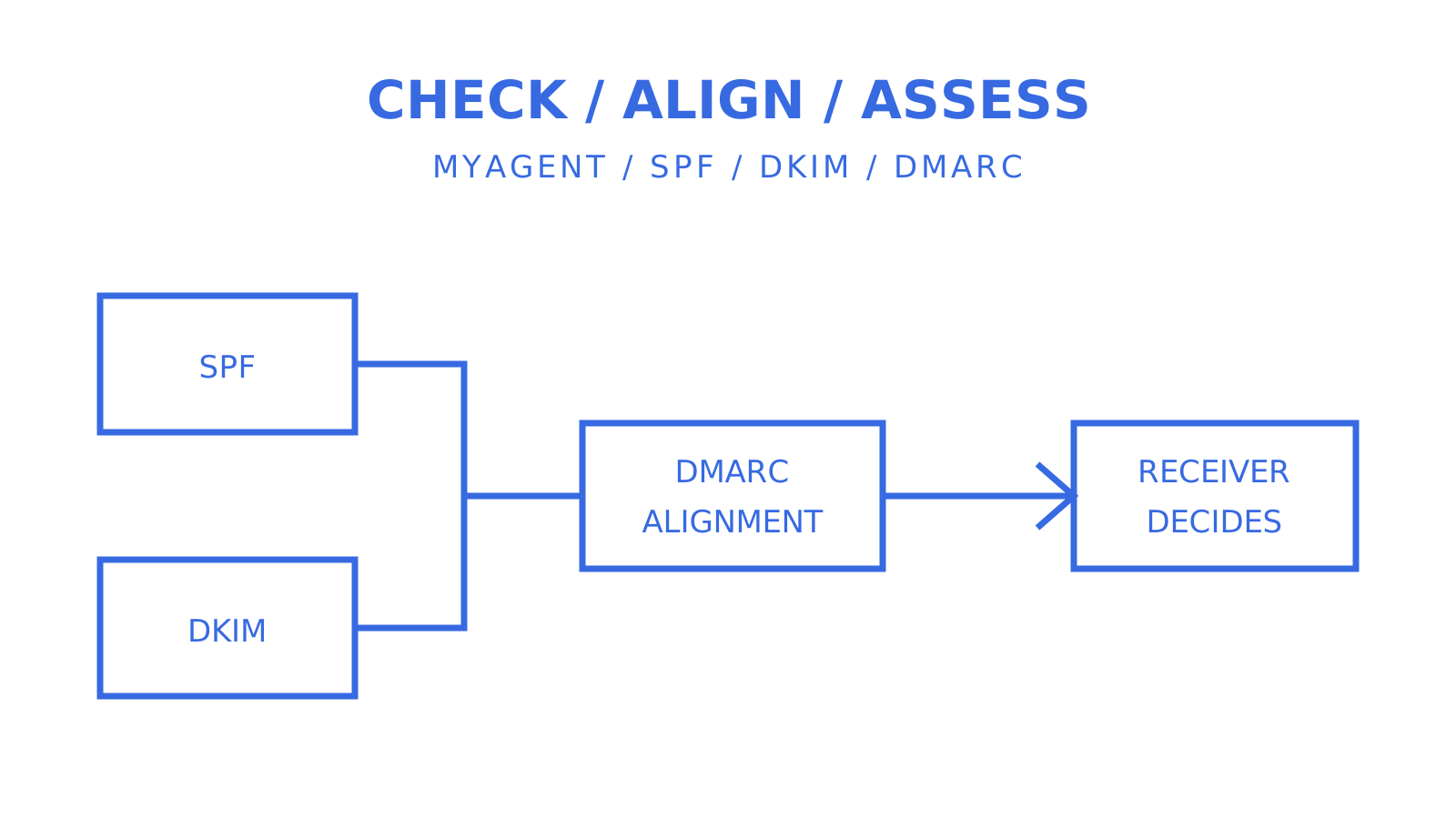
The logical flow starts when a message leaves a sending server. The receiver can check SPF and DKIM independently, then evaluate whether either passing result aligns with the visible From domain before considering the published DMARC policy. SPF is specified in RFC 7208, DKIM in RFC 6376 with later algorithm updates, and DMARC in RFC 9989. [Proofpoint's guidance](https://www.proofpoint.com/us/threat-reference/spf-dkim-dmarc) recommends configuring the three together; DMARC itself can pass through either aligned authentication path.
## How SPF authenticates a sending server
Publish one SPF policy as a TXT record at the domain used by SMTP MAIL FROM, which may be a subdomain rather than your domain's root. For a null reverse-path, SPF uses the HELO identity. This illustrative record uses example addresses; replace them with your actual sending IP and provider-authorized include domain:
`v=spf1 ip4:203.0.113.10 include:_spf.examplehost.com ~all`
The `v=spf1` version identifies SPF. The `ip4` mechanism matches an IP address, and `include` evaluates another domain's SPF policy. A final `~all` produces softfail and `-all` produces fail for unmatched senders; those results do not dictate the receiver's final action. SPF checks MAIL FROM rather than the visible From header. DMARC then checks alignment between an authenticated domain and that visible From domain.
SPF has a hard ceiling that catches teams off guard once they've layered on a few marketing tools and a helpdesk platform.
**Pro Tip:** *An evaluated `include:` counts toward the [10-lookup limit discussed by Valimail](https://www.valimail.com/blog/approaching-spf-limit/), and evaluated nested terms share that limit. RFC 7208 counts `include`, `a`, `mx`, `ptr`, `exists` and `redirect` across the whole SPF evaluation; `ip4`, `ip6` and `all` do not count toward it. Exceeding the limit returns `permerror`, which is distinct from `fail`; receiver policy determines the consequence.*
Keep the record lean:
- Use `redirect=` only when delegating the whole SPF policy to another domain; it does not combine the permissions of several `include` mechanisms.
- Use explicit `ip4`/`ip6` mechanisms for sending IP addresses you control when appropriate, instead of another `include` mechanism.
- Audit the record every time a new sending tool is added, not just at initial setup.
- Use DNSSEC where supported, and plan a rollout TTL such as 300 to 3,600 seconds around your DNS provider and operational needs. This range is an example, not an RFC requirement; existing cached records can remain until their earlier TTL expires.
## How DKIM signs and verifies your mail
DKIM attaches a digital signature generated with a private key held by the authorized signer. The corresponding public key is retrieved through DNS at a selector name such as `selector1._domainkey.example.com`. A receiver uses it to verify the signed headers and body content.
A DKIM signature covers selected headers, which must include From; Subject, Date and other headers are chosen by the signer. It also includes a hash of canonicalized body content, potentially limited by the optional body-length tag. Canonicalisation determines which formatting changes are tolerated, so a valid signature does not prove every byte of the whole message is unchanged.
Two operational decisions matter more than the rest:
- For RSA DKIM, RFC 8301 requires at least 1024-bit keys and recommends at least 2048 bits; use 2048-bit keys where supported. RFC 8463 also defines Ed25519-SHA256 with 256-bit public keys, so bit lengths cannot be judged identically across algorithms.
- Rotate keys under a defined schedule and respond promptly to compromise. Retire old selectors after accounting for mail still in transit; retaining an old public key temporarily can be necessary to verify delayed messages.
**Pro Tip:** *DKIM can survive forwarding because verification does not depend on the forwarding IP. Changes to signed headers or the signed body content can invalidate the signature, depending on canonicalisation. ARC records authentication results across intermediaries for a receiver to assess; it does not make an invalid DKIM signature valid.*
## How DMARC ties SPF and DKIM together
DMARC uses SPF and DKIM results rather than a separate signature or IP check. A message passes when either mechanism passes authentication and its verified domain aligns with the visible From domain. Strict alignment requires an exact domain match; relaxed alignment uses the organisational domain, so `mail.example.com` and `example.com` can align when they share that organisational domain. The `adkim` and `aspf` tags set the modes separately.
A starter DMARC record looks like this:
`v=DMARC1; p=none; rua=mailto:reports@example.com`
Key tags worth knowing:
- **p=** declares the domain owner's assessment policy: `none`, `quarantine` or `reject`. These express how failing mail should be assessed; they do not guarantee spam-folder placement or rejection, because receivers retain local discretion.
- **rua=** lists aggregate-report destinations. RUA reports use XML under RFC 9990 and commonly cover a reporting interval such as a day; participation and delivery timing vary, so do not assume every receiver sends a daily batch.
- **ruf=** requests message-specific failure reports defined by RFC 9991. Receivers may limit or omit them, including for privacy reasons; do not assume they are available for every failure.
- **t=** is RFC 9989's test-mode tag, with `n` as the default. `t=y` requests testing one policy level below the declared assessment: `quarantine` becomes `none`, and `reject` becomes `quarantine`. It does not affect `p=none` or report generation. The older **pct=** percentage-sampling tag was removed; `t=` is not arbitrary percentage sampling.
RFC 9989 moved DMARC onto the Internet Standards Track in May 2026 and obsoletes RFC 7489 and RFC 9091. Its bounded DNS tree walk replaces reliance on a Public Suffix List for organisational-domain discovery, allowing policy boundaries at different points in the DNS namespace while limiting the walk to eight queries. That affects policy discovery and relaxed alignment across subdomains or acquired domains. Review those boundaries and your receivers' observed behavior; publication of the RFC does not establish that every receiver has upgraded.
## Where these records live in DNS
SPF and DMARC policies and DKIM public keys are obtained through DNS TXT data at different names. Some sending providers ask you to publish DKIM CNAME records that delegate lookup to provider-managed keys; follow the record type your provider supplies.
- SPF publishes at the authenticated MAIL FROM domain, such as `example.com` or a sending subdomain (TXT); a null reverse-path uses HELO.
- DKIM public-key lookup uses the selector: `selector1._domainkey.example.com` (TXT, possibly reached through provider-supplied CNAME delegation).
- DMARC publishes at a fixed subdomain: `_dmarc.example.com` (TXT).
Only one SPF policy record may be selected at a domain name. Multiple SPF records at that name produce `permerror`, not the distinct SPF `fail` result. A DNS TXT record can contain multiple quoted character strings, each limited to 255 octets, which are concatenated for use; this is different from publishing multiple policy records. Check your provider's handling of long DKIM values. Use DNSSEC where supported, and plan TTL changes before rollout rather than assuming caches update instantly.
## A safe rollout plan from monitoring to enforcement
Moving straight to `p=reject` before validating legitimate senders can cause delivery failures where receivers honor the policy. A staged rollout reduces that risk, but no sequence guarantees that every receiver will handle mail identically.
1. **Inventory every sending source.** List every system that sends mail as your domain: your primary mail platform, helpdesk tools, marketing platforms, transactional senders, even that one internal script that emails reports. For each, confirm what signs it (DKIM) and what IP it sends from (SPF).
2. **Publish SPF and DKIM per sender.** Authorize legitimate sources at their actual MAIL FROM domains and enable DKIM signing with aligned domains. Use distinct selectors per sending stream where your provider supports that separation.
3. **Publish DMARC at `p=none` with `rua=` set**, then observe representative sending cycles. Two to six weeks is an example monitoring window, not a requirement or outage statistic established by Proofpoint. Its guidance recommends monitoring and fixing gaps before enforcement; adjust the period to your own traffic and reporting coverage.
4. **Read aggregate reports and fix failures.** Compare observed IPs, counts and authentication results with your sender inventory. Missing reports do not prove a sender is absent or correctly configured.
5. **Stage enforcement using current policy semantics.** RFC 9989 removed `pct=`, so the old 10 to 25 percent rollout is not its mechanism. After validating alignment, evaluate `p=quarantine` and, where you are testing RFC 9989 behavior, `t=y`; that test flag requests `none` for failing mail under a declared quarantine policy. Observe actual receiver handling before disabling test mode.
6. **Move to `p=reject`** when representative legitimate traffic remains aligned and your rollback criteria are satisfied. Continue monitoring across reporting cycles; a single clean cycle cannot guarantee that every intermittent sender has been covered.
**Pro Tip:** *Prepare a rollback record before enforcement. Moving `p=reject` back to `p=quarantine` or `p=none` can reduce the requested policy, but publishing a DNS change does not replace cached records instantly. Account for the previous TTL and actual receiver behavior, especially in the first month; verify recovery instead of treating the policy tag as an immediate switch.*
## Reading authentication results and the tools that help
A receiver may add an `Authentication-Results` header with results such as `spf=pass`, `dkim=pass` and `dmarc=pass`, together with relevant identities. Use results produced by a receiver you trust and interpret them within that system's trust boundary; an arbitrary header supplied by a sender is not proof. Not every message or receiver provides the header, and it must be read alongside delivery logs and message context.
DMARC aggregate reports (RUA) contain XML summaries from participating receivers. Under RFC 9990, records include source IPs, message counts, policy-evaluation information and underlying authentication results. Compare them with known senders to investigate misconfiguration or possible spoofing; an unfamiliar IP or a failure alone does not establish an attack.
- Use a header analyser to decode a single `Authentication-Results` string during troubleshooting.
- Use a DMARC report parser to turn the raw XML into a readable table of senders, volumes and pass rates, since reading it by hand doesn't scale past a handful of reports.
- Automate ingestion rather than opening reports manually. Weekly review is a reasonable cadence once policy is stable; daily review makes sense in the first month after any enforcement change.
## Common pitfalls that derail an authentication programme
When authentication fails, start by checking these recurring configuration and operational problems. The list is a troubleshooting aid, not a measured ranking of failure causes.
- **SPF lookup creep.** Adding a marketing or CRM tool can increase the number of evaluated DNS-causing terms. Recheck the complete evaluation against the 10-term limit whenever the policy changes, including nested includes, to avoid `permerror`.
- **Stale or leaked private keys.** Protect DKIM private keys and respond immediately to exposure by replacing the compromised signing key and revoking its selector as appropriate. Do not wait for a reporting cycle or routine rotation date; account for DNS caching when checking recovery.
- **Forwarding can disrupt authentication.** SPF can fail when the forwarding IP is not authorized for the evaluated envelope domain. DKIM can survive if the signed content remains valid. ARC preserves a chain of authentication assessments across intermediaries, which a receiver may use under its own trust and policy decisions; it neither repairs DKIM nor guarantees acceptance.
- **Undocumented receiver-side overrides.** Some organisations apply local allow rules that bypass DMARC policy for specific senders. [Technical guidance from BSI](https://www.bsi.bund.de/SharedDocs/Downloads/EN/BSI/Publications/TechGuidelines/TR03182/BSI-TR-03182.pdf?__blob=publicationFile\&v=6) requires operators following that guideline to justify and document deviations such as local overrides. Its 2024 document cites RFC 7489, so use RFC 9989 for the current DMARC mechanism while retaining this operational documentation practice.
- **No post-change review.** Recheck SPF authorization and DKIM selectors after a sending vendor, hosting provider or mail platform changes. Compare DMARC results before and after the migration so a new failure pattern is investigated promptly.
**Pro Tip:** *Keep a remediation log that maps each DMARC report anomaly to the configuration change that resolved it. Six months into a rollout, use that log to answer why a setting was chosen without reconstructing the reasoning from scratch.*
## How this plays out on agent mailboxes
The same authentication discipline applies when an autonomous agent sends mail. The [Myagent domain-verification articles](https://myagent.mx/blog/topic/domain%20verification%20email) provide related reading; SPF must authorize the actual sending route, and DKIM selectors must match the configured signer. Sendmux supports mailbox-scoped credentials, which limit the operations and mailbox accessible through that credential. A compromised credential can still affect shared sending reputation or resources; mailbox scope does not isolate an entire domain. Self-registration grants read and receive access first, and sending requires the human owner to accept the invitation and explicitly approve it. That permission boundary is separate from DMARC policy enforcement.
## Where to focus first when the backlog is long
Begin the planned rollout with a sender inventory and DMARC monitoring, while remediating a compromised key immediately rather than postponing it for reporting. The linked [Email Marketing Expert course page](https://get-voucher.com/course/email-marketing-expert) describes an email-marketing certification; it explicitly does not confirm deliverability, SPF, DKIM or DMARC as separate certification outcomes, so verify the syllabus before choosing authentication training. A `p=none` record with RUA reports helps identify alignment problems within the observed traffic. Delegating subdomains per tenant or product can separate rollout policies when DNS delegation and DMARC discovery are configured accordingly; it does not guarantee isolation from shared IP reputation. Keep the inventory and policy boundaries current before enforcing `p=reject`.
## Simplifying key management as you scale
Managing authentication across many senders, tenants or agent mailboxes involves DNS records, signing-key ownership and report handling. An email API platform may help with domain verification and provider-specific DNS setup, but central DKIM rotation and DMARC aggregate-report ingestion are separate capabilities to verify. A shared dashboard does not establish that either is included.
Sendmux provides domain-verification and DNS-setup capabilities for teams and AI agents, together with mailbox access and sending APIs. Its supplied DMARC record is `p=quarantine` without reporting; it does not provide a DMARC aggregator. Add your own reporting destination and processing workflow, and follow the SPF/DKIM records required by each chosen sending provider. Sendmux is an optional part of that setup, not a substitute for owning your domain policy. Developers can follow the registration instructions linked from [Myagent](https://myagent.mx) to start a free shared-domain mailbox with read and receive access; sending still requires owner acceptance and explicit approval. Test that access flow separately from the custom-domain authentication rollout.
## Sources
- [RFC 9989 — DMARC updates (May 2026)](https://www.rfc-editor.org/rfc/rfc9989.txt)
- [Proofpoint — SPF, DKIM and DMARC guide](https://www.proofpoint.com/us/threat-reference/spf-dkim-dmarc)
- [Valimail — approaching the SPF lookup limit](https://www.valimail.com/blog/approaching-spf-limit/)
- [BSI TR-03182 guidance (technical recommendations)](https://www.bsi.bund.de/SharedDocs/Downloads/EN/BSI/Publications/TechGuidelines/TR03182/BSI-TR-03182.pdf?__blob=publicationFile\&v=6)
## FAQ
### What is SPF, DKIM and DMARC?
SPF checks whether a sending IP is authorized for the envelope-sender domain. DKIM verifies a signature over selected message content. DMARC checks whether an authenticated SPF or DKIM domain aligns with the visible From domain, supplies the domain owner's assessment policy and supports reporting; receivers retain their own handling decisions.
### Does DMARC require both SPF and DKIM?
DMARC passes when either SPF or DKIM passes authentication and aligns with the visible From domain; both do not have to pass. Configuring both gives a second authentication path when forwarding or a configuration change disrupts one, but neither guarantees delivery.
### How do I set up SPF, DKIM and DMARC?
Inventory legitimate senders, publish one SPF policy at each relevant MAIL FROM domain, enable DKIM with the appropriate published selectors, and publish DMARC at a name such as `_dmarc.yourdomain.com`. Start at `p=none` with reporting enabled, correct alignment gaps and stage changes toward quarantine or reject using current RFC 9989 semantics.
### How do I check that SPF, DKIM and DMARC are working?
Send representative test messages and inspect trusted receiver-generated `Authentication-Results` headers where available. Check SPF and DKIM results and verify that at least one passing path aligns for DMARC; both are useful to test even though a DMARC pass does not require both. Review aggregate reports and delivery evidence across your actual senders, accounting for reporting gaps.
### What changed with the May 2026 DMARC update?
RFC 9989 moved DMARC onto the Internet Standards Track in May 2026, obsoleting RFC 7489 and RFC 9091. It introduces bounded DNS tree-walk discovery for organisational domains and replaces the older `pct` sampling tag with `t` test-mode semantics. Aggregate and failure reporting are specified separately in RFC 9990 and RFC 9991.