---
title: "Email Deliverability Monitoring: A Guide for Technical Teams"
description: "Master email deliverability monitoring with effective strategies to enhance inbox placement, prevent reputation drops, and ensure seamless delivery."
canonical: "https://myagent.mx/blog/email-deliverability-monitoring"
publishedAt: "2026-08-16T00:00:00.000Z"
updatedAt: "2026-08-16T00:00:00.000Z"
category: "deliverability"
topic: "email deliverability monitoring"
author: "Roshan Jonnalagadda"
authorProfile: "https://myagent.mx/blog/author/roshan-jonnalagadda"
keywords:
- "email bounce tracking"
- "email sending reputation"
- "how to track email deliverability"
- "monitoring email performance"
- "best email monitoring tools"
- "improving deliverability rates"
- "email deliverability monitoring"
- "email inbox placement"
- "email deliverability analysis"
- "email reputation monitoring"
---
# Email Deliverability Monitoring: A Guide for Technical Teams
Master email deliverability monitoring with effective strategies to enhance inbox placement, prevent reputation drops, and ensure seamless delivery.
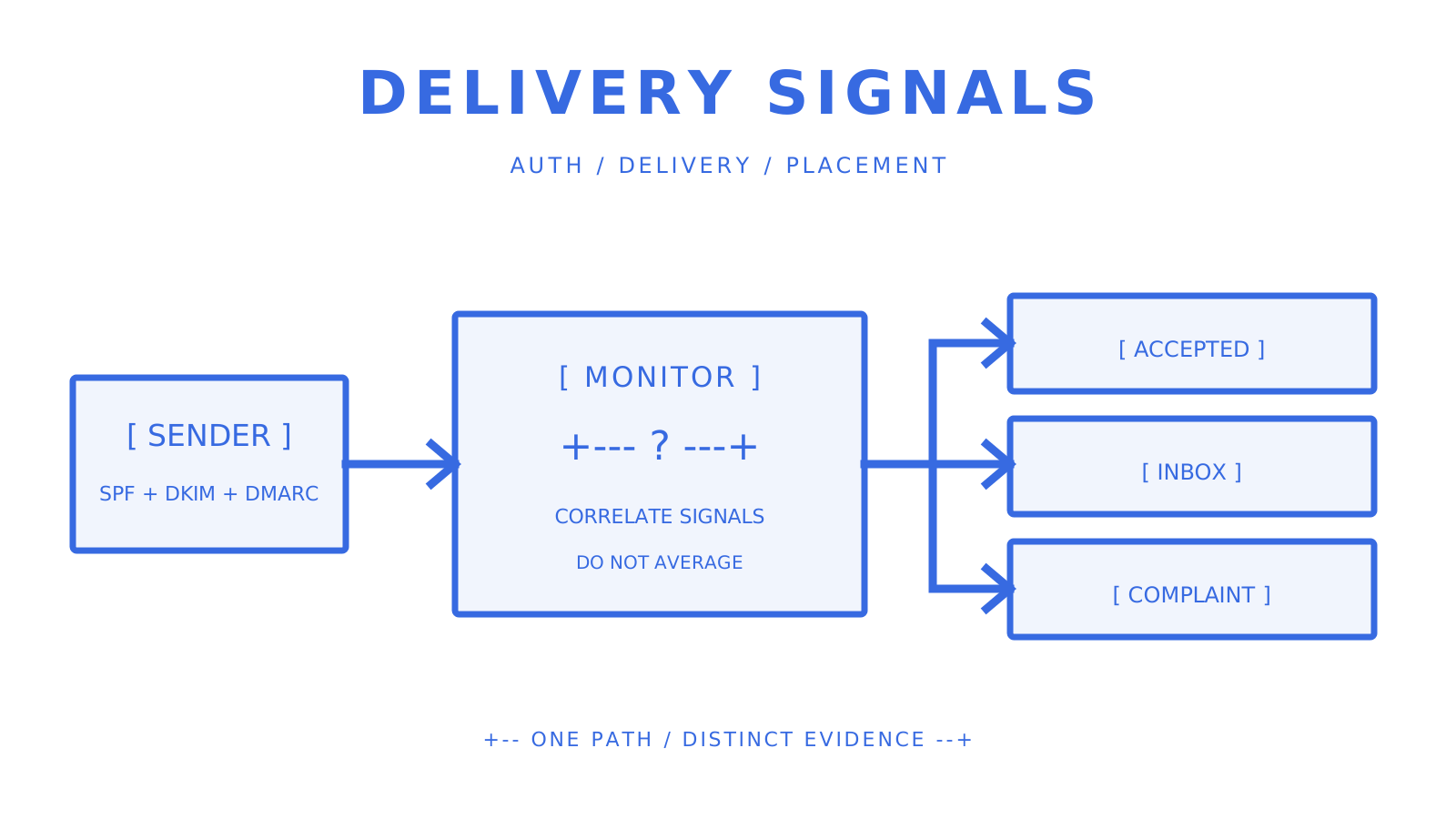
Authentication, delivery, complaint, reputation, and placement signals answer different questions.
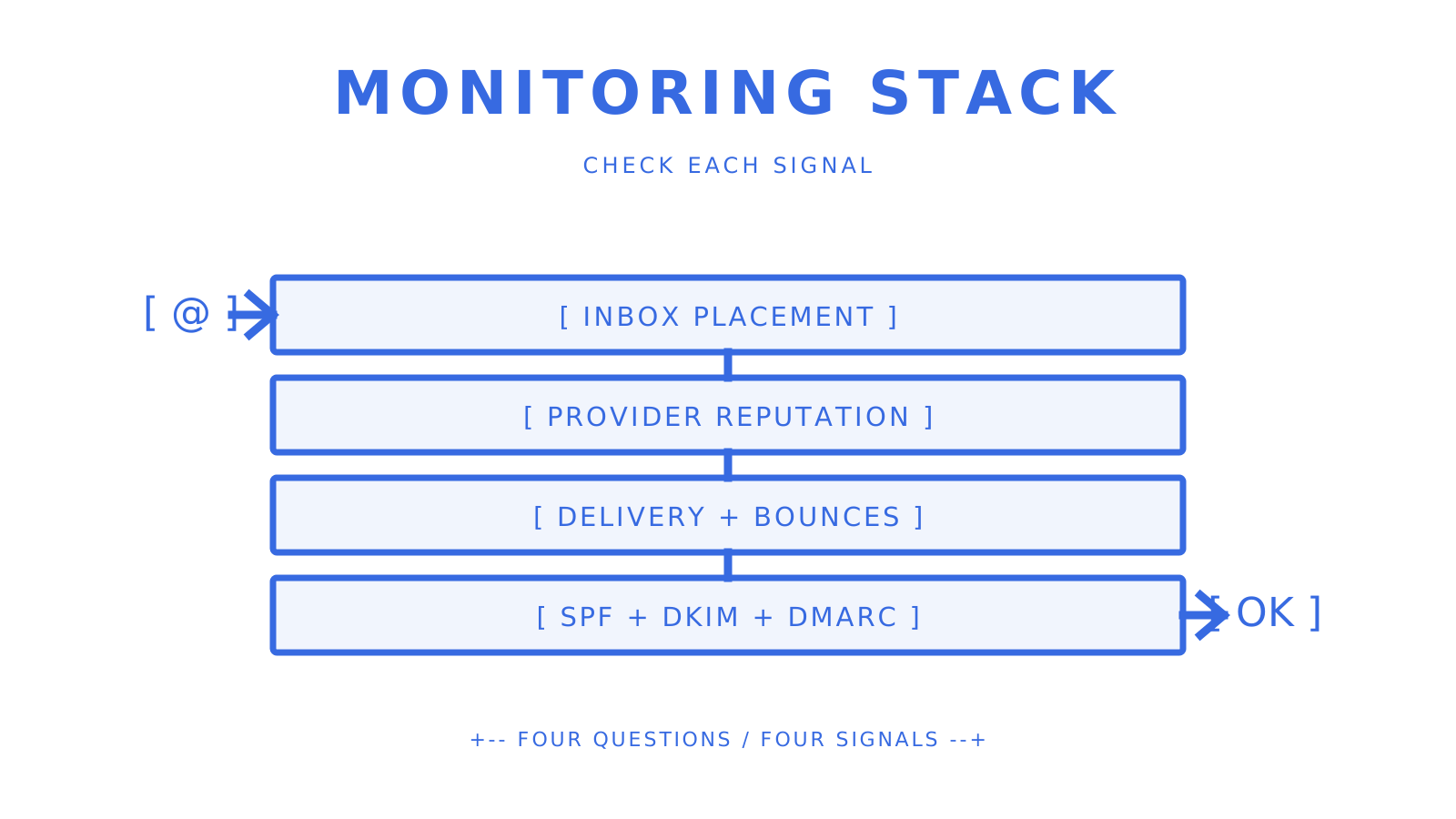
Good email deliverability monitoring uses a combination of independent signals: inbox placement tests, SPF/DKIM/DMARC checks, native provider reputation data, delivery and bounce events, complaint feedback, and blocklist monitoring. Bounce rate alone doesn’t tell you anything more than if the receiving servers accepted or rejected mail. It doesn’t tell you if accepted mail made it to an inbox, another tab, or spam.
Current monitoring workflows are dominated by three approaches. Lightweight diagnostics are good for teams that do manual DNS, authentication and blocklist checks before big sends. The dashboard included with managed deliverability suites includes inbox placement testing, DMARC reporting, blocklist checks, and reputation signals. API-first monitoring products expose alerts and machine-readable results for platform teams needing to automate a response across many sending identities.
The signals worth prioritising are:
- **Inbox placement rate (IPR)**: the percentage of delivered mail that reaches the primary inbox rather than spam or another folder such as Promotions.
- **SPF, DKIM, and DMARC status**: DNS or sender changes can leave a sending source unauthenticated or misaligned.
- **Spam complaint and provider reputation data**: Google Postmaster Tools and Yahoo's Complaint Feedback Loop expose destination-specific feedback that generic delivery logs do not.
- **Blocklist status**: a listing is a diagnostic signal to investigate with the list operator and affected destination data, not proof that every provider is blocking the sender.
- **Delivery and bounce events**: these show acceptance, temporary deferral, rejection, and provider responses, but not final folder placement.
This guide covers **email bounce tracking**, **email sending reputation**, **how to track email deliverability**, **monitoring email performance**, **best email monitoring tools**, **improving deliverability rates**, **email deliverability monitoring**, **email inbox placement**, **email deliverability analysis**, and **email reputation monitoring** without treating one score as a complete answer.
**Pro Tip:** *Then, complement your authentication and provider requirements with inbox placement testing, complaint feedback, delivery events, and blocklist alerts. Match each signal to the question it really answers.*
## Key Takeaways
Centralised monitoring is helpful when it preserves signal boundaries rather than collapsing them into a single unexplained score.
| Point | Details |
| --- | --- |
| Distinguish delivery from placement | A receiving server can accept a message that is later placed in spam or another tab. |
| Monitor authentication | SPF, DKIM, and DMARC checks help detect missing senders, invalid records, and alignment failures. |
| Match recheck cadence to operations | SenderSignal documents scheduled blocklist rechecks from 60 minutes to as fast as one minute, including a 15-minute plan cadence. |
| Prefer automatable evidence when needed | APIs and signed webhooks can feed incident workflows; dashboards remain useful for investigation and reporting. |
| Keep Sendmux in its verified lane | Sendmux exposes domain verification status, delivery logs, CSV export, provider routing, inbound mailbox SSE, and signed outbound delivery webhooks; it does not provide inbox placement testing, DMARC aggregate-report ingestion, or public blocklist monitoring. |
### A Note From the Author on Testing and Disclosure
Sendmux is the product discussed directly in this article, so its claims were checked against the current owning repositories rather than a marketing feature list. External deliverability claims were checked against current provider documentation, standards, and each vendor's own current product surface. Product-owned pages can verify what a tool says it provides; they do not make that tool's comparative marketing claims independent evidence.
## Which Email Deliverability Monitoring Approach Fits Your Team?
Deliverability monitoring is more of a continuum than a product category. Four solution categories deal with the operational models of this guide. The right choice depends on whether people look at reports, systems need programmatic events, or a team needs only periodic diagnostics.
Choose the monitoring model by required signals, response time, and integration depth.
### 1. API-first monitoring platforms
These products expose monitoring results to the systems that operate a sending programme. Rather than relying only on a person opening a dashboard, an API or webhook can pass a new listing, authentication change, or placement result into an incident workflow. This model fits engineering-led teams and platforms that manage many domains or IP addresses.
The strength is response automation, provided the event has a documented payload, authentication method, retry policy, and source signal. A [layered monitoring approach](https://e-warmup.com/features/email-health-monitoring) can bring authentication, reputation, bounce, blocklist, DNS, and inbox placement views together. The integration must still distinguish a DNS check from a seed-list result and a receiving-server response.
### 2. All-in-one deliverability suites
These consolidate inbox placement testing, DMARC monitoring, blocklist checks, and postmaster telemetry in a dashboard for marketing and deliverability teams. [EmailConsul](https://emailconsul.com/) documents DMARC monitoring, seed-list tests, IP and domain reputation monitoring, Google Postmaster Tools, Microsoft SNDS, and SMTP-log analysis as separate services within one interface.
The trade-off is integration depth. A dashboard can make investigation easier, while a team that must pause or quarantine a sender automatically needs a documented API, webhook, or export for that exact signal.
### 3. Inbox placement testers plus manual audit workflows
Seed-list tests show where controlled messages land across participating mailbox providers. A manual audit then checks infrastructure, content, list practices, and reputation evidence around those results. A current [Litmus email deliverability audit](https://www.litmus.com/blog/email-deliverability-audit) recommends regular review and reports that marketers who describe their programmes as successful are 22% more likely to monitor deliverability or inbox placement than less successful programmes.
That 22% result is an association reported by Litmus, not proof that monitoring alone caused programme success. Audit duration also varies by scope; the source does not support a universal two-week completion time.
### 4. Free diagnostic tools plus custom alerting
Teams can combine free DNS, authentication, sender-reputation and blocklist lookups with scripts or scheduled checks. This works if ownership is explicit. It becomes brittle if no one owns false-positive review and delisting follow-up, a new domain or IPs are not added, or an upstream response shape changes.
For a quick diagnostic, [SenderReputation.org](https://senderreputation.org/) advertises a free A through F grade from live authentication, DNS and blocklist checks. It also supplies a category breakdown and suggested fixes. That grade is the tool's own summary, not a Gmail, Outlook or Yahoo reputation score or an inbox placement result. Use it to investigate specific checks, then validate the relevant signal with the responsible provider.
### Comparing the four categories
| Dimension | API-first platform | All-in-one suite | Placement tester + manual audit | Free tools + custom alerts |
|---|---|---|---|---|
| Best for | Engineering-led and multi-tenant teams | Marketing and deliverability specialists | Periodic audits and pre-send checks | Budget-constrained teams with engineering ownership |
| Core features | Machine-readable monitoring signals and alerts | Bundled placement, authentication, reputation, and reporting views | Seed-list results plus a manual review | Individual DNS, authentication, reputation, and blocklist checks |
| Reporting & alerting | API, webhook, or event feed where documented | Dashboard reports and vendor-specific alerts | Point-in-time report | Whatever the team builds and maintains |
| Integration / API access | Central product requirement | Varies by product and plan | Usually limited | Depends on each selected tool |
| Data granularity | Verify domain, IP, campaign, provider, and tenant fields | Verify the dimensions exposed by the suite | Per test and seed provider | Per query, domain, or IP |
| Pricing shape | Usage, asset, or subscription pricing | Subscription tiers | Per test, audit, or subscription | Free usage plus engineering time |
| Ease of setup | Requires an integration and incident policy | Dashboard configuration | Repeated manual workflow | Scripts, schedules, and maintenance |
| Support model | Documentation plus plan-specific support | Human support plus documentation | Audit deliverable or tool support | Tool documentation and community help |
**Quick actions after an alert fires**, regardless of category:
- Confirm the signal and its scope. A second DNS lookup can confirm a record result, but a DNS check cannot confirm inbox placement.
- For a blocklist hit, identify the exact list, affected IP or domain, published reason, and operator-owned removal process.
- For authentication drift, compare current SPF, DKIM, and DMARC records with every authorised sending source and the destination's requirements.
- For a bounce spike, group receiving-server responses by destination and enhanced status code before treating it as a global reputation issue.
- For a complaint spike, pause the affected promotional stream, suppress reporters where feedback is available, and review consent, targeting, frequency, and unsubscribe handling.
**Pro Tip:** *If the incident workflow involves pausing a campaign or quarantining a sender, make sure the tool you choose exposes that exact signal via a supported, machine-readable interface.*
Using a combination of placement tests, delivery and bounce logs, authentication results, and destination-native telemetry, practitioners can triangulate the root cause. Each source covers a different part of the path, so disagreement between sources is evidence to investigate, not to average into one score.
## How Do You Choose the Right Deliverability Monitoring Tool?
A short checklist narrows the market before a vendor evaluation:
1. **Does it test inbox placement across the providers you need**, and does it distinguish primary inbox, other tabs, spam, and missing mail?
2. **Does it monitor authentication continuously**, or only run an on-demand DNS check?
3. **What is the blocklist recheck cadence?** [SenderSignal](https://sendersignal.com/) currently documents scheduled cadences of 60 minutes, 30 minutes, 15 minutes, and as fast as one minute, depending on plan.
4. **Can it integrate through an API or authenticated webhook**, and are retries, event identifiers, and replay behaviour documented?
5. **Does it expose or connect destination-native data**, such as Google Postmaster Tools, Yahoo Complaint Feedback Loop reports, or Microsoft SNDS, and does it state update latency and qualification limits?
**Vendor questions worth asking directly:**
- What granularity is available: IP, domain, campaign, provider, or account?
- Which alert channels exist, and which plans expose APIs or webhooks?
- Which blocklists and mailbox providers are covered today?
- How are seed addresses maintained, and how is a missing message classified?
- Can the vendor provide a sample report, schema, or redacted event payload before purchase?
**Red flags that should stop a deal:**
- A single opaque score with no component evidence.
- Authentication checks presented as proof of inbox placement.
- No documented provider coverage or blocklist inventory.
- No stated monitoring cadence or data-refresh behaviour.
- An automation promise without API, event authentication, retry, or replay documentation.
Pricing takes several forms: per test, per monitored asset, subscription tiers, usage charges, or negotiated enterprise terms. Compare the billable unit and current plan limits rather than assuming that domain count, API calls, seats, and support are bundled the same way. If sending cadence is part of the risk, read the [batch sending strategy guide](https://myagent.mx/blog/batch-email-sending) alongside the monitoring decision. Google and Yahoo also tell senders to use permission-based lists, remove invalid recipients, and honour unsubscribe and complaint signals; those [operating practices](https://babylovegrowth.ai/blog/how-to-grow-email-list-proven-strategies-smbs-marketers) matter as much as the dashboard.
## What Metrics Actually Predict Inbox Placement?
The inbox placement rate is the proportion of delivered test messages that land in the inbox, not spam or some other folder. Delivery rate is a measure of server acceptance. These are related metrics, but they are not interchangeable: a provider can accept a message and then put it outside of the inbox.
Other signals worth tracking alongside IPR include:
- **Bounce rate, separated by permanent and temporary responses**: classify the actual SMTP response before deciding whether to suppress or retry.
- **Spam complaint rate**: Google recommends keeping Postmaster Tools spam rates below 0.10% and avoiding 0.30% or higher; Yahoo requires bulk senders to remain below 0.3%.
- **Engagement trends**: use them as audience feedback, but remember that Google says it does not track open rates and cannot verify third-party open-rate accuracy.
- **DMARC aggregate reports and ARC headers**: DMARC reports show authentication and alignment results reported by receivers; ARC preserves an authenticated chain through forwarding but is not an "ARC alignment report."
- **Blocklist status**: investigate the specific list, listed asset, destination impact, and delisting instructions.
- **Provider-native reputation and delivery data**: Google Postmaster Tools exposes spam, reputation, authentication, and delivery-error dashboards for mail sent to personal Gmail accounts; Yahoo's feedback loop reports complaints for enrolled DKIM domains.
For each signal, define an action. A permanent invalid-recipient response should enter suppression policy. Temporary responses need bounded retries based on the receiving server's status. A complaint report should stop promotional mail to that recipient. A DMARC failure should be traced to the sending source and alignment result. A blocklist event should be scoped before changing global sending policy.
Authentication is required by major mailbox providers, but passing authentication does not guarantee inbox placement. Google and Yahoo also cite complaints, wanted mail, DNS, message format, and other reputation signals in their sender guidance.
**Pro Tip:** *Use threshold alerts for actionable items. A daily report may be appropriate for a slow-moving trend, but a new complaint spike, permanent rejection pattern, or critical blocklist listing may require a more rapid response.*
## How Are Deliverability Monitoring Tools Actually Tested?
Assess the tool against the signals and workflows it says it owns. The six most important factors are:
1. **Coverage**: authentication, blocklists, placement, complaints, provider telemetry, and delivery logs are separate capabilities.
2. **Recheck cadence**: record the actual schedule for each signal instead of quoting one platform-wide frequency.
3. **Reporting and alerting fidelity**: inspect event payloads, timestamps, history, and the evidence behind a score.
4. **API and integration maturity**: verify authentication, idempotency, retry, replay, pagination, limits, and failure semantics.
5. **Remediation guidance**: confirm whether a recommendation links to the responsible provider or list operator and identifies the affected asset.
6. **Historical trend analysis**: choose a retention window that matches incident review and reporting needs; a 90-day trend is useful only if the source data and sampling stay comparable.
Practical evaluation can include seed-list tests across the required providers, SPF/DKIM/DMARC validation, a blocklist sweep with a known clean test asset, parsing of representative hard and soft bounce responses and review of Google Postmaster Tools or Microsoft SNDS data where the sender qualifies. Do not create a real reputation incident to test an alert.
A useful report details timestamps, source signals, provider or list names, affected IPs or domains, and a prioritised action list. Have a look at a sample report, redacted event payload and API schema before you buy, so you know you are looking at the operational interface, not the sales demo.
## How Does Centralized Monitoring Change for API-First Platforms?
Deliverability monitoring becomes a tenant-boundary problem when a platform sends for many customers. If tenants share a sending domain or IP, their activity contributes to the same reputation context. AWS documents that shared IP reputation is pooled across customers, while dedicated IPs isolate reputation after warm-up. Yahoo recommends separating different message types by IP or DKIM domain because each carries reputation.
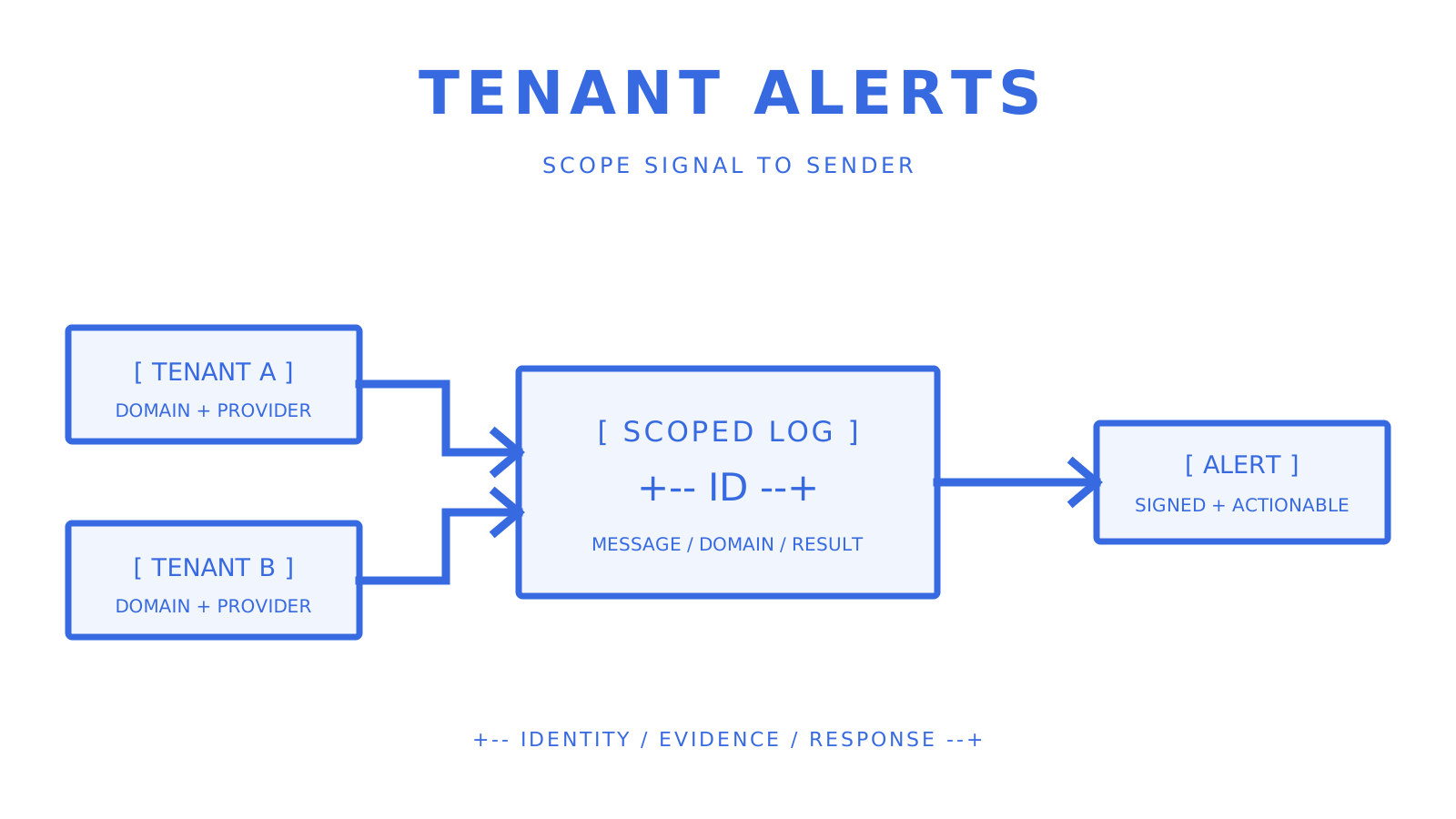
The architecture combines destination and placement evidence with tenant-scoped delivery telemetry. A platform may need placement tests per sending domain, provider-native data for eligible destinations, delivery and bounce events, authentication checks, and complaint feedback tied to the tenant that originated the message.
**Integration checklist for platform teams:**
- Ingest delivery responses and events into a tenant-scoped store with stable message, provider, domain, and recipient references.
- Connect destination-native feeds such as Google Postmaster Tools, Yahoo CFL, and Microsoft SNDS where available.
- Schedule placement tests for the identities whose placement you actually need to measure.
- Monitor SPF, DKIM, and DMARC records for every authorised sending domain and source.
- Require signed webhooks, stable event IDs, bounded retry, replay or retrieval, and idempotent consumers.
- Keep access controls, provider eligibility, quotas, logs, billing, and complaint policy aligned to the same tenant boundary.
Tenant scope must survive from sending identity through logs, alerts, and response policy.
Per-tenant visibility prevents one customer's delivery evidence from disappearing inside an account-wide average. It does not automatically isolate sending reputation. Reputation isolation depends on the actual domain, DKIM identity, provider account, IP pool, message stream, and destination behaviour used for each tenant.
This operating model fits AI agent mailboxes, outbound platforms, and multi-tenant SaaS products only when the platform can trace each signal back to the responsible sending identity. Centralisation should improve correlation without erasing the boundaries needed for diagnosis and remediation.
## Per-Tool Summary: Best-For, Features, and Pricing
**Sendmux** provides sending and mailbox infrastructure rather than a complete deliverability-monitoring suite. Its verified surface includes domain verification status, delivery logs with `pending`, `sent`, `failed`, and `rejected` filters, CSV export, configured sending accounts, quota windows, weighted provider selection, inbound mailbox SSE, and HMAC-SHA256 signed outbound webhooks with durable retries. Each provider-accepted recipient through an owned or connected provider costs $0.000500; the Sendmux-managed Amazon SES route costs $0.000750 per accepted recipient. Add a separate product for inbox placement, DMARC aggregate-report analysis, or public blocklist monitoring.
**Mailtrap** documents an email sandbox for pre-production testing and separate email-delivery products. Verify the current plan if inbox placement or ongoing reputation monitoring is required rather than inferring those capabilities from the sandbox.
**GlockApps** documents inbox placement testing across multiple mailbox providers for pre-send and diagnostic checks.
**Mailgun Optimize** documents inbox placement tests, IP and domain blocklist monitoring, Google Postmaster Tools and Microsoft SNDS integrations, validation, and deliverability services.
**Warmup Inbox** and **EmailWarmup.com** focus on warm-up and placement workflows. EmailWarmup.com currently documents IP warm-up and placement tracking across more than 50 providers; verify methodology, guarantees, and current plan terms directly.
**MXToolbox** provides DNS, SPF, DKIM, DMARC, MX, and blocklist lookups. Its public API reference includes lookup and monitor commands; free and paid limits differ.
**PowerDMARC** centres on DMARC aggregate-report analysis, SPF/DKIM alignment views, authentication tools, and domain-security monitoring.
**Sender Score** provides sender-reputation and blocklist tools for a quick benchmark; treat the score as one diagnostic input rather than an inbox-placement result.
**Litmus** documents pre-send rendering and spam tests plus deliverability products for inbox placement, authentication, blocklists, reputation, alerts, and engagement analytics.
**Postmark** focuses on transactional email with message activity, receiving-server responses, bounces, suppressions, webhooks, and configurable retention. Server acceptance still does not prove inbox placement.
**Mailshake** targets outreach workflows and documents warm-up, validation, mailbox rotation, bounce and blocklist monitoring, and campaign tracking.
## Does Your IP Reputation Really Depend on Dedicated vs. Shared?
Shared IPs and dedicated IPs have different reputation boundaries. A shared IP aggregates traffic from multiple senders, meaning the provider manages a pooled reputation and the customer has less direct control. A dedicated IP is assigned to a single customer, which isolates the reputation of that IP, but also places the onus on the customer to build and maintain a consistent history.
AWS recommends that you use shared IPs if you don't send a high volume on a regular and predictable basis. Its SES guidance says that most mailbox providers need a lot of volume before they track an IP's reputation, giving the example of hundreds of messages to each provider within a 24-hour period at least once a month. That’s not an across-the-board threshold of tens of thousands a month.
New standard dedicated IPs need warm-up. Managed dedicated IP products can automate warm-up or route some volume through a shared pool while reputation builds, but the exact behaviour varies by provider. Choose the model according to real volume, predictability, need for IP control, destination mix, and the reputation boundary the platform requires.
## How Sendmux Centralizes Deliverability Monitoring
Sendmux centralises sending evidence, not every deliverability signal. The Management API exposes configured sending accounts, routing weights, quota windows, custom-domain verification status, message-level delivery logs, and filtered CSV export. The sending implementation excludes disabled or quota-exhausted accounts and selects from eligible accounts by configured weight.
Outbound delivery changes can arrive through HMAC-SHA256 signed webhooks. The event owner records durable retry state and delivery attempts, while inbound mailbox `message.received` events use SSE. These event directions are different: SSE is not the public channel for outbound delivery changes, and a signed delivery webhook is not an inbox placement test or an authentication-drift alert.
Mailbox-scoped API keys support `email.send`, `email.receive`, `mailbox.read`, and `mailbox.settings.update`. Team and mailbox scope can isolate access, logs, and resource ownership. They do not prove that tenants have separate IP or domain reputation; verify the actual sending account, domain, DKIM identity, and IP arrangement.
Developers get current OpenAPI 3.1 contracts, first-party SDK packages for TypeScript, Python, Go, PHP, Ruby, and Rust, plus a CLI for published Management, Mailbox, and Sending operations. Use these interfaces to collect Sendmux delivery evidence, then correlate it with a specialist placement, DMARC-reporting, reputation, or blocklist product when the incident requires those signals.
## Sources
- [Google email sender guidelines](https://support.google.com/mail/answer/81126?hl=en)
- [Google Postmaster Tools dashboards](https://support.google.com/mail/answer/14668346?hl=en)
- [Yahoo Sender Requirements and Recommendations](https://senders.yahooinc.com/best-practices/)
- [Yahoo Complaint Feedback Loop](https://senders.yahooinc.com/complaint-feedback-loop/)
- [Amazon SES dedicated IP guidance](https://docs.aws.amazon.com/ses/latest/dg/dedicated-ip.html)
- [Email Deliverability Audit: How to Find and Fix Your Issues | Litmus](https://www.litmus.com/blog/email-deliverability-audit)
- [Litmus inbox placement guidance](https://www.litmus.com/blog/deliverability-myth-why-you-need-measure-inbox-placement)
- [E-Warmup email health monitoring](https://e-warmup.com/features/email-health-monitoring)
- [EmailConsul deliverability monitoring](https://emailconsul.com/)
- [SenderSignal: Email deliverability and reputation monitoring](https://sendersignal.com/)
- [SenderReputation.org](https://senderreputation.org/)
- [Mailgun Optimize](https://www.mailgun.com/products/optimize/)
- [MXToolbox Lookup API](https://api.mxtoolbox.com/api/api-reference)
- [PowerDMARC SaaS platform](https://powerdmarc.com/dmarc-saas-platform/)
- [Postmark delivery confirmation](https://postmarkapp.com/support/article/787-how-can-i-confirm-delivery-of-a-message)
- [Mailshake email deliverability](https://mailshake.com/features/email-deliverability/)
**Pro Tip:** *Before any unusually important send, run a placement test and have the provider-native reputation, complaint, authentication, and delivery data ready to go for diagnosis.*
## FAQ
### What is the 30/30/50 rule for writing effective cold emails?
There is no single standardised 30/30/50 rule in the current provider or standards sources reviewed for this article. Judge a sending programme with permission, complaints, authentication, delivery responses, and inbox placement rather than treating a copywriting ratio as a deliverability control.
### How can I check the deliverability of my email?
Begin with authentication and DNS checks, then run a seed list inbox placement test across the providers that are important to your audience. Add destination-native reputation and complaint data plus delivery and bounce logs so you can tell server acceptance from folder placement.
### What are the 5 D's of email management?
The 5 D's are not a standardised deliverability framework in the current sources reviewed here. For deliverability, track inbox placement, receiving-server responses, complaint rates, authentication, provider reputation, and blocklist status as separate signals.
### What is the 12 second rule for emails?
The 12 second rule is a copy-reading heuristic, not a sender requirement or inbox-placement metric. Current Google and Yahoo guidance instead covers authentication, DNS, wanted mail, complaints, message format, and unsubscribe behaviour.
### How often should I recheck my blacklist status?
Use a cadence that matches the monitored asset, sending risk, and response coverage. Current SenderSignal plans document scheduled rechecks from 60 minutes to as fast as one minute, including a 15-minute cadence; lower-risk programmes may use a slower schedule, while every alert still needs exact-list confirmation and investigation.