---
title: "Engineers: Treat DMARC RUA as Telemetry, RUF Only for Forensics"
description: "Engineer-focused guide to using DMARC RUA as your telemetry stream, when to enable RUF, and the DNS, security, and enforcement steps you must run."
canonical: "https://myagent.mx/blog/dmarc-rua-ruf"
publishedAt: "2026-09-13T06:35:10.559Z"
updatedAt: "2026-09-13T06:35:22.798Z"
category: "deliverability"
topic: "dmarc rua ruf"
author: "Roshan Jonnalagadda"
authorProfile: "https://myagent.mx/blog/author/roshan-jonnalagadda"
keywords:
- "dmarc aggregate reports"
- "dmarc rua ruf"
- "dmarc alignment"
- "DMARC reporting"
- "dmarc forensic reports"
- "RUA RUF examples"
- "how to set RUA RUF"
- "email security standards"
- "DMARC configuration guide"
- "DMARC best practices"
- "RUA RUF definitions"
- "email authentication methods"
---
# Engineers: Treat DMARC RUA as Telemetry, RUF Only for Forensics
Engineer-focused guide to using DMARC RUA as your telemetry stream, when to enable RUF, and the DNS, security, and enforcement steps you must run.
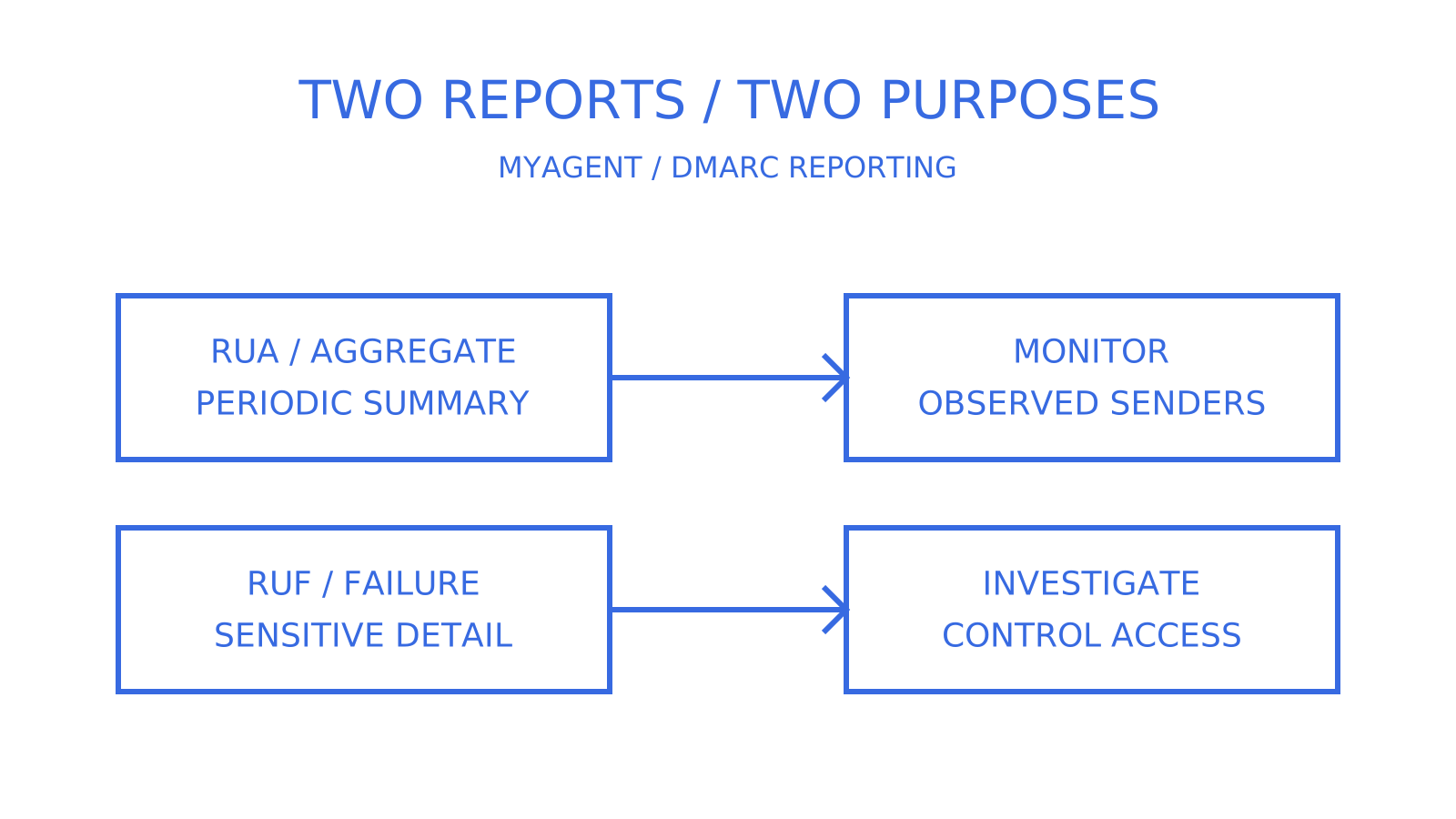
Request RUA aggregate reports for each domain you protect with DMARC; treat RUF forensic reports as optional. RUA supplies periodic, machine-readable summaries from participating receivers about mail claiming your domain and its SPF, DKIM and alignment results. RUF requests individual authentication-failure reports that can expose message content. RFC 9991 notes that many large-scale providers limit or disable these reports because of privacy concerns.
***
> **TL;DR:**
>
> - RUA reports help inventory observed systems sending email as your domain, including possible shadow IT, without message content; they cannot guarantee coverage of every sender or receiver.
> - Forensic RUF reports have limited receiver support and can expose sensitive content; reserve them for specific investigations with controlled scope and duration.
> - Proper configuration requires validating DNS records, setting report destinations, and staggering enforcement policies based on RUA data.
> - Secure report destinations and verify external authorisation records to limit leakage and unwanted reports; authorisation alone does not establish report accuracy.
> - Treat RUA as periodic telemetry for infrastructure monitoring, not a real-time feed or a manual archive, especially at scale.
***
## What is DMARC RUA and how do you read the reports?
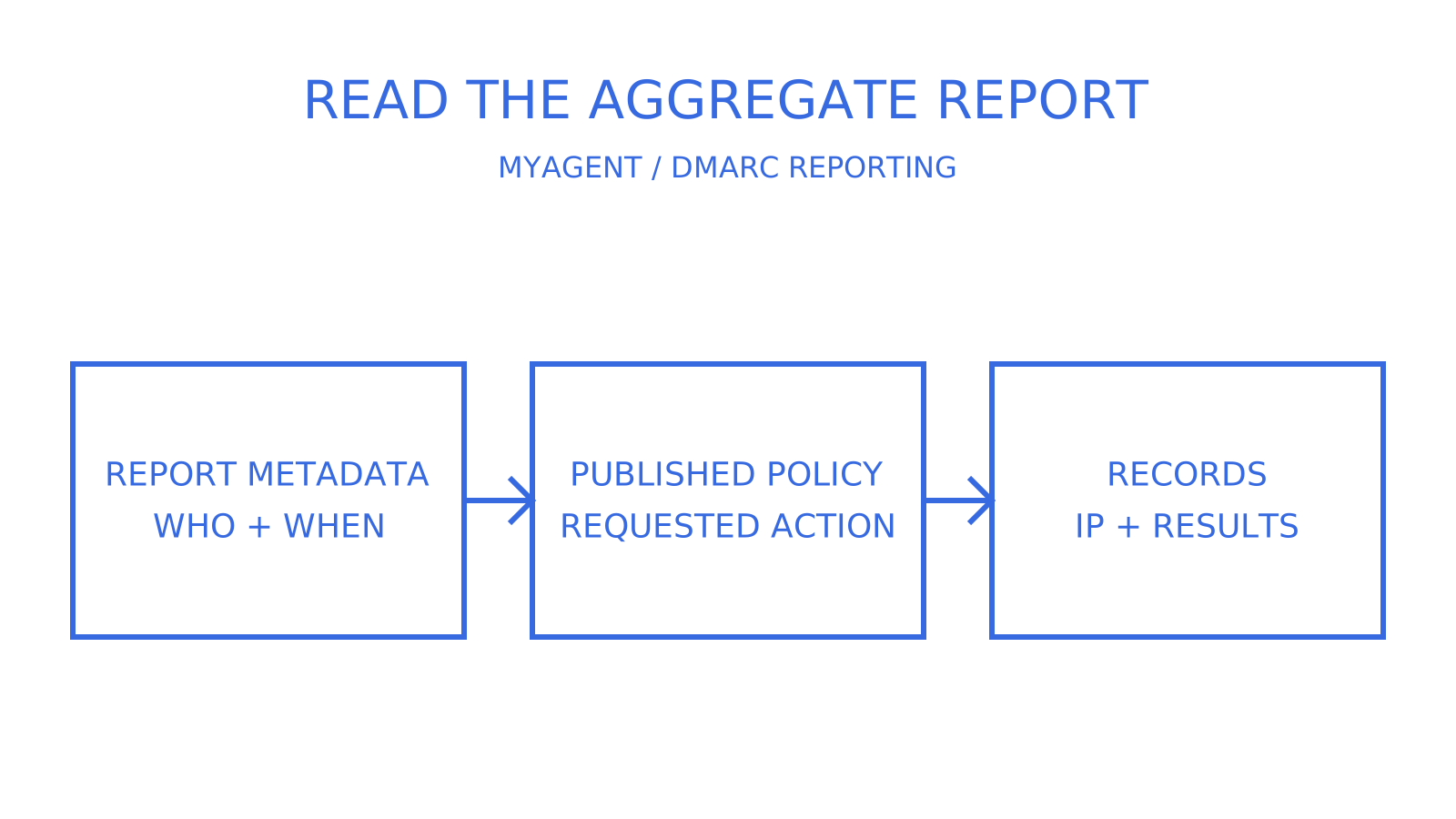
The `rua` DNS tag lists Reporting URIs for aggregate reports. Participating receiving mail servers send DMARC aggregate data as XML; RFC 9990 recommends GZIP compression, but plain XML is also allowed. Reports normally cover a 24-hour UTC day, without guaranteeing that every provider sends one on that schedule. The `` block identifies the reporting organisation and date range, `` describes the reported policy, and `` rows group messages sharing source IP and other reported characteristics. Each row includes a count, evaluated SPF and DKIM alignment results, authentication details and a disposition.
Consider an illustrative row: source IP `203.0.113.9` accounts for 42 messages claiming your domain, SPF passes with alignment, DKIM fails, and the recorded disposition is none while the published policy is `p=none`. Aligned SPF already makes DMARC pass; the absence of quarantine is not proof that monitoring policy rescued failing mail. The row alone cannot establish a legitimate third-party sender or prove that a mismatched DKIM selector caused the failure. Correlate it with your sender inventory and DKIM diagnostics without needing a message body or a recipient's full address.
RUA reports are XML aggregate summaries, commonly compressed, that exclude message content and individual recipient addresses. This supports sender inventory and authentication monitoring without collecting live mail content. Still protect the infrastructure metadata: RFC 9990 discusses third-party traffic analysis and feedback leakage, so aggregate reporting does not remove every privacy or security consideration.
**Pro Tip:** *As an operational rule of thumb, move beyond reading RUA files by eye after week one. A parser that groups by source IP and pass/fail status can turn a spike in observed unauthenticated volume into a chart instead of a search through a thousand XML attachments. Keep each report's date range and reporting coverage visible.*
Three useful roles for RUA:
- Building an inventory of observed systems sending mail as your domain, including possible shadow IT; combine it with your own sender records to cover reporting gaps.
- Tracking daily pass and fail rates where reports provide that coverage, alongside the reporting period and receiver, as you would track API error rates.
- Assessing readiness for enforcement alongside sender tests and delivery evidence before changing policy.
## What is DMARC RUF and should you rely on it?
The `ruf` tag lists Reporting URIs for failure reports, often called forensic reports. A participating receiver may send an individual authentication-failure report, rather than an aggregate summary. It can contain headers, a subject line, body excerpts or even the entire message; redaction is possible but is not guaranteed. The receiving report generator decides what it can disclose.
Receiver support limits what you can collect. RFC 9991 says many large-scale providers limit or entirely disable failure reports and prefer aggregate reports. Publishing a `ruf=` tag requests reports; it does not guarantee a steady stream of forensic evidence, or any reports from a particular receiver.
If you enable it, the `fo` tag requests these trigger conditions; report generators may choose whether to honour them:
- `fo=0` requests a DMARC failure report when all underlying authentication mechanisms fail to produce an aligned pass; SPF or DKIM may authenticate successfully yet fail alignment.
- `fo=1` requests a DMARC failure report when either underlying mechanism fails to produce an aligned pass. The [DMARC complete guide discusses report volume](https://www.dmarcsignal.com/guides/dmarc-complete-guide/), but actual volume and privacy exposure depend on receiver support, failures and report content; this is not a guaranteed highest-volume setting.
- `fo=d` requests a DKIM failure report when a message has a signature that fails evaluation, regardless of alignment.
- `fo=s` requests an SPF failure report when SPF evaluation fails, regardless of alignment.
Forensic reports can carry headers and content tied to a real sender or recipient, raising [data-protection concerns](https://dmarc.com/en/blog/rua-vs-ruf-reports). Aggregate reports avoid that message-content exposure, but their infrastructure metadata still needs appropriate handling. Redact what an investigation does not need, restrict access to the triage team and choose a justified retention period. Days rather than months is a possible operational limit, not a universal legal deadline.
## How do you configure rua, ruf and fo in your DNS record?
An illustrative current DMARC record requesting both report types is:
```
v=DMARC1; p=none; rua=mailto:dmarc-agg@example.com; ruf=mailto:dmarc-forensic@example.com; fo=0
```
Break that down and each tag has a specific job:
1. `rua=mailto:...` requests aggregate reports at the listed destinations; multiple addresses are comma-separated, subject to receiver URI limits and authorisation.
2. `ruf=mailto:...` is optional; omit it entirely if you've decided forensic reports aren't worth the privacy overhead.
3. `fo=0` (or `1`, `d`, `s`) requests failure-report conditions and is ignored without `ruf`. Multiple values can be colon-separated, but `0` and `1` are mutually exclusive.
4. The legacy `ri=86400` requested a 24 hour interval: 86400 seconds. RFC 9989 removes `ri`; current reports normally cover a UTC day under RFC 9990, and the old interval request does not guarantee receiver timing.
5. The legacy `pct=100` requested policy application to 100 percent of affected mail. RFC 9989 removes `pct`; it is not a current control after `p=none`. The current `t` testing tag changes the requested disposition by one level rather than selecting a percentage.
When the report destination has a different Organizational Domain from the domain where the DMARC policy was found, the receiver must verify external authorisation. The destination publishes a confirming TXT record under the policy-domain name followed by `_report._dmarc` and the destination host. RFC 9990 defines this procedure for `rua`; RFC 9991 applies it to `ruf`. Without positive authorisation, the receiver must ignore that destination URI, rather than necessarily discarding reports for every other valid destination.
Before you rely on any of it, run this checklist:
- Validate the DNS TXT record syntax with a DMARC record checker.
- Confirm external authorisation records exist when `rua` or `ruf` use a different Organizational Domain.
- Use 24 to 48 hours as an initial review point, not an arrival guarantee; check reporting support, observed traffic, DNS and delivery if reports are absent.
- Assign a named owner responsible for reading and acting on the data.
For the DNS mechanics behind DKIM and domain verification that DMARC relies on, consult the current DNS and DKIM configuration guidance for your sending service and verify the published records.
## How do you use RUA to move from monitoring to enforcement?
The [staged rollout discussion](https://dmarcengine.com/blog/dmarc-rua-ruf-reports) provides operational context. Use current RFC 9989 policy guidance and RUA evidence to evaluate each stage; reports alone do not guarantee that a stricter policy is safe.
1. Publish `p=none` with `rua` set and observe representative traffic. Two to four weeks is an example planning window, not an RFC minimum; include infrequent legitimate senders before deciding you have enough evidence.
2. Build a sender inventory from aggregate data, including each observed source IP whether recognised or not, and reconcile it with known senders; missing reports prevent a complete inventory guarantee.
3. Investigate authentication gaps: add a missing sender to the SPF include list only after confirming it is authorised, diagnose DKIM selectors and signatures, and flag unrecognised sources rather than authorising them automatically.
4. Evaluate `p=quarantine` using current testing semantics: `t=y` asks for none instead of quarantine, while `t=n` applies the requested policy normally. The removed `pct` tag cannot provide a current low-percentage ramp. Assess representative pass rates and delivery evidence before ending testing; receivers retain local discretion.
5. Consider `p=reject` only where domain use and delivery evidence justify it after quarantine evaluation. RFC 9989 says general-purpose email domains should not use reject because legitimate indirect mail can fail DMARC; a clean reporting period is not proof against future mail loss.
SPF pass with DKIM fail on a known marketing platform warrants investigation, but does not by itself identify an outdated rotated selector. An unfamiliar IP with both checks failing could reflect spoofing, sender misconfiguration or an indirect path such as forwarding. Check the authentication details and known sending route before assigning a cause.
**Pro Tip:** *When aggregate evidence cannot explain a sender's failure, consider a short, targeted RUF investigation alongside message and provider diagnostics. Receiver support and privacy controls still apply, and a domain's `ruf`/`fo` record is not a per-sender filter. Define the scope, restrict access, then remove the request when that investigation ends.*
Alert on sudden pass-rate drops after a policy change and plan rollback in advance. Returning to `p=none` can reduce requested enforcement while you investigate legitimate failures, but also relaxes spoofing protection; a lower legacy `pct` is not a current rollback control. DNS caching and receiver discretion mean a record change does not instantly reverse every rejection.
## How do you secure DMARC report endpoints and limit privacy risk?
Treat any mailbox or collector receiving DMARC reports as sensitive infrastructure. Restrict access, encrypt stored reports and log access events. Use HTTPS for a collector's application API when provided; that does not make HTTPS a universally supported DMARC reporting URI. RFC 9990 recommends TLS for report delivery, including SMTP+STARTTLS for email transport.
Protect report-mailbox credentials and rotate them under your credential policy. Apply a justified short retention schedule to RUF content, with an audit trail of access. The [email-account security discussion](https://internet-analysis.com/articles/how-to-secure-your-email-account) supplies context for those controls: a report mailbox can reveal sending-infrastructure metadata as well as any received failure-report content.
Before choosing a third-party collector, verify any required external authorisation TXT record and review its data-handling policy. Where GDPR applies, a failure-report excerpt identifying a sender or recipient can be personal data; an IP address tied to an identifiable person can also qualify. Minimise collection and access according to the investigation and applicable obligations rather than treating every report as unrestricted data.
## Common pitfalls when configuring DMARC reporting
Pitfalls include relying on RUF reports a receiver does not send, missing external authorisation and leaving a `rua` mailbox unread. An unnoticed configuration failure can persist for months; that is a reason to monitor report delivery, not a measured ranking of the most common mistakes.
Quick fixes: parse XML into an operational view, record the reporting period, name one owner per domain and test destinations before changing enforcement. Do not set the removed `ri=86400` as a current default; its legacy 86400-second request does not control current report timing. Escalate unexpected RUF content to security and route sender misconfigurations to deliverability.
## RUA as telemetry, not paperwork
Treat RUA as periodic production telemetry to review and alert on, rather than an archive to forget. This matters for a large enterprise domain and for applications that assign a sending identity per tenant or agent. Sendmux supports mailbox and verified-domain workflows, but it is not a DMARC aggregate-report collector. Use a separate collector or your own parser to normalise XML and reduce manual work as the number of sending domains grows; automation helps without being the only workable approach.
## Where to verify the technical details
DMARC tag definitions and reporting formats are specified in [RFC 9989](https://www.rfc-editor.org/rfc/rfc9989), [RFC 9990](https://www.rfc-editor.org/rfc/rfc9990) and [RFC 9991](https://www.rfc-editor.org/rfc/rfc9991). Consult these current specifications for automated collectors and edge cases. Treat dmarc.org guidance and the contextual sources below as background, checking any older tag or rollout advice against the current RFCs.
For the sending and receiving workflows, Sendmux provides domain verification, inbound mailbox access and outbound routing APIs. A custom domain still needs its DNS setup. [Myagent](https://myagent.mx) links to registration for a free shared-domain agent mailbox without your own DNS project: initial access is read and receive, with sending gated on owner invitation acceptance and explicit approval. These mailbox capabilities do not replace a RUA/RUF collector.
## Sources
- [DMARC RUF reports – RUA vs RUF explained](https://dmarcengine.com/blog/dmarc-rua-ruf-reports)
- [DMARC complete guide](https://www.dmarcsignal.com/guides/dmarc-complete-guide/)
- [DMARC reports: RUA vs RUF](https://dmarc.com/en/blog/rua-vs-ruf-reports)
## FAQ
### What is the purpose of the RUA tag in DMARC?
The `rua` tag requests aggregate reports at specified destinations. Participating receivers summarise observed authentication and alignment results for mail claiming your domain, normally over a daily reporting period. This periodic telemetry helps track senders and DMARC rollout progress, but coverage and arrival are not guaranteed.
### What does DMARC stand for?
DMARC stands for Domain-based Message Authentication, Reporting and Conformance, an email security standard built on top of SPF and DKIM alignment checks.
### Why am I getting a DMARC aggregate report?
A report may arrive because a domain's DMARC policy names your address in `rua=` and a participating receiver observed relevant mail during its reporting period. You might also be an authorised third-party collector. Receiving a report is not proof that you own the domain, that its contents are genuine or that there is a problem; validate its provenance and reported data before acting.
### Is DMARC really necessary?
DMARC helps domain owners request handling of mail that fails aligned SPF and DKIM authentication, limiting one form of domain impersonation. It does not stop every phishing or lookalike-domain attack. RUA reports help assess observed senders before enforcement, alongside your own inventory and delivery evidence; they are not the only reliable evidence or a complete view of all mail.